

Overview
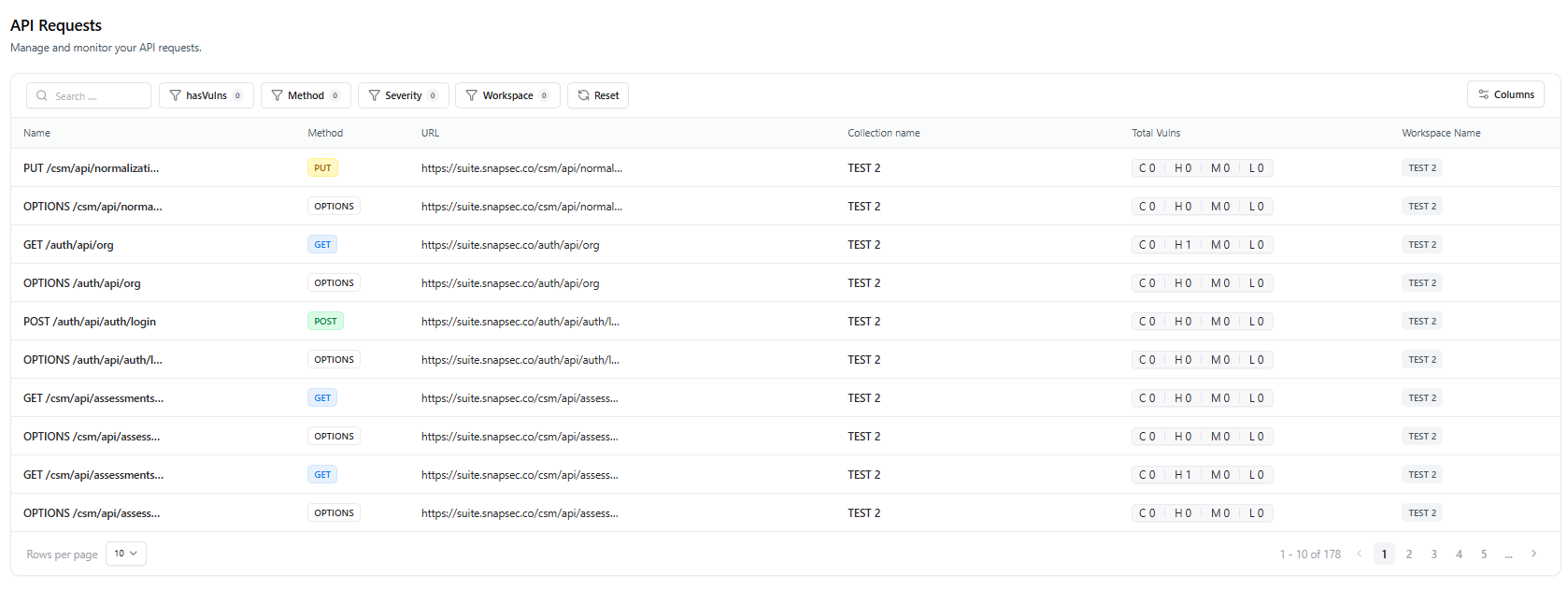
The Requests module gives you full visibility into every API request captured during scanning, whether imported from Postman, proxy traffic, or runtime discovery.It provides detailed filtering, vulnerability indicators, request metadata, and workspace-level organization.
Overview
The Requests section displays all API requests associated with your application or project.It allows you to:
- Inspect request URLs, methods, and workspaces
- Identify requests that contain vulnerabilities
- Filter based on severity, method, vulnerability presence, or workspace
- Track which collection or integration the request originated from
- Quickly understand vulnerability counts (Critical, High, Medium, Low) per request
Key Table Metrics
Request Name
Displays the HTTP operation and endpoint path (e.g.,
GET /api/v1/user).Method
Indicates the HTTP method — GET, POST, PUT, DELETE, etc.
URL
Shows the full URL where the request was executed.
Workspace
Identifies the workspace or environment this request belongs to.
Collection Name
Specifies where the request originated — Postman, imported API spec, or auto-discovery.
Has Vulnerabilities
Displays vulnerability severity badges: Critical (C), High (H), Medium (M), Low (L).
Filters & Search
Search by endpoint, filter by method, severity, presence of vulnerabilities, or workspace.
Filters & Search
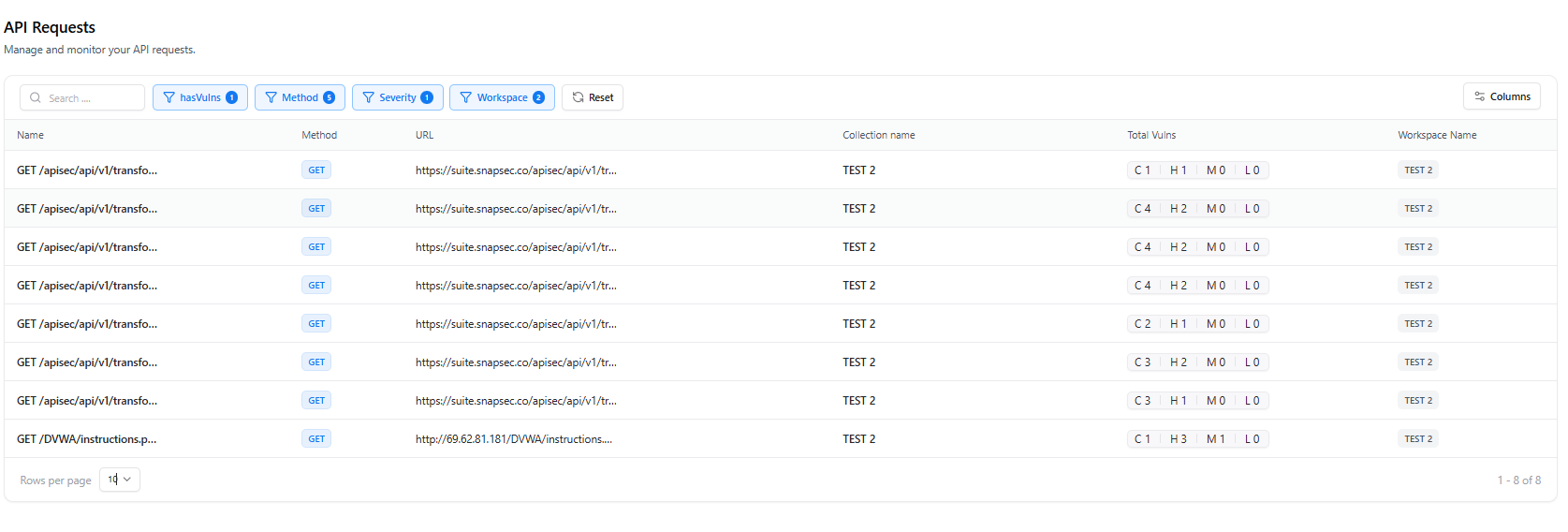
The request table provides powerful filtering options:- Search → Search by URL, request name, or any keyword
- Method Filter → GET, POST, PUT, DELETE, etc.
- Severity Filter → Show requests containing Critical, High, Medium, or Low vulnerabilities
- Has Vulnerabilities Filter → Quickly isolate risky endpoints
- Workspace Filter → Limit requests to a specific workspace
Understanding Vulnerability Badges
- C → Critical findings
- H → High findings
- M → Medium findings
- L → Low findings
Use Cases
Troubleshoot API Behavior
Inspect individual requests to understand failures, misconfigurations, or inconsistent responses.
Locate Vulnerable Endpoints
Filter for requests containing vulnerabilities to prioritize remediation.
Validate Scan Coverage
View all traffic captured to ensure the scanner crawled and tested your entire API surface.
Analyze Collections
Compare imported Postman requests with runtime-discovered requests.
Example Row Breakdown
A typical request entry includes:| Column | Description |
|---|---|
| Name | GET /apiesec/api/v1/vulnerabilities |
| Method | GET |
| URL | Full request URL |
| Collection Name | e.g., “new project”, “Postman”, etc. |
| Vulnerability Summary | C0 / H0 / M4 / L0 |
| Workspace Name | e.g., “new project” |
Actions & Next Steps
View API Endpoints Module
Explore detailed endpoint-level vulnerability breakdowns.
Run a Scan
Generate new requests and update vulnerability insights.
Manage Projects
Organize your requests into structured workspaces.
Explore Live Demo
Explore Snapsec Live — No Signup Needed
Jump straight into the live environment and see how Snapsec unifies asset intelligence, threat detection, and vulnerability tracking — all in one dashboard.