

Overview
The AIM Dashboard provides a high-level, real-time view of all assets across your organization.It centralizes visibility into asset types, vulnerability distribution, and infrastructure composition — enabling security teams to quickly understand their external and internal footprint.
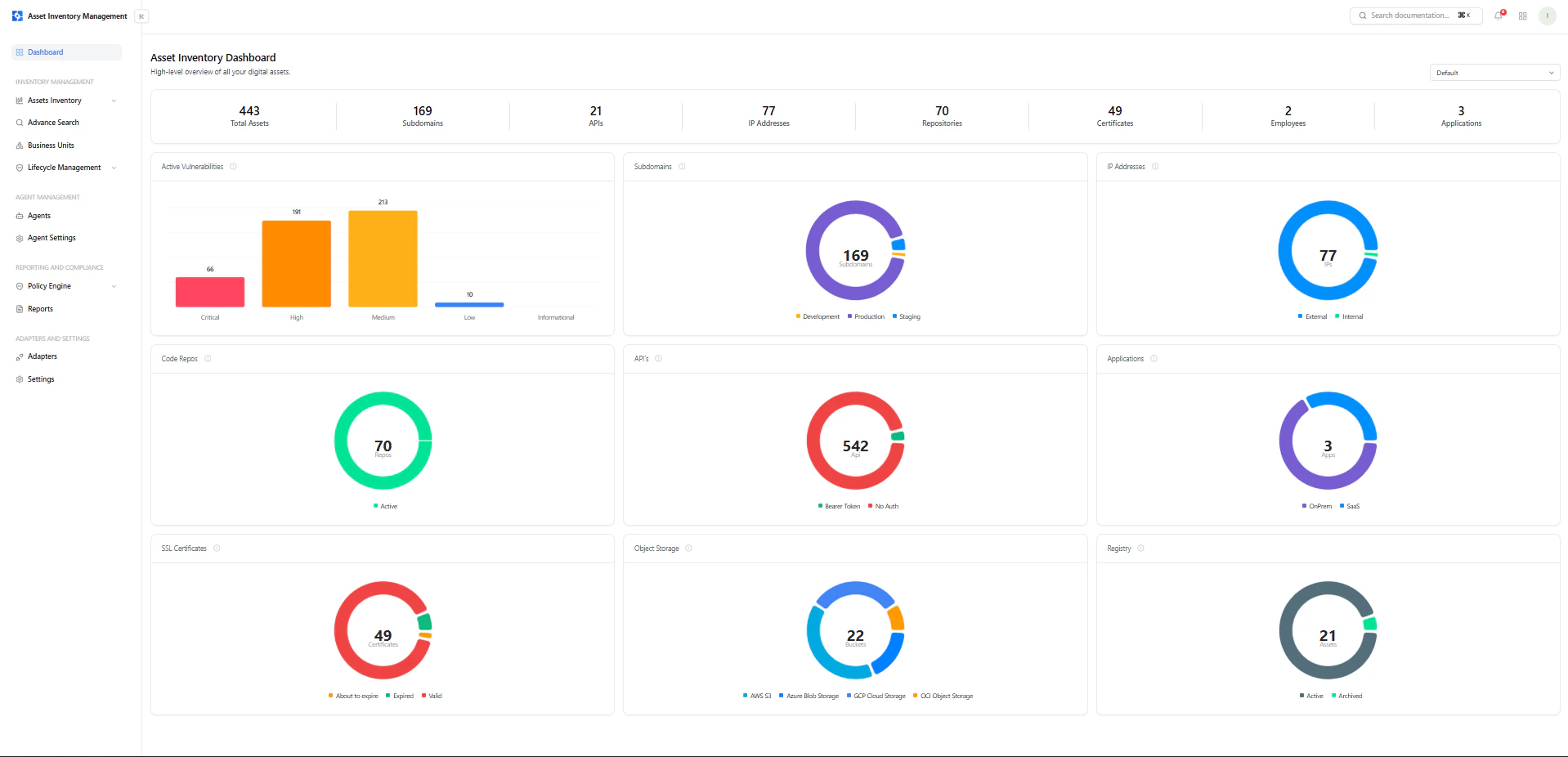
AIM Dashboard showing asset counts, vulnerability distribution, and asset type breakdown
Top-Level Asset Summary
At the top of the dashboard, you get an instant snapshot of your total asset inventory:- Total Assets — Complete count of all discovered assets
- Subdomains — All discovered domains and subdomains
- APIs — Identified API endpoints and services
- IP Addresses — Mapped internal and external IPs
- Repositories — Connected code repositories
- Certificates — SSL/TLS certificates across assets
- Employees — Mapped identities (if integrated)
- Applications — Detected applications across environments
Asset View Selector
The dashboard includes a dynamic view selector (top-right), allowing you to filter insights by asset type:- Default (All assets)
- Subdomains
- IP Addresses
- Certificates
- Applications
- Repositories
- Object Storage
- APIs
- Employees
Focused Asset Dashboards
Each asset type has its own dedicated dashboard view, allowing you to drill into specific asset categories with tailored insights.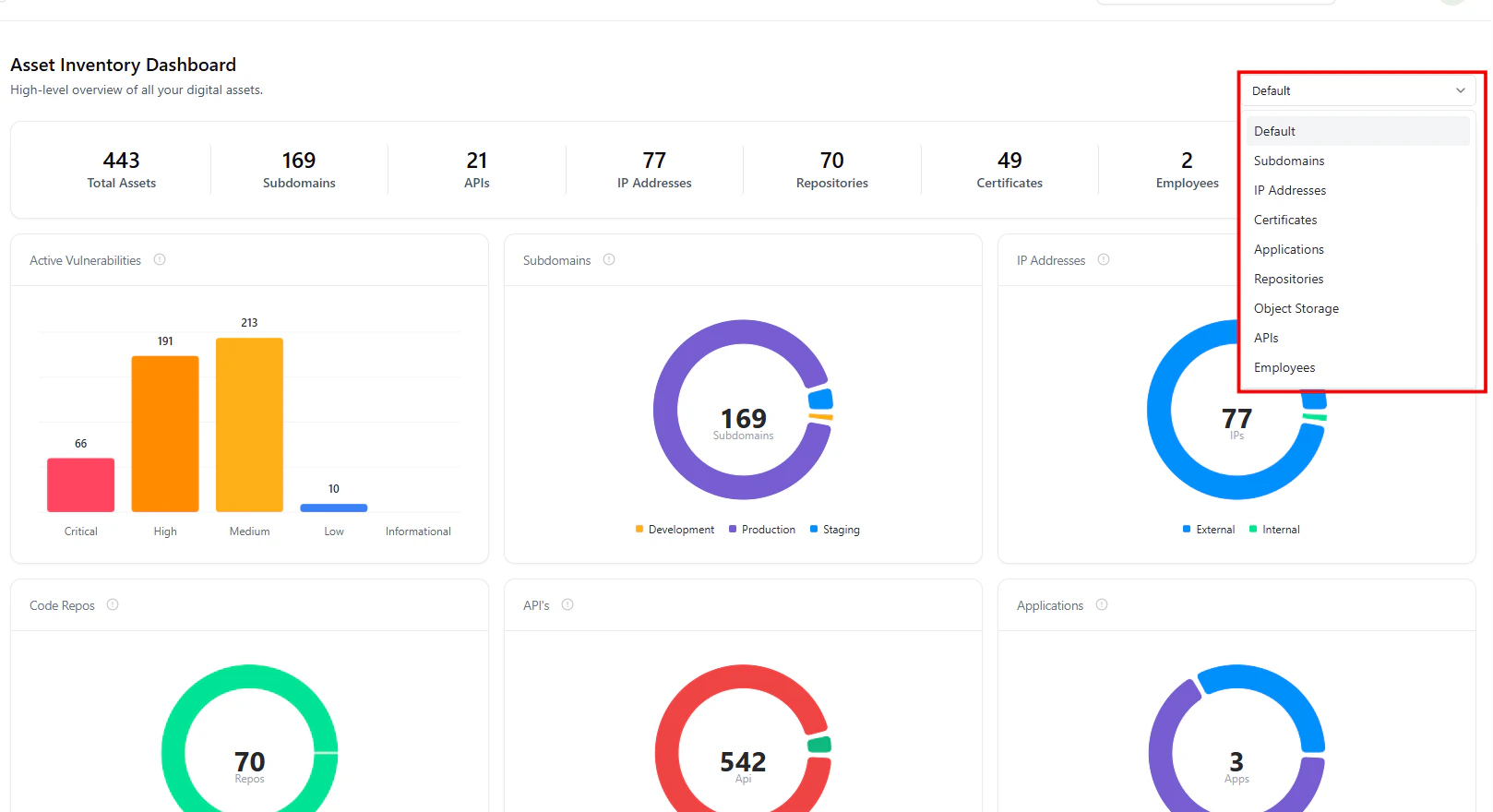
Focused dashboard view for a selected asset type (e.g., Subdomains, APIs, or IPs)
- Metrics update contextually for that asset class only
- Visualizations reflect type-specific insights
- Teams can analyze risk and distribution in isolation
- Noise is reduced, enabling faster decision-making
Key Visual Insights
Active Vulnerabilities
A severity-based bar chart showing:- Critical
- High
- Medium
- Low
- Informational
Subdomains Distribution
Breakdown across environments:- Production
- Development
- Staging
IP Address Classification
- External
- Internal
Code Repositories
Displays total repositories and their activity status.Useful for understanding code exposure and supply chain risk.
APIs Overview
Shows API exposure and authentication posture:- Secured (e.g., bearer token)
- Unauthenticated
Applications Overview
Breakdown by deployment type:- SaaS
- On-Prem
SSL Certificates
Tracks certificate lifecycle:- Valid
- Expired
- About to expire
Object Storage
Distribution across cloud providers:- AWS S3
- Azure Blob
- GCP Storage
- OCI
Registry / Asset State
- Active
- Archived
Why This Matters
The AIM Dashboard transforms fragmented asset data into a single, actionable intelligence layer:- Understand your complete asset inventory instantly
- Identify risk concentration areas quickly
- Detect public exposure and weak configurations
- Analyze specific asset classes in isolation
- Enable faster, data-driven security decisions
Explore Live Demo
Explore AIM Live — No Signup Needed
Instantly explore how Snapsec AIM discovers, enriches, and tracks every asset in real time — all without creating an account.