

Overview
Adapters in AIM act as data bridges between your asset inventory and external platforms.They automatically fetch, synchronize, and enrich asset data from connected systems — ensuring your inventory stays continuously updated without manual effort.

What Are Adapters?
Adapters are modular integrations that connect AIM with external data sources such as:- Cloud Providers – e.g., Oracle Cloud, Cloudflare
- Security Tools – e.g., Snapsec ASM, VM, TechDetect, Secret Scanner
- Repositories & CI/CD – e.g., GitHub, GitLab
- API Platforms – e.g., Postman, Swagger
- Data Enrichment Sources – e.g., IPinfo, CertGrabber, DNS Resolver

Connecting Adapters
Connecting an adapter allows AIM to pull data automatically from that system into your asset inventory.- Navigate to the Adapters tab.
- Click Install on the adapter you wish to connect (e.g., Postman, Cloudflare, GitHub).
- Enter the required credentials or API key in the connection form.
- Optionally, provide a description or context for the integration.
- Click Install Now to activate the adapter.

Disconnecting Adapters
If an integration is no longer required or needs replacement, it can be easily disconnected.- Open the Active Adapters tab.
- Locate the adapter you want to remove.
- Click Delete — this will safely disconnect the adapter without removing previously fetched data.
Active Adapters
The Active Adapters tab lists all currently configured integrations.Each card displays:
- Adapter Name (e.g.,
crt,vm,techdetect) - Description (e.g., Fetching Subdomains for bugcrowd.com)
- Status (
Installed) - Last Sync Time (e.g., “2 months ago”)

Refreshing Adapters
Refreshing an adapter allows AIM to fetch the latest data from that integration on-demand.- Click the Refresh button on any active adapter card.
- AIM will initiate an immediate sync to pull updated assets or vulnerability data.
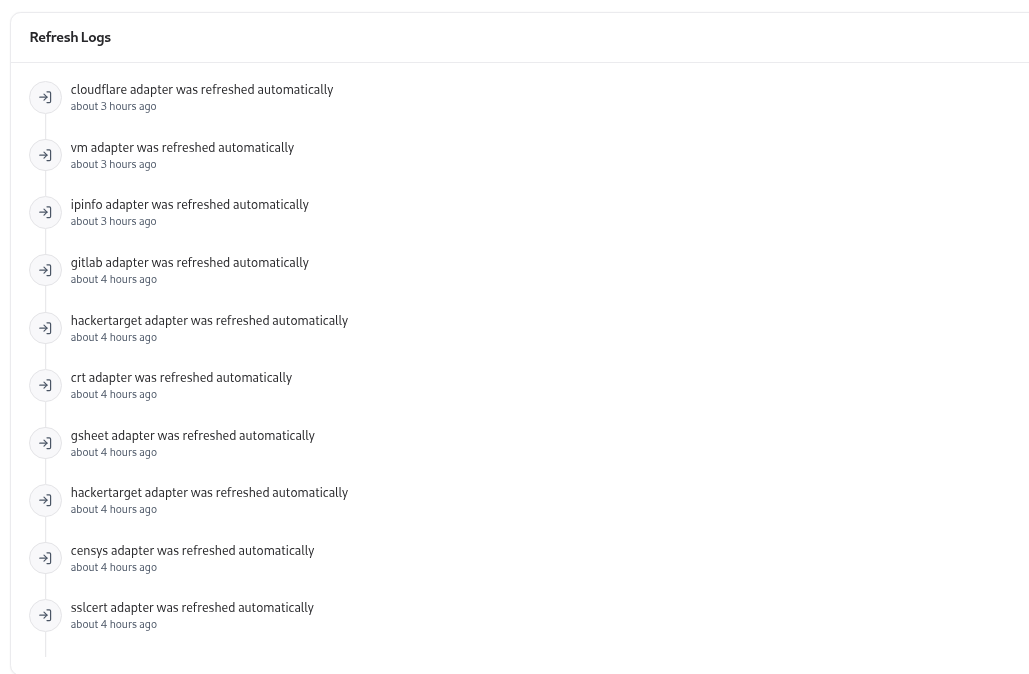
- The process is logged automatically under Refresh Logs.
Refresh Logs
The Refresh Logs tab provides a complete audit trail of adapter activities. Each log entry includes:- Adapter name
- User who triggered the installation or refresh
- Action type (e.g., installed, refreshed)
- Timestamp of the action
Adapter Lifecycle
| Stage | Description |
|---|---|
| Install | Adapter is connected and credentials validated. |
| Sync | Data import begins automatically after installation. |
| Refresh | Manually trigger new data pull anytime. |
| Disconnect | Adapter removed without deleting existing data. |
| Reinstall | Reconnect adapter using stored credentials or a new API key. |
Example Use Cases
- Sync Subdomains: Use CRT, DNS Resolver, or Snapsec ASM adapters to import discovered subdomains.
- Fetch Vulnerabilities: Integrate with the VM adapter to bring in risk data for associated assets.
- Enrich IP Data: Connect IPinfo to map IP locations, ASN data, and ownership.
- Automate Technology Detection: Use TechDetect to fingerprint technology stacks automatically.
- Pull Repositories: Link GitHub or GitLab adapters to track repositories as assets.
Explore Live Demo
Explore AIM Live — No Signup Needed
Instantly explore how Snapsec AIM discovers, enriches, and tracks every asset in real time — all without creating an account.