> ## Documentation Index
> Fetch the complete documentation index at: https://docs.snapsec.co/llms.txt
> Use this file to discover all available pages before exploring further.
# Vulnerabilities
> View, analyze, and manage all detected security issues across your applications.
## Overview
The Vulnerabilities section provides a centralized view of all security issues identified during scans.
It enables teams to understand risk, validate findings, and take action with clear remediation guidance.
***
## Vulnerability Summary
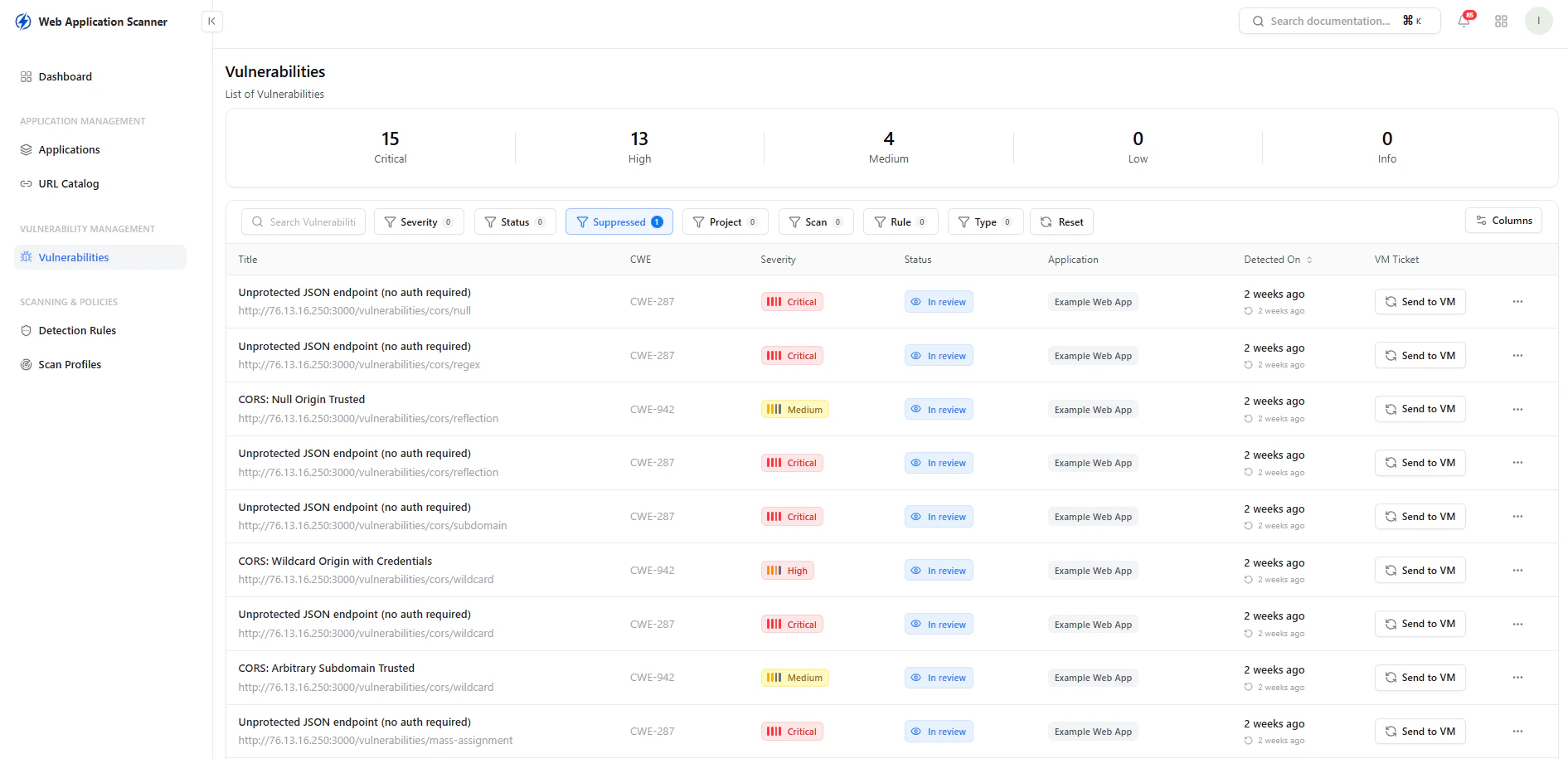 ### What You See
* Total count of vulnerabilities by severity:
* Critical
* High
* Medium
* Low
* Info
This gives an immediate understanding of the overall risk posture of your application.
***
## Vulnerability List
The main table displays all detected vulnerabilities with key details:
* **Title** — Description of the issue
* **CWE** — Standard classification (Common Weakness Enumeration)
* **Severity** — Impact level of the vulnerability
* **Status** — Current state (e.g., In Review, Resolved)
* **Application** — Affected application
* **Detected On** — When the issue was identified
* **VM Ticket** — Option to send to vulnerability management
### Capabilities
* Search and filter vulnerabilities
* Filter by severity, status, application, and more
* Track remediation progress
* Send findings to VM workflow
***
## Vulnerability Details
### What You See
* Total count of vulnerabilities by severity:
* Critical
* High
* Medium
* Low
* Info
This gives an immediate understanding of the overall risk posture of your application.
***
## Vulnerability List
The main table displays all detected vulnerabilities with key details:
* **Title** — Description of the issue
* **CWE** — Standard classification (Common Weakness Enumeration)
* **Severity** — Impact level of the vulnerability
* **Status** — Current state (e.g., In Review, Resolved)
* **Application** — Affected application
* **Detected On** — When the issue was identified
* **VM Ticket** — Option to send to vulnerability management
### Capabilities
* Search and filter vulnerabilities
* Filter by severity, status, application, and more
* Track remediation progress
* Send findings to VM workflow
***
## Vulnerability Details
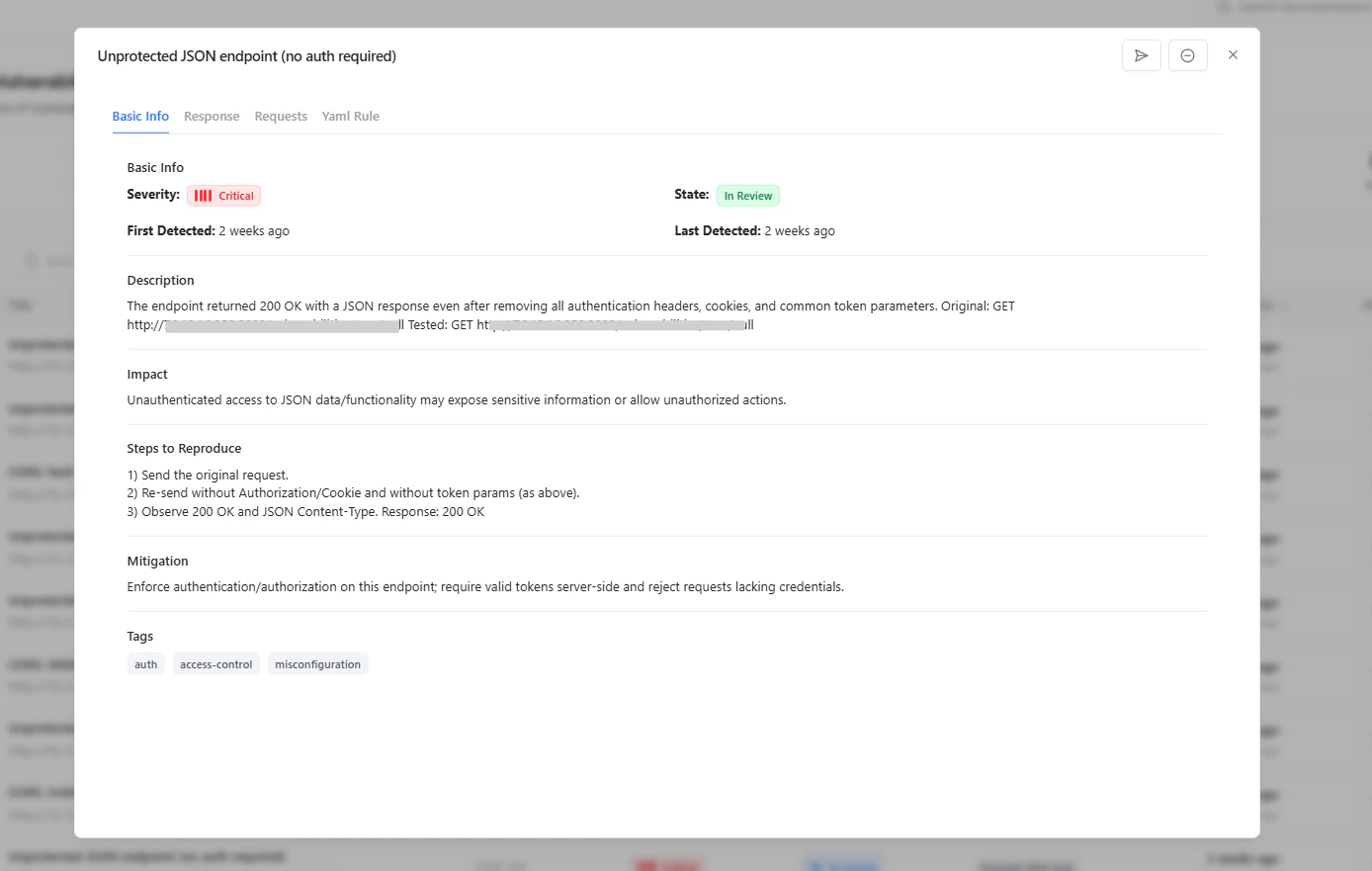 Each vulnerability includes detailed context to help security and development teams act effectively.
### Included Information
* **Description**\
Explains what the vulnerability is and how it was identified
* **Impact**\
Describes the potential risk and consequences
* **Steps to Reproduce**\
Provides exact steps to validate the issue
* **Mitigation**\
Recommends how to fix or secure the issue
* **Tags**\
Adds contextual classification (e.g., auth, misconfiguration)
***
## Why It Matters
The Vulnerabilities section transforms scan results into actionable insights.
### Key Value
* Centralized visibility of all security issues
* Clear prioritization based on severity
* Reproducible findings for validation
* Actionable remediation guidance
* Integration with vulnerability management workflows
***
## Explore Live Demo
Explore how Snapsec helps you identify, prioritize, and fix vulnerabilities with complete context.
Each vulnerability includes detailed context to help security and development teams act effectively.
### Included Information
* **Description**\
Explains what the vulnerability is and how it was identified
* **Impact**\
Describes the potential risk and consequences
* **Steps to Reproduce**\
Provides exact steps to validate the issue
* **Mitigation**\
Recommends how to fix or secure the issue
* **Tags**\
Adds contextual classification (e.g., auth, misconfiguration)
***
## Why It Matters
The Vulnerabilities section transforms scan results into actionable insights.
### Key Value
* Centralized visibility of all security issues
* Clear prioritization based on severity
* Reproducible findings for validation
* Actionable remediation guidance
* Integration with vulnerability management workflows
***
## Explore Live Demo
Explore how Snapsec helps you identify, prioritize, and fix vulnerabilities with complete context.