> ## Documentation Index
> Fetch the complete documentation index at: https://docs.snapsec.co/llms.txt
> Use this file to discover all available pages before exploring further.
# Vulnerabilities
> View, analyze, and manage detected vulnerabilities across all assets with full context and remediation workflows.
## Overview
The Vulnerabilities page provides a centralized view of all detected security issues across your assets.
It enables teams to investigate findings, prioritize risks, and take action efficiently.
***
## Vulnerabilities List
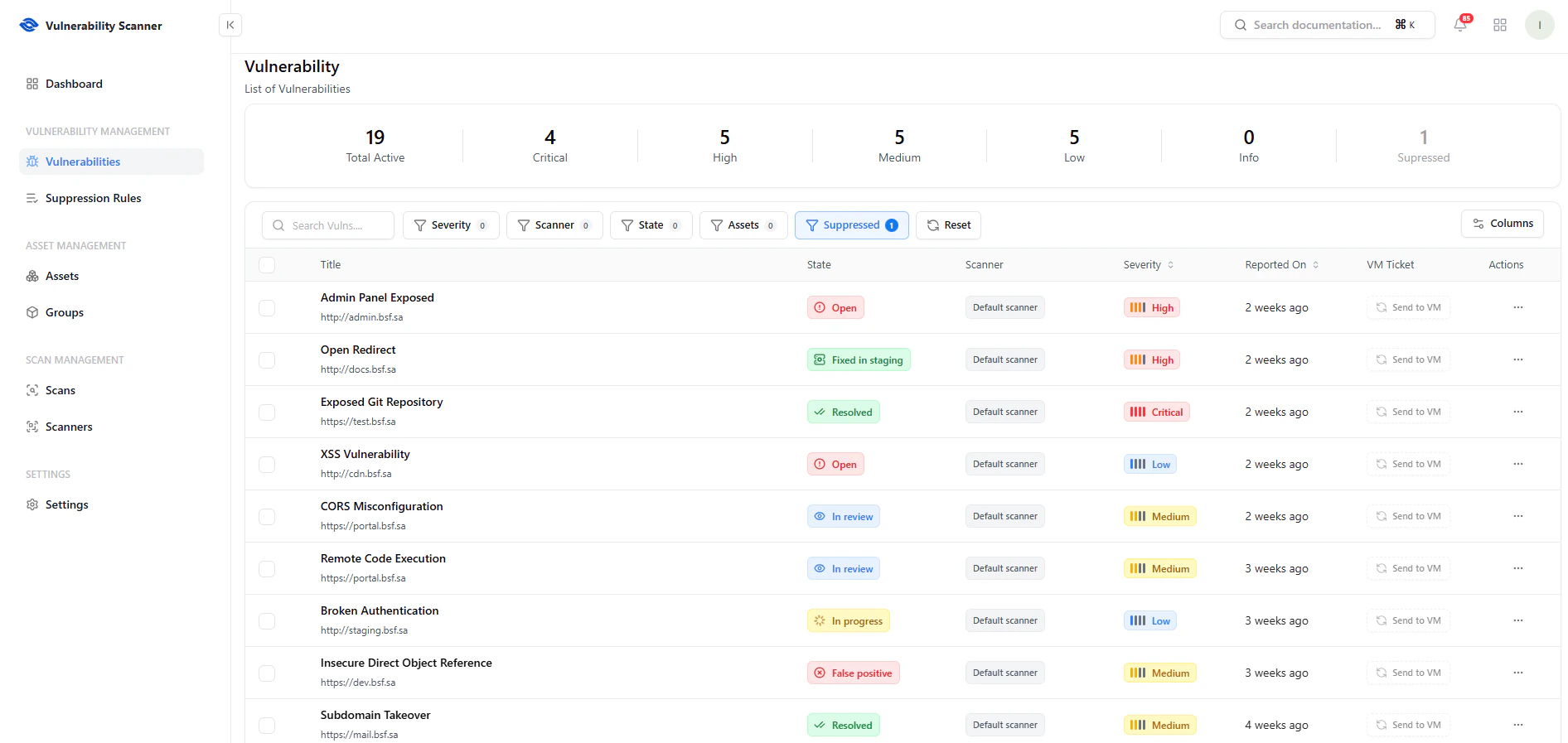 This table displays all discovered vulnerabilities across your environment.
### Key Features
* **Search** — Quickly find vulnerabilities
* **Filters** — Filter by severity, scanner, state, assets, or suppressed status
* **Columns Control** — Customize visible fields
* **Severity Breakdown** — Instant counts (Critical, High, Medium, Low, Info, Suppressed)
### Key Columns
* **Title** — Vulnerability name and endpoint
* **State** — Open, In Review, Resolved, False Positive
* **Scanner** — Detection source
* **Severity** — Risk level
* **Reported On** — Detection timestamp
* **VM Ticket** — Integration with vulnerability management
***
## Actions & Workflow
This table displays all discovered vulnerabilities across your environment.
### Key Features
* **Search** — Quickly find vulnerabilities
* **Filters** — Filter by severity, scanner, state, assets, or suppressed status
* **Columns Control** — Customize visible fields
* **Severity Breakdown** — Instant counts (Critical, High, Medium, Low, Info, Suppressed)
### Key Columns
* **Title** — Vulnerability name and endpoint
* **State** — Open, In Review, Resolved, False Positive
* **Scanner** — Detection source
* **Severity** — Risk level
* **Reported On** — Detection timestamp
* **VM Ticket** — Integration with vulnerability management
***
## Actions & Workflow
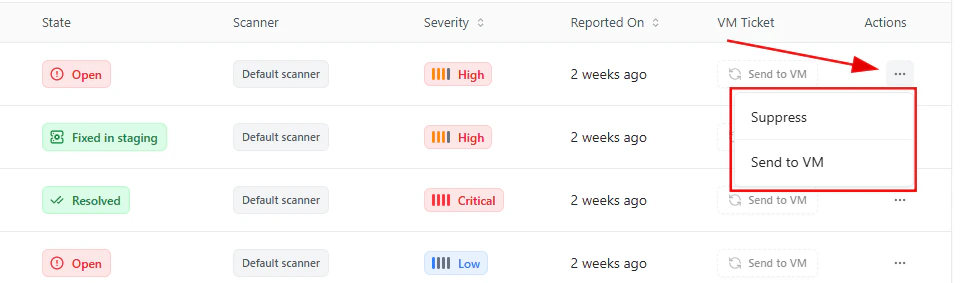 Each vulnerability provides quick actions through the actions menu.
### Available Actions
* **Send to VM** — Forward vulnerability for tracking and remediation
* **Suppress** — Mark as false positive or ignore
These actions help reduce noise and streamline remediation workflows.
***
## Vulnerability Details
Each vulnerability provides quick actions through the actions menu.
### Available Actions
* **Send to VM** — Forward vulnerability for tracking and remediation
* **Suppress** — Mark as false positive or ignore
These actions help reduce noise and streamline remediation workflows.
***
## Vulnerability Details
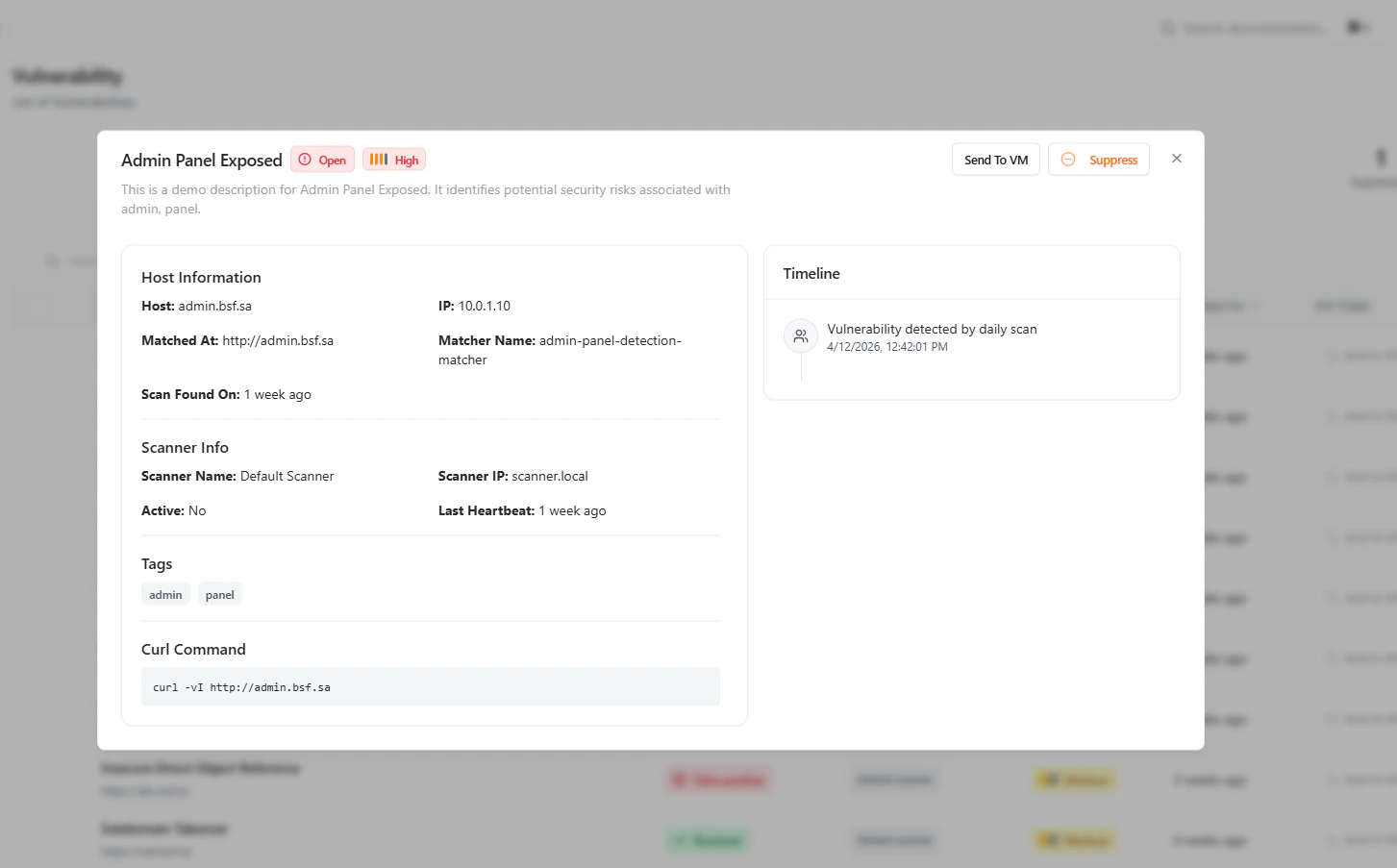 Clicking a vulnerability opens a detailed investigation panel.
### Host Information
* **Host / Domain**
* **IP Address**
* **Matched Endpoint**
* **Matcher Name**
* **Scan Found On**
### Scanner Information
* **Scanner Name**
* **Scanner IP**
* **Heartbeat Status**
### Additional Context
* **Tags** — Classification labels
* **Timeline** — Detection history
* **Reproduction Command** — Example curl request
### Actions
* **Send to VM**
* **Suppress**
***
## Investigation Workflow
1. Identify critical vulnerabilities
2. Filter and prioritize findings
3. Review detailed context
4. Take action (send to VM or suppress)
5. Track remediation progress
***
## Why This Matters
* Centralizes vulnerability management
* Enables faster triage and prioritization
* Reduces false positives through suppression
* Provides deep technical context for investigation
* Improves remediation efficiency and tracking
***
## Explore Live Demo
See how Snapsec VS helps you detect, analyze, and act on vulnerabilities across your infrastructure in real-time.
Clicking a vulnerability opens a detailed investigation panel.
### Host Information
* **Host / Domain**
* **IP Address**
* **Matched Endpoint**
* **Matcher Name**
* **Scan Found On**
### Scanner Information
* **Scanner Name**
* **Scanner IP**
* **Heartbeat Status**
### Additional Context
* **Tags** — Classification labels
* **Timeline** — Detection history
* **Reproduction Command** — Example curl request
### Actions
* **Send to VM**
* **Suppress**
***
## Investigation Workflow
1. Identify critical vulnerabilities
2. Filter and prioritize findings
3. Review detailed context
4. Take action (send to VM or suppress)
5. Track remediation progress
***
## Why This Matters
* Centralizes vulnerability management
* Enables faster triage and prioritization
* Reduces false positives through suppression
* Provides deep technical context for investigation
* Improves remediation efficiency and tracking
***
## Explore Live Demo
See how Snapsec VS helps you detect, analyze, and act on vulnerabilities across your infrastructure in real-time.