> ## Documentation Index
> Fetch the complete documentation index at: https://docs.snapsec.co/llms.txt
> Use this file to discover all available pages before exploring further.
# Vulnerabilities
> View, manage, and remediate all vulnerabilities across assessments from a unified interface.
## Overview
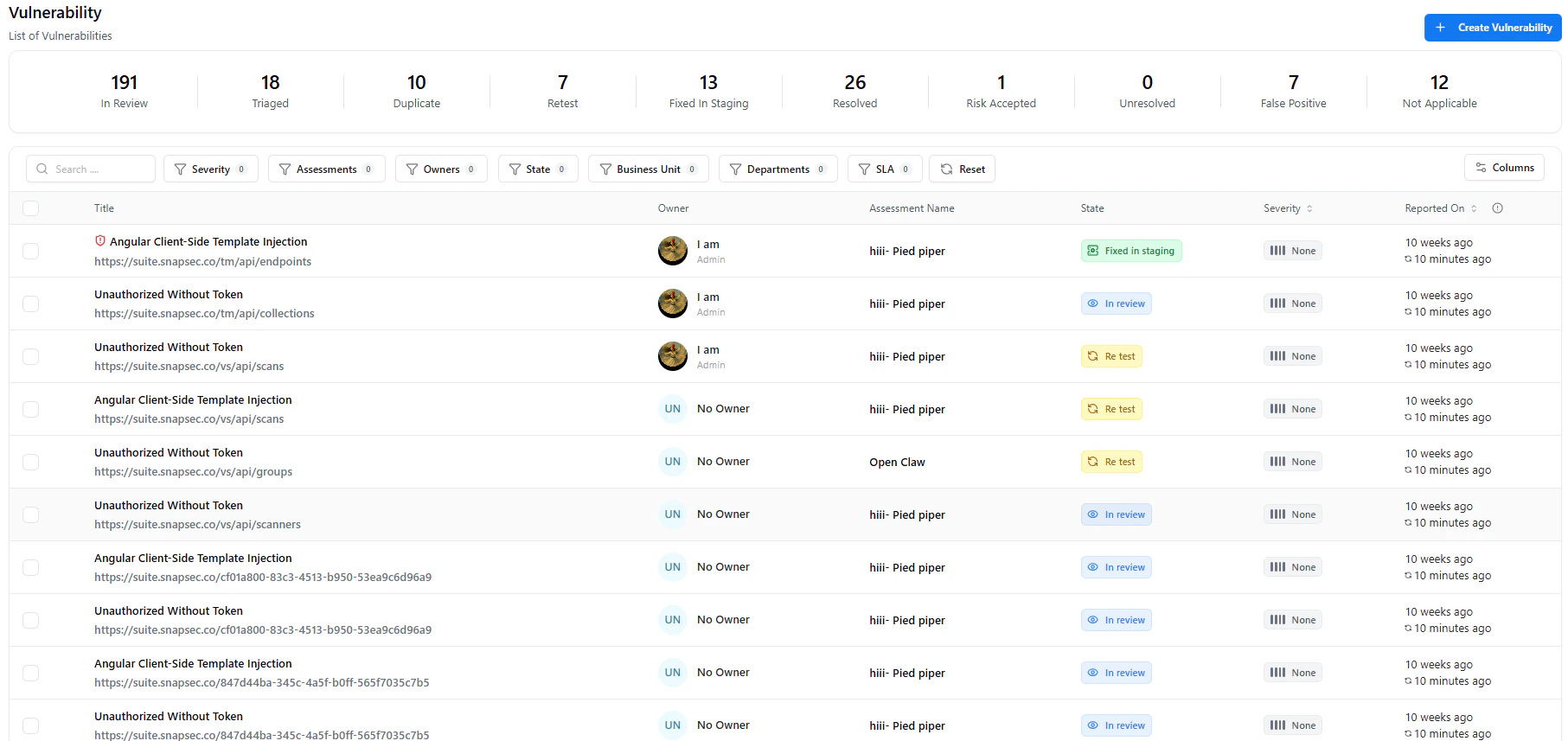 The **Vulnerabilities** section provides a unified view of all identified security issues across assessments, assets, and teams.
It allows you to track, prioritize, and manage vulnerabilities from discovery to resolution — all in one place.
Every vulnerability is tracked with full context — including severity, ownership, activity, and evidence — ensuring complete visibility across the remediation lifecycle.
***
## What You Can Do
* **View All Vulnerabilities**
* Access a centralized list across all assessments
* **Track Status**
* Monitor states like *In Review, Re-test, Fixed in Staging, Resolved*
* **Assign Ownership**
* Clearly see who is responsible for remediation
* **Prioritize Fixes**
* Focus on critical issues using severity and SLA indicators
***
## Filtering and Search
The **Vulnerabilities** section provides a unified view of all identified security issues across assessments, assets, and teams.
It allows you to track, prioritize, and manage vulnerabilities from discovery to resolution — all in one place.
Every vulnerability is tracked with full context — including severity, ownership, activity, and evidence — ensuring complete visibility across the remediation lifecycle.
***
## What You Can Do
* **View All Vulnerabilities**
* Access a centralized list across all assessments
* **Track Status**
* Monitor states like *In Review, Re-test, Fixed in Staging, Resolved*
* **Assign Ownership**
* Clearly see who is responsible for remediation
* **Prioritize Fixes**
* Focus on critical issues using severity and SLA indicators
***
## Filtering and Search
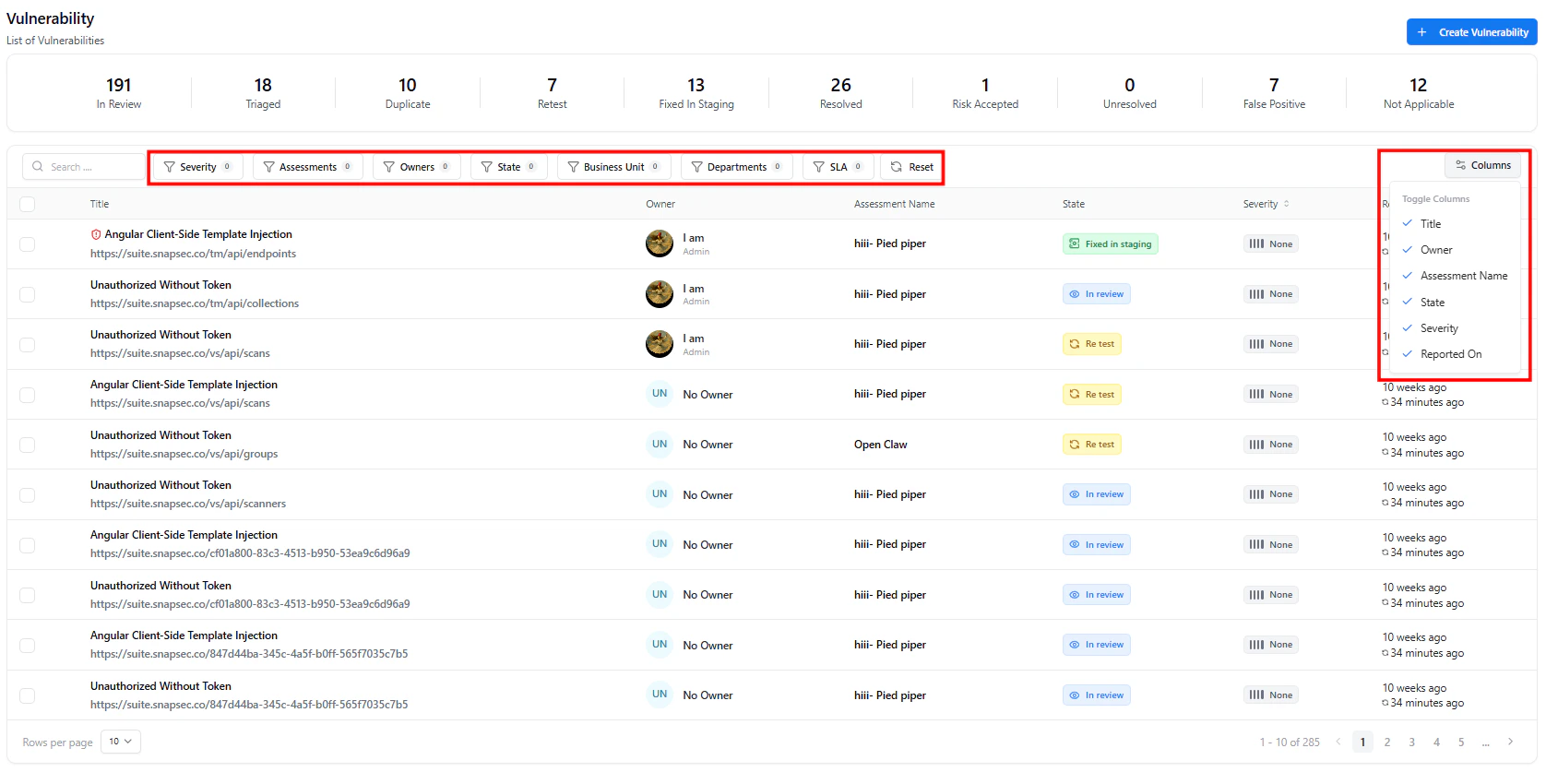 Use filters to quickly find relevant vulnerabilities:
* **Severity**
* **Assessments**
* **Owners**
* **State**
* **Business Unit / Departments**
* **SLA Status**
Combine filters to narrow results — for example, *High severity vulnerabilities in Re-test assigned to Backend Team*.
***
## Vulnerability States
Each vulnerability moves through defined states:
* **In Review**
* **Triaged**
* **Re-test**
* **Fixed in Staging**
* **Resolved**
* **Risk Accepted**
* **False Positive / Not Applicable**
State changes are reflected instantly across dashboards and reports.
***
## Creating a Vulnerability
Use filters to quickly find relevant vulnerabilities:
* **Severity**
* **Assessments**
* **Owners**
* **State**
* **Business Unit / Departments**
* **SLA Status**
Combine filters to narrow results — for example, *High severity vulnerabilities in Re-test assigned to Backend Team*.
***
## Vulnerability States
Each vulnerability moves through defined states:
* **In Review**
* **Triaged**
* **Re-test**
* **Fixed in Staging**
* **Resolved**
* **Risk Accepted**
* **False Positive / Not Applicable**
State changes are reflected instantly across dashboards and reports.
***
## Creating a Vulnerability
 * Click **Create Vulnerability**
* Add details like title, severity, and affected asset
* Link it to an assessment
Manual creation is useful for adding findings from external tools or internal reviews.
***
## Vulnerability Details
Clicking a vulnerability opens a **single unified view** containing all information needed for remediation.
* Click **Create Vulnerability**
* Add details like title, severity, and affected asset
* Link it to an assessment
Manual creation is useful for adding findings from external tools or internal reviews.
***
## Vulnerability Details
Clicking a vulnerability opens a **single unified view** containing all information needed for remediation.
 ***
### Description & Reproduction
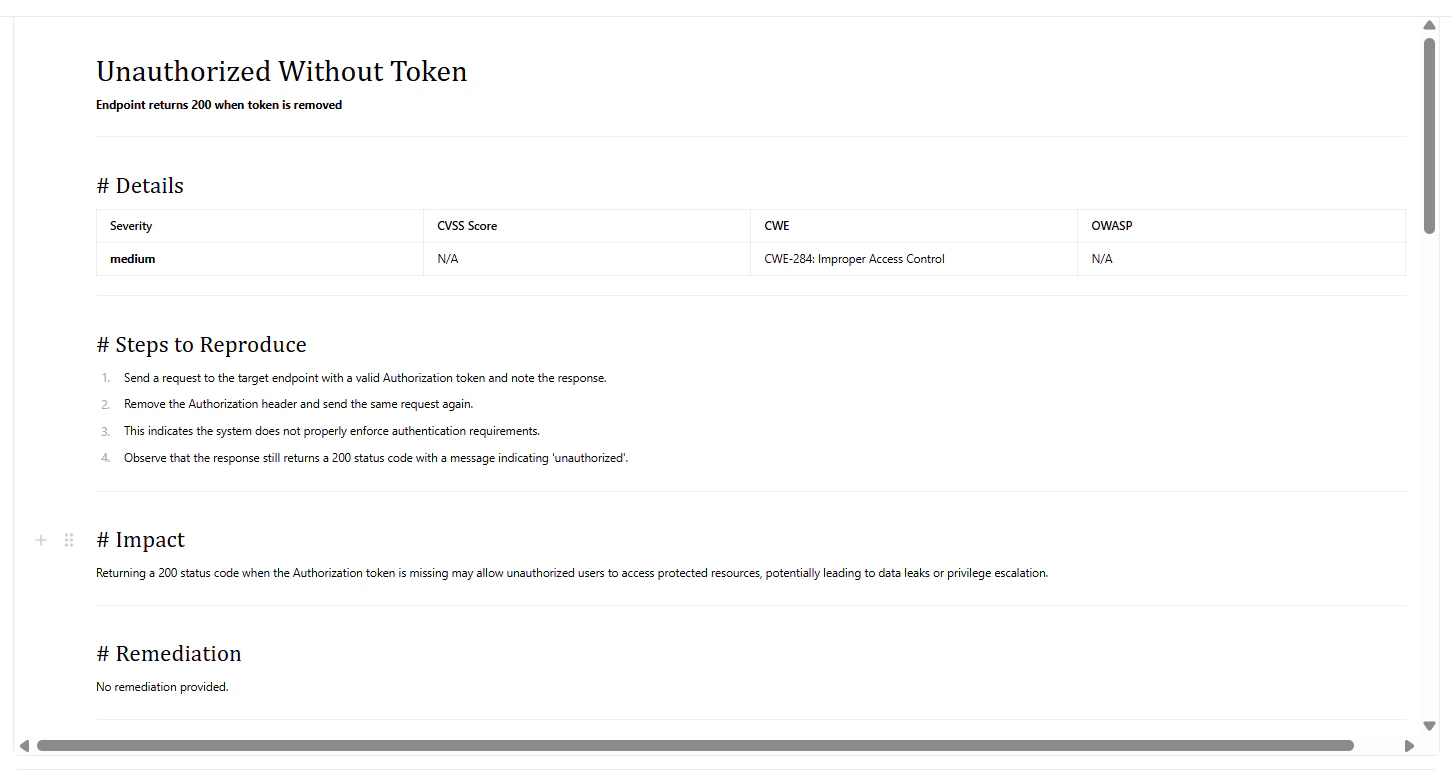
This section includes:
* **Title & Description**
* **Steps to Reproduce**
* **Impact**
* **Remediation Guidance**
It serves as the **primary reference** for developers fixing the issue.
***
### Activity & Collaboration
***
### Description & Reproduction
This section includes:
* **Title & Description**
* **Steps to Reproduce**
* **Impact**
* **Remediation Guidance**
It serves as the **primary reference** for developers fixing the issue.
***
### Activity & Collaboration
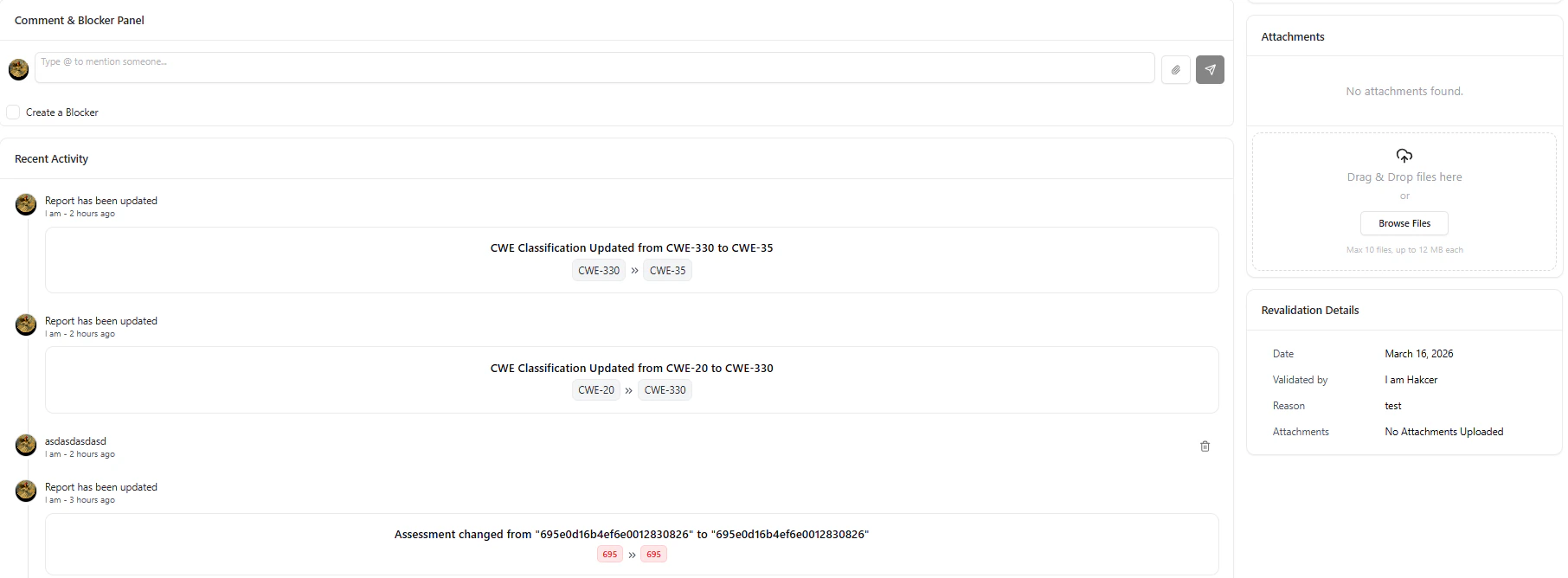 * Add comments and tag team members
* Track all updates and system changes
* Create blockers if remediation is blocked
All communication stays tied to the vulnerability — ensuring full traceability.
***
### Report Details Panel
* Add comments and tag team members
* Track all updates and system changes
* Create blockers if remediation is blocked
All communication stays tied to the vulnerability — ensuring full traceability.
***
### Report Details Panel
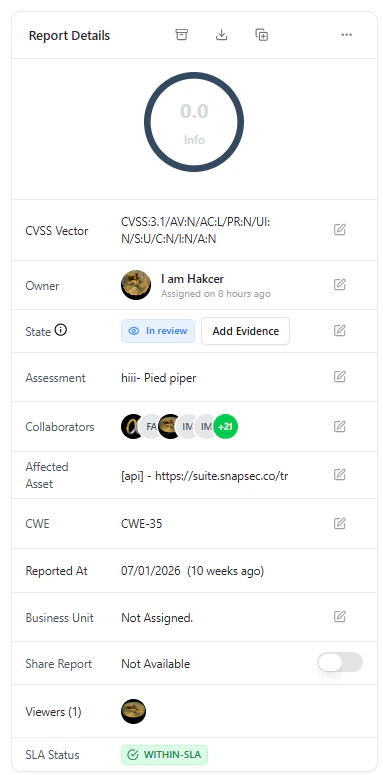 Key information includes:
* **Severity & CVSS**
* **Owner & Collaborators**
* **Current State**
* **Assessment Source**
* **Affected Asset**
* **CWE Classification**
* **SLA Status**
* **Reported Date**
Use this panel to quickly assess risk and decide remediation priority.
***
### Attachments & Revalidation
Within the same view:
* Upload screenshots, logs, and PoCs
* Track revalidation details
* Maintain proof for audits
Evidence ensures vulnerabilities are verifiable, reproducible, and audit-ready.
***
## Why It Matters
The Vulnerabilities section centralizes everything required to manage security issues effectively.
It ensures:
* Clear understanding of each issue
* Structured collaboration between teams
* Complete audit trail with activity and evidence
* End-to-end tracking from discovery to resolution
***
## Explore Live Demo
Experience how Snapsec helps teams track and remediate vulnerabilities in a unified workflow.
Key information includes:
* **Severity & CVSS**
* **Owner & Collaborators**
* **Current State**
* **Assessment Source**
* **Affected Asset**
* **CWE Classification**
* **SLA Status**
* **Reported Date**
Use this panel to quickly assess risk and decide remediation priority.
***
### Attachments & Revalidation
Within the same view:
* Upload screenshots, logs, and PoCs
* Track revalidation details
* Maintain proof for audits
Evidence ensures vulnerabilities are verifiable, reproducible, and audit-ready.
***
## Why It Matters
The Vulnerabilities section centralizes everything required to manage security issues effectively.
It ensures:
* Clear understanding of each issue
* Structured collaboration between teams
* Complete audit trail with activity and evidence
* End-to-end tracking from discovery to resolution
***
## Explore Live Demo
Experience how Snapsec helps teams track and remediate vulnerabilities in a unified workflow.