> ## Documentation Index
> Fetch the complete documentation index at: https://docs.snapsec.co/llms.txt
> Use this file to discover all available pages before exploring further.
# Risk Acceptance
> Review, approve, or reject risk acceptance requests raised for vulnerabilities.
 ## Overview
**Risk Acceptance** allows organizations to formally accept certain vulnerabilities when immediate remediation is not feasible.
Instead of leaving vulnerabilities unresolved, teams can raise a **risk acceptance request** with justification, business context, and compensating controls — ensuring every decision is documented, reviewed, and auditable.
Risk Acceptance ensures that accepted risks are **intentional, reviewed, and documented** — not ignored.
***
## What You Can Do
* **Review Requests**
* View all submitted risk acceptance requests
* **Approve or Reject**
* Take action based on risk, justification, and business impact
* **Track Status**
* Monitor requests as *Pending, Approved, or Rejected*
* **Maintain Audit Trail**
* Keep full visibility of decisions and approvers
***
## Escalations List
## Overview
**Risk Acceptance** allows organizations to formally accept certain vulnerabilities when immediate remediation is not feasible.
Instead of leaving vulnerabilities unresolved, teams can raise a **risk acceptance request** with justification, business context, and compensating controls — ensuring every decision is documented, reviewed, and auditable.
Risk Acceptance ensures that accepted risks are **intentional, reviewed, and documented** — not ignored.
***
## What You Can Do
* **Review Requests**
* View all submitted risk acceptance requests
* **Approve or Reject**
* Take action based on risk, justification, and business impact
* **Track Status**
* Monitor requests as *Pending, Approved, or Rejected*
* **Maintain Audit Trail**
* Keep full visibility of decisions and approvers
***
## Escalations List
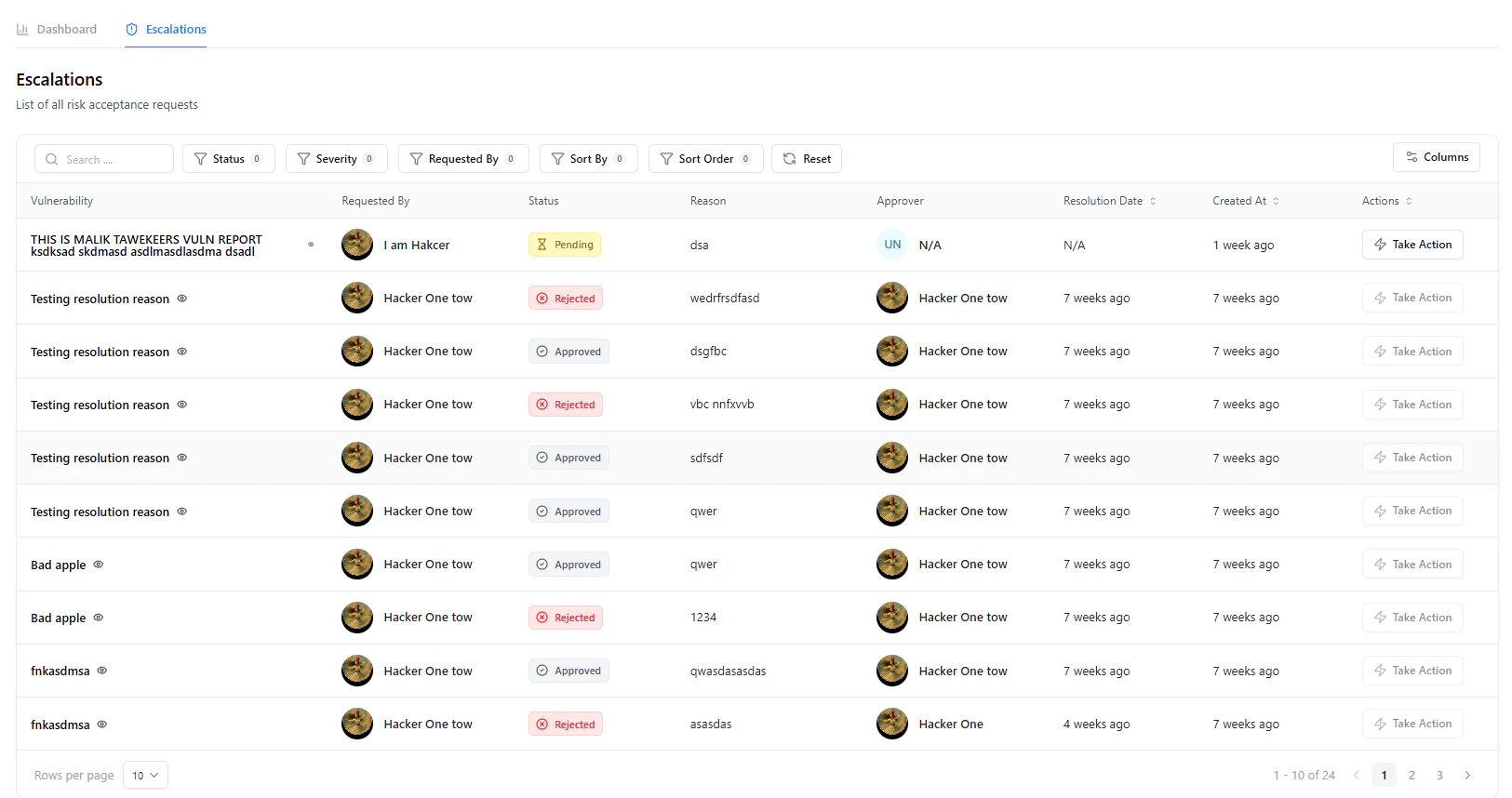 The **Escalations** page provides a centralized view of all risk acceptance requests.
### Key Details
* **Vulnerability**
* Associated vulnerability for which risk is being accepted
* **Requested By**
* User who raised the request
* **Status**
* *Pending, Approved, Rejected*
* **Reason**
* Summary of why acceptance is requested
* **Approver**
* Assigned reviewer or decision-maker
* **Resolution Date**
* Date of approval or rejection
* **Actions**
* Take action directly from the table
Use filters to quickly identify pending approvals or high-risk requests requiring immediate attention.
***
## Reviewing a Request
The **Escalations** page provides a centralized view of all risk acceptance requests.
### Key Details
* **Vulnerability**
* Associated vulnerability for which risk is being accepted
* **Requested By**
* User who raised the request
* **Status**
* *Pending, Approved, Rejected*
* **Reason**
* Summary of why acceptance is requested
* **Approver**
* Assigned reviewer or decision-maker
* **Resolution Date**
* Date of approval or rejection
* **Actions**
* Take action directly from the table
Use filters to quickly identify pending approvals or high-risk requests requiring immediate attention.
***
## Reviewing a Request
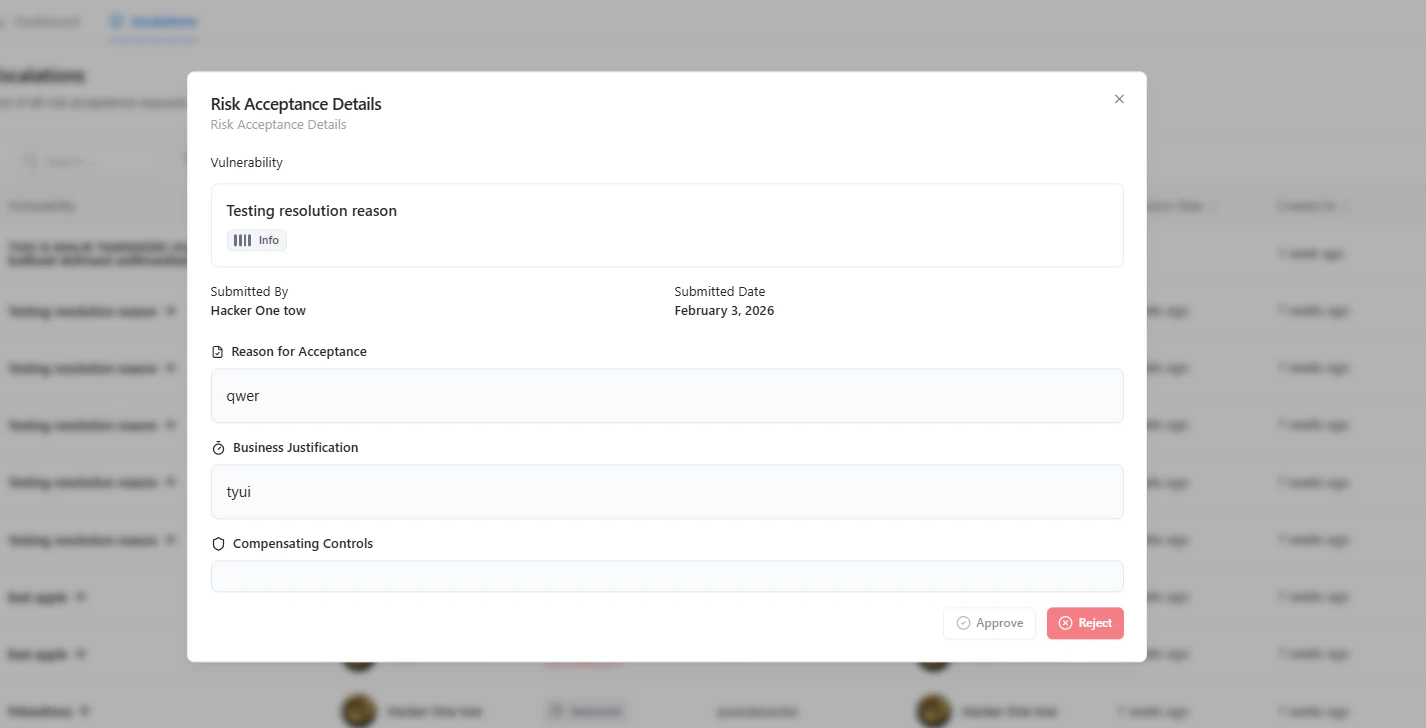 Click **Take Action** to open the full request details.
### Included Information
* **Vulnerability Context**
* **Submitted By & Date**
* **Reason for Acceptance**
* **Business Justification**
* **Compensating Controls**
***
## Taking Action
From the request panel, you can:
* **Approve**
* Accept the risk based on justification and controls
* **Reject**
* Require remediation or additional clarification
Approval should be based on risk impact, business necessity, and presence of compensating controls.
***
## Dashboard Insights
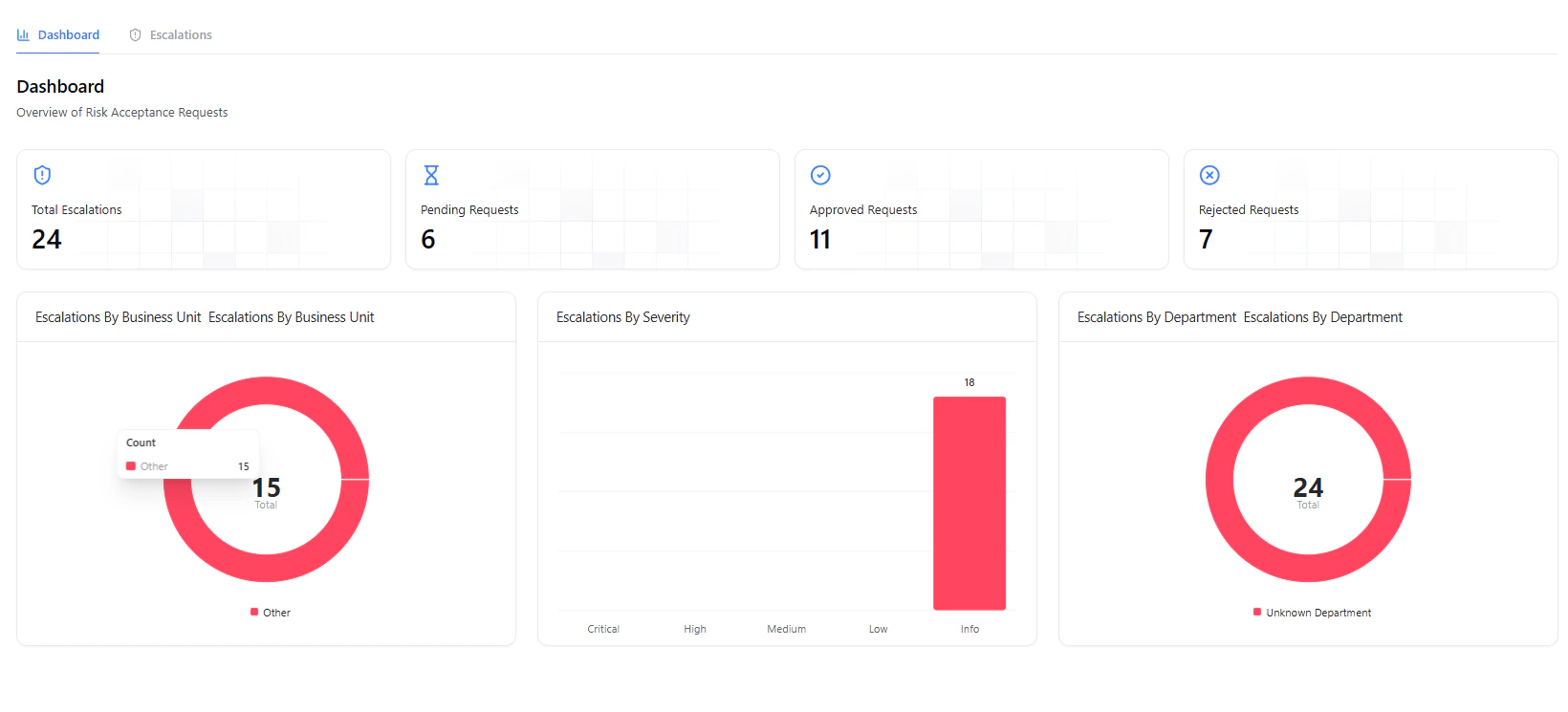
The dashboard provides a high-level overview of:
* Total requests
* Pending approvals
* Approved requests
* Rejected requests
It also includes visual breakdowns by:
* **Business Unit**
* **Severity**
* **Department**
***
## Why It Matters
Risk Acceptance brings governance and accountability into vulnerability management.
It ensures:
* No vulnerability is silently ignored
* Business decisions are documented and justified
* Security and business teams stay aligned
* Compliance and audit requirements are met
***
## Explore Live Demo
Experience how Snapsec enables structured risk acceptance and approval workflows.
Click **Take Action** to open the full request details.
### Included Information
* **Vulnerability Context**
* **Submitted By & Date**
* **Reason for Acceptance**
* **Business Justification**
* **Compensating Controls**
***
## Taking Action
From the request panel, you can:
* **Approve**
* Accept the risk based on justification and controls
* **Reject**
* Require remediation or additional clarification
Approval should be based on risk impact, business necessity, and presence of compensating controls.
***
## Dashboard Insights
The dashboard provides a high-level overview of:
* Total requests
* Pending approvals
* Approved requests
* Rejected requests
It also includes visual breakdowns by:
* **Business Unit**
* **Severity**
* **Department**
***
## Why It Matters
Risk Acceptance brings governance and accountability into vulnerability management.
It ensures:
* No vulnerability is silently ignored
* Business decisions are documented and justified
* Security and business teams stay aligned
* Compliance and audit requirements are met
***
## Explore Live Demo
Experience how Snapsec enables structured risk acceptance and approval workflows.