> ## Documentation Index
> Fetch the complete documentation index at: https://docs.snapsec.co/llms.txt
> Use this file to discover all available pages before exploring further.
# Settings
> Configure scan schedules, target domains, and vulnerability synchronization for your attack surface monitoring.
## Overview
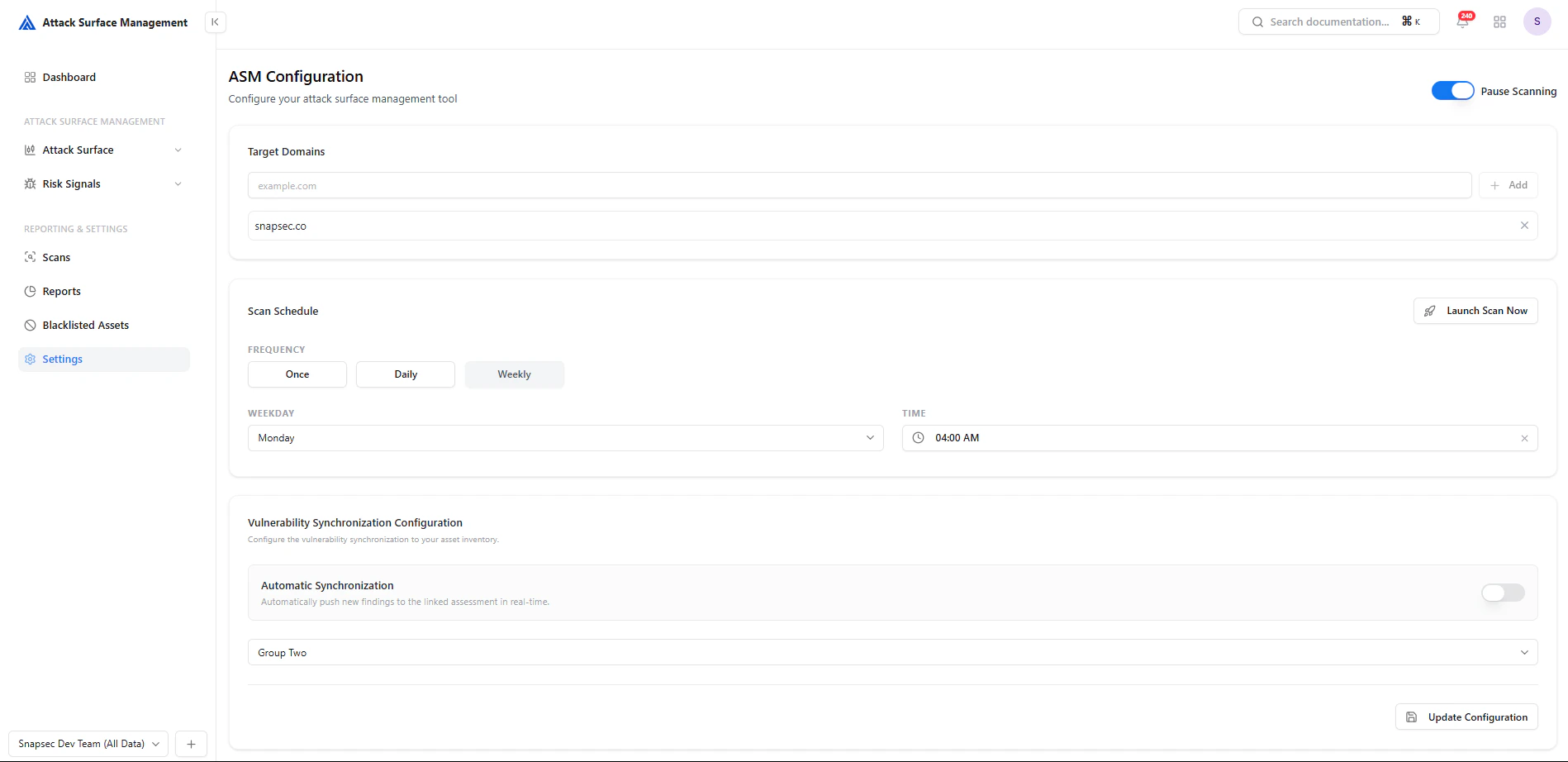
The **Settings** section allows you to configure how your **Attack Surface Management (ASM)** system operates.
From defining target domains to scheduling scans and enabling integrations, this section controls how assets are discovered, monitored, and synchronized across your security workflows.
 ***
## Target Domains
Define the domains that ASM should monitor and scan.
* Add root domains (e.g., `example.com`)
* ASM automatically discovers related subdomains and assets
* Multiple domains can be configured
### Why it matters
* Establishes your **attack surface scope**
* Ensures all relevant assets are included in discovery
* Prevents missing shadow or unknown infrastructure
***
## Scan Scheduling
***
## Target Domains
Define the domains that ASM should monitor and scan.
* Add root domains (e.g., `example.com`)
* ASM automatically discovers related subdomains and assets
* Multiple domains can be configured
### Why it matters
* Establishes your **attack surface scope**
* Ensures all relevant assets are included in discovery
* Prevents missing shadow or unknown infrastructure
***
## Scan Scheduling
 Control how often scans are executed.
### Configuration Options
* **Frequency**
* Once
* Daily
* Weekly
* **Weekday Selection**
* Choose execution day (for weekly scans)
* **Time**
* Define scan start time
* **Manual Trigger**
* Use **Launch Scan Now** to run scans instantly
***
## Launching a Scan
The **Launch Scan Now** button allows immediate execution outside the schedule.
* Useful for **on-demand validation**
* Helps verify fixes after remediation
* Enables quick reassessment of new assets
***
## Vulnerability Synchronization
Control how often scans are executed.
### Configuration Options
* **Frequency**
* Once
* Daily
* Weekly
* **Weekday Selection**
* Choose execution day (for weekly scans)
* **Time**
* Define scan start time
* **Manual Trigger**
* Use **Launch Scan Now** to run scans instantly
***
## Launching a Scan
The **Launch Scan Now** button allows immediate execution outside the schedule.
* Useful for **on-demand validation**
* Helps verify fixes after remediation
* Enables quick reassessment of new assets
***
## Vulnerability Synchronization
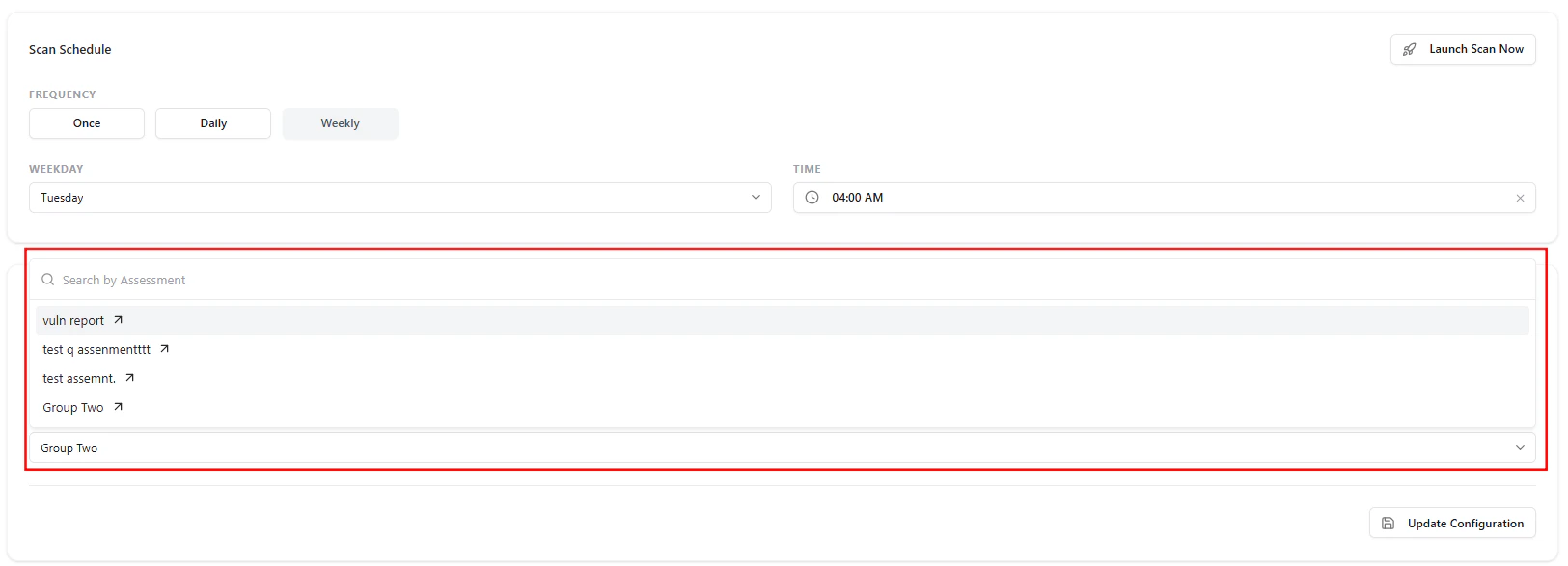 Configure how detected exposures are synchronized with external systems or internal assessments.
### Key Features
* **Assessment Mapping**
* Link ASM findings to a selected assessment group
* **Search & Select**
* Easily find and assign the correct assessment
* **Automated Sync (Optional)**
* Push findings automatically in real time
***
## Automatic Synchronization
Enable automatic syncing to streamline workflows:
* New exposures are **automatically pushed**
* Reduces manual effort
* Ensures real-time visibility across systems
***
## Workflow Example
1. Add your target domains
2. Configure scan frequency and timing
3. Link an assessment group
4. Enable automatic synchronization (optional)
5. Run scans manually or on schedule
6. Findings flow into Risk Signals and Tickets
***
## Best Practices
* 🌐 Always include **all root domains**
* 🕒 Use **weekly scans** as a baseline
* ⚡ Run manual scans after major changes
* 🔗 Keep assessment mapping updated
* 🔄 Enable auto-sync for real-time workflows
***
## Value to Security Teams
| Benefit | Description |
| --------------------- | ----------------------------------------------------- |
| **Full Control** | Configure how ASM operates |
| **Automation** | Reduce manual intervention |
| **Consistency** | Standardized scanning workflows |
| **Integration Ready** | Seamless connection with ticketing/assessment systems |
***
## From Configuration to Coverage
**Configure → Scan → Detect → Sync → Act**
Settings ensure your ASM platform runs **efficiently, consistently, and intelligently**.
***
## Explore Live Demo
Instantly explore how Snapsec Attack Surface Management (ASM) discovers assets, detects exposures, and enables real-time security decisions — all in one unified platform.
Configure how detected exposures are synchronized with external systems or internal assessments.
### Key Features
* **Assessment Mapping**
* Link ASM findings to a selected assessment group
* **Search & Select**
* Easily find and assign the correct assessment
* **Automated Sync (Optional)**
* Push findings automatically in real time
***
## Automatic Synchronization
Enable automatic syncing to streamline workflows:
* New exposures are **automatically pushed**
* Reduces manual effort
* Ensures real-time visibility across systems
***
## Workflow Example
1. Add your target domains
2. Configure scan frequency and timing
3. Link an assessment group
4. Enable automatic synchronization (optional)
5. Run scans manually or on schedule
6. Findings flow into Risk Signals and Tickets
***
## Best Practices
* 🌐 Always include **all root domains**
* 🕒 Use **weekly scans** as a baseline
* ⚡ Run manual scans after major changes
* 🔗 Keep assessment mapping updated
* 🔄 Enable auto-sync for real-time workflows
***
## Value to Security Teams
| Benefit | Description |
| --------------------- | ----------------------------------------------------- |
| **Full Control** | Configure how ASM operates |
| **Automation** | Reduce manual intervention |
| **Consistency** | Standardized scanning workflows |
| **Integration Ready** | Seamless connection with ticketing/assessment systems |
***
## From Configuration to Coverage
**Configure → Scan → Detect → Sync → Act**
Settings ensure your ASM platform runs **efficiently, consistently, and intelligently**.
***
## Explore Live Demo
Instantly explore how Snapsec Attack Surface Management (ASM) discovers assets, detects exposures, and enables real-time security decisions — all in one unified platform.