> ## Documentation Index
> Fetch the complete documentation index at: https://docs.snapsec.co/llms.txt
> Use this file to discover all available pages before exploring further.
# Reports
> Generate, download, and manage reports for your attack surface, exposures, and security posture.
## Overview
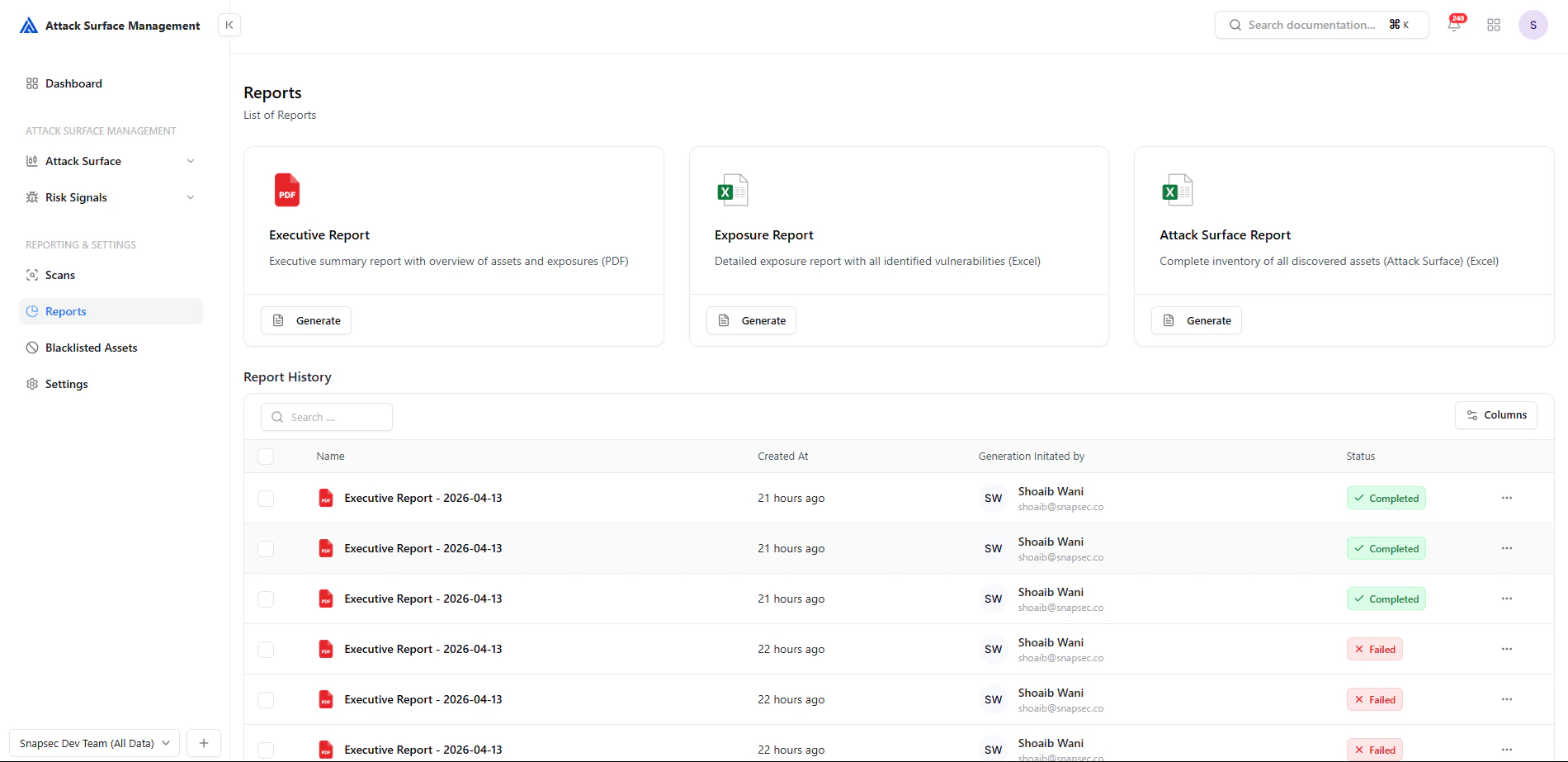
The **Reports** section allows security teams to **generate, manage, and export structured reports** of their external attack surface.
Reports consolidate data from scans, assets, and risk signals into **executive-ready and audit-friendly documents**, enabling better visibility, decision-making, and compliance tracking.
 ***
## Report Types
The platform supports multiple report formats tailored for different use cases:
High-level PDF report summarizing assets, exposures, and risk posture for leadership and stakeholders.
Detailed breakdown of all detected exposures and vulnerabilities in structured format.
Complete inventory of all discovered external assets across your organization.
***
## Generating Reports
To generate a report:
1. Select the desired report type
2. Click **Generate**
3. The system compiles data from scans and exposures
4. Report appears in **Report History**
Reports are generated asynchronously and updated with a **status indicator**.
***
## Report History
The **Report History** section provides a complete log of all generated reports.
### Fields Explained
| Field | Description |
| --------------------------- | ---------------------------------- |
| **Name** | Report title with timestamp |
| **Created At** | When the report was generated |
| **Generation Initiated By** | User who triggered the report |
| **Status** | Current state (Completed / Failed) |
***
## Report Status
* 🟢 **Completed** — Report is ready for download
* 🔴 **Failed** — Report generation failed
* 🟡 *(Processing)* — Report is being generated (if applicable)
***
## Report Actions
***
## Report Types
The platform supports multiple report formats tailored for different use cases:
High-level PDF report summarizing assets, exposures, and risk posture for leadership and stakeholders.
Detailed breakdown of all detected exposures and vulnerabilities in structured format.
Complete inventory of all discovered external assets across your organization.
***
## Generating Reports
To generate a report:
1. Select the desired report type
2. Click **Generate**
3. The system compiles data from scans and exposures
4. Report appears in **Report History**
Reports are generated asynchronously and updated with a **status indicator**.
***
## Report History
The **Report History** section provides a complete log of all generated reports.
### Fields Explained
| Field | Description |
| --------------------------- | ---------------------------------- |
| **Name** | Report title with timestamp |
| **Created At** | When the report was generated |
| **Generation Initiated By** | User who triggered the report |
| **Status** | Current state (Completed / Failed) |
***
## Report Status
* 🟢 **Completed** — Report is ready for download
* 🔴 **Failed** — Report generation failed
* 🟡 *(Processing)* — Report is being generated (if applicable)
***
## Report Actions
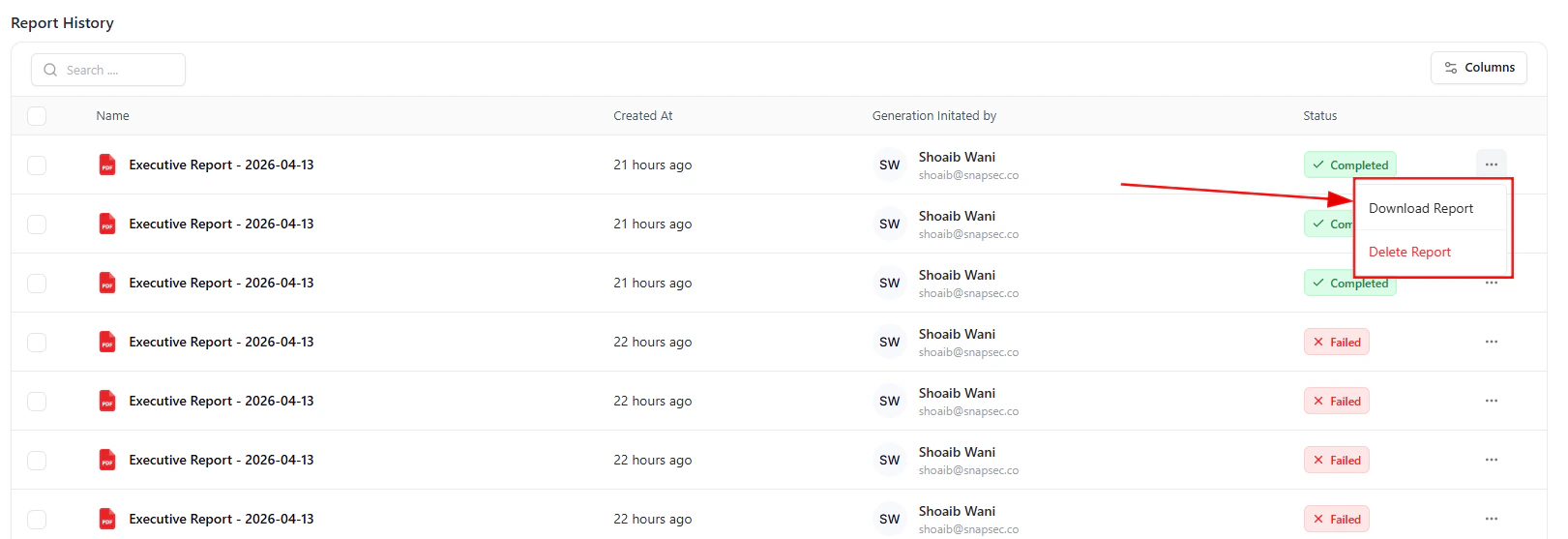 Each report provides quick actions via the menu:
* ⬇️ **Download Report** — Export the report file
* 🗑️ **Delete Report** — Remove unnecessary reports
These actions allow teams to maintain a clean and usable report repository.
***
## How Reports Are Built
Reports aggregate data from multiple ASM components:
1. **Scans** — Asset discovery results
2. **Assets** — Subdomains, IPs, services
3. **Exposures** — Detected risks and misconfigurations
4. **Risk Signals** — Correlated findings and severity
This ensures every report reflects the **latest security posture**.
***
## Workflow Example
1. Run or complete a scan
2. Navigate to **Reports**
3. Generate an Executive or Exposure report
4. Wait for processing to complete
5. Download and share with stakeholders
***
## Benefits
* ✅ Centralized reporting for all ASM data
* ✅ Executive-ready summaries
* ✅ Easy export for compliance and audits
* ✅ Full audit trail of generated reports
* ✅ Quick access to historical reports
***
## Best Practices
* 📅 Generate reports after each major scan
* 📊 Use Executive Reports for leadership
* 🔍 Use Exposure Reports for technical teams
* 🧹 Clean up failed or duplicate reports regularly
***
## From Data to Decisions
**Scan → Detect → Analyze → Report → Act**
Reports transform raw attack surface data into **actionable insights** for both technical and non-technical stakeholders.
***
## Explore Live Demo
Instantly explore how Snapsec Attack Surface Management (ASM) detects exposures, correlates signals, and enables real-time security decisions — all in one unified platform.
Each report provides quick actions via the menu:
* ⬇️ **Download Report** — Export the report file
* 🗑️ **Delete Report** — Remove unnecessary reports
These actions allow teams to maintain a clean and usable report repository.
***
## How Reports Are Built
Reports aggregate data from multiple ASM components:
1. **Scans** — Asset discovery results
2. **Assets** — Subdomains, IPs, services
3. **Exposures** — Detected risks and misconfigurations
4. **Risk Signals** — Correlated findings and severity
This ensures every report reflects the **latest security posture**.
***
## Workflow Example
1. Run or complete a scan
2. Navigate to **Reports**
3. Generate an Executive or Exposure report
4. Wait for processing to complete
5. Download and share with stakeholders
***
## Benefits
* ✅ Centralized reporting for all ASM data
* ✅ Executive-ready summaries
* ✅ Easy export for compliance and audits
* ✅ Full audit trail of generated reports
* ✅ Quick access to historical reports
***
## Best Practices
* 📅 Generate reports after each major scan
* 📊 Use Executive Reports for leadership
* 🔍 Use Exposure Reports for technical teams
* 🧹 Clean up failed or duplicate reports regularly
***
## From Data to Decisions
**Scan → Detect → Analyze → Report → Act**
Reports transform raw attack surface data into **actionable insights** for both technical and non-technical stakeholders.
***
## Explore Live Demo
Instantly explore how Snapsec Attack Surface Management (ASM) detects exposures, correlates signals, and enables real-time security decisions — all in one unified platform.