> ## Documentation Index
> Fetch the complete documentation index at: https://docs.snapsec.co/llms.txt
> Use this file to discover all available pages before exploring further.
# Lifecycle
> Manage asset states across staging, active usage, and decommissioning with full visibility, restoration capabilities, and deep asset context.
## Overview
The **Lifecycle Management** module allows teams to control how assets transition across different operational states — from staging to decommissioning — while maintaining full visibility and context.
It ensures assets are never lost, supports recovery when needed, and preserves security and ownership data across the entire lifecycle.
***
## Staged Assets
 The **Staged** section acts as a holding layer for assets that are identified but not yet active.
### Key Behavior
* Assets can be reviewed before activation
* Prevents unverified assets from entering active inventory
* Displays an empty state when no assets are staged
***
## Decommissioned Inventory
The **Staged** section acts as a holding layer for assets that are identified but not yet active.
### Key Behavior
* Assets can be reviewed before activation
* Prevents unverified assets from entering active inventory
* Displays an empty state when no assets are staged
***
## Decommissioned Inventory
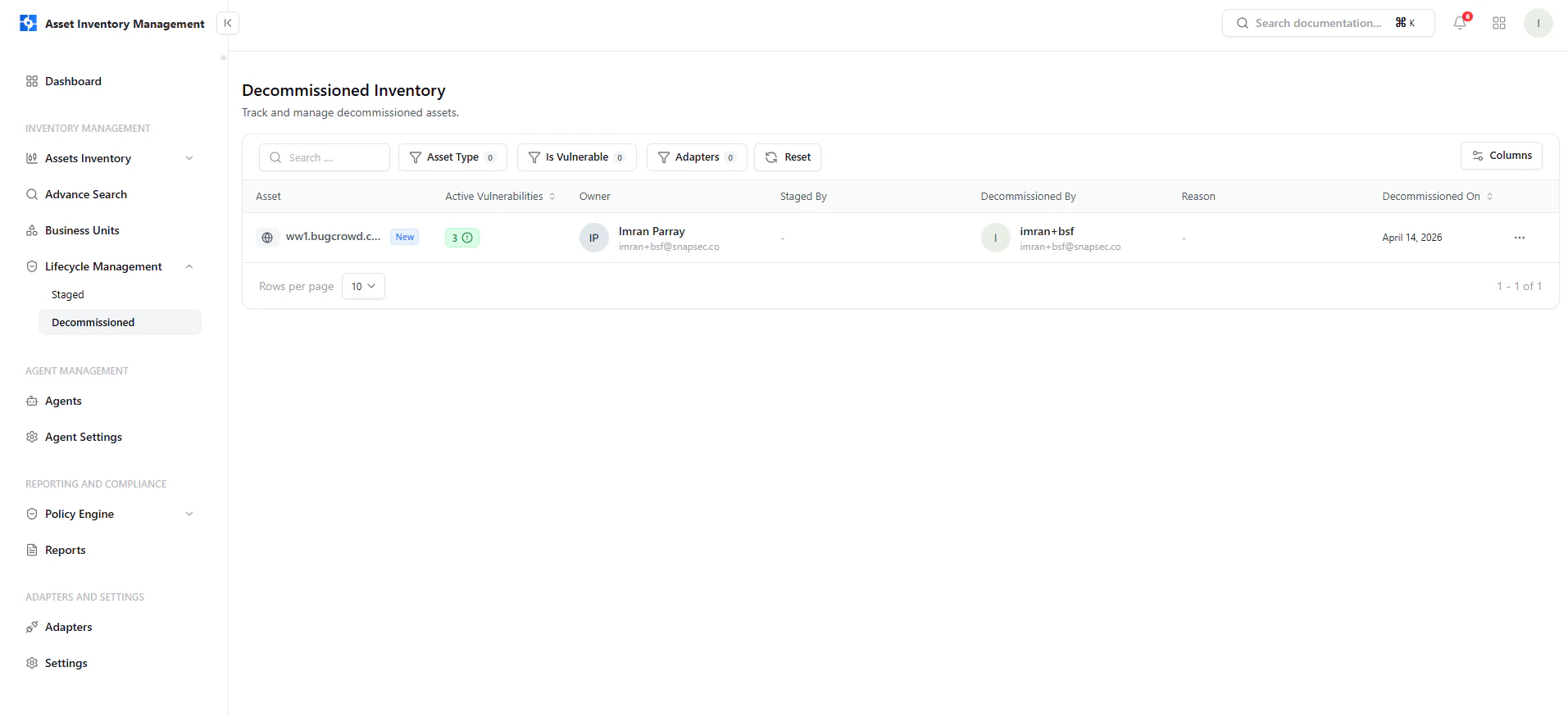 The **Decommissioned** section stores assets that are no longer active but are retained for visibility and audit purposes.
### What You Can See
* Asset name and type
* Active vulnerabilities at time of decommission
* Owner and ownership details
* Who decommissioned the asset
* Decommission date
***
## Restoring Assets
The **Decommissioned** section stores assets that are no longer active but are retained for visibility and audit purposes.
### What You Can See
* Asset name and type
* Active vulnerabilities at time of decommission
* Owner and ownership details
* Who decommissioned the asset
* Decommission date
***
## Restoring Assets
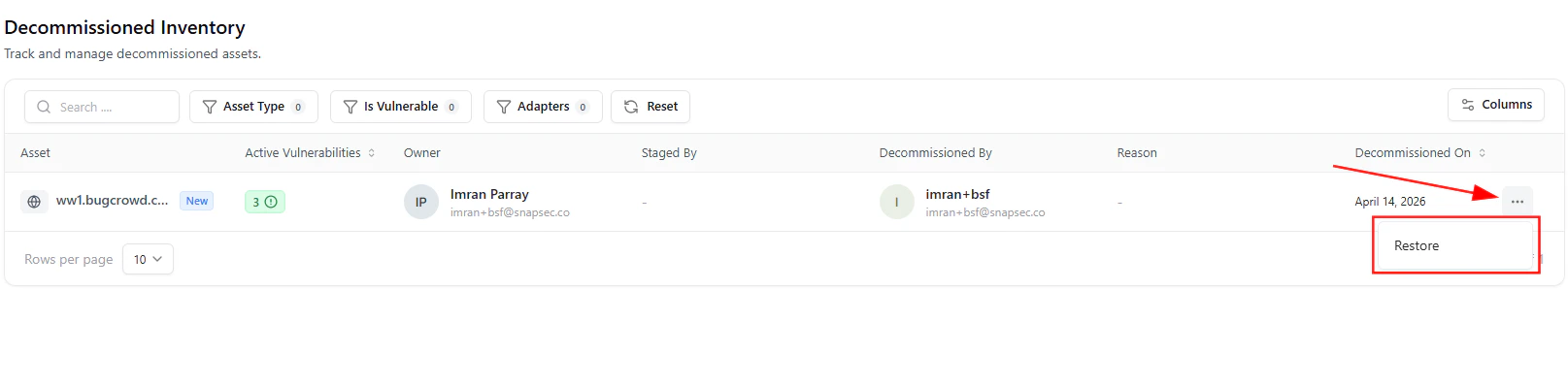 Assets in the decommissioned state can be restored at any time.
### How It Works
1. Click the **three-dot menu (⋯)**
2. Select **Restore**
3. Asset returns to active inventory
This ensures no asset is permanently lost and historical context remains intact.
***
## Lifecycle State Control
Assets in the decommissioned state can be restored at any time.
### How It Works
1. Click the **three-dot menu (⋯)**
2. Select **Restore**
3. Asset returns to active inventory
This ensures no asset is permanently lost and historical context remains intact.
***
## Lifecycle State Control
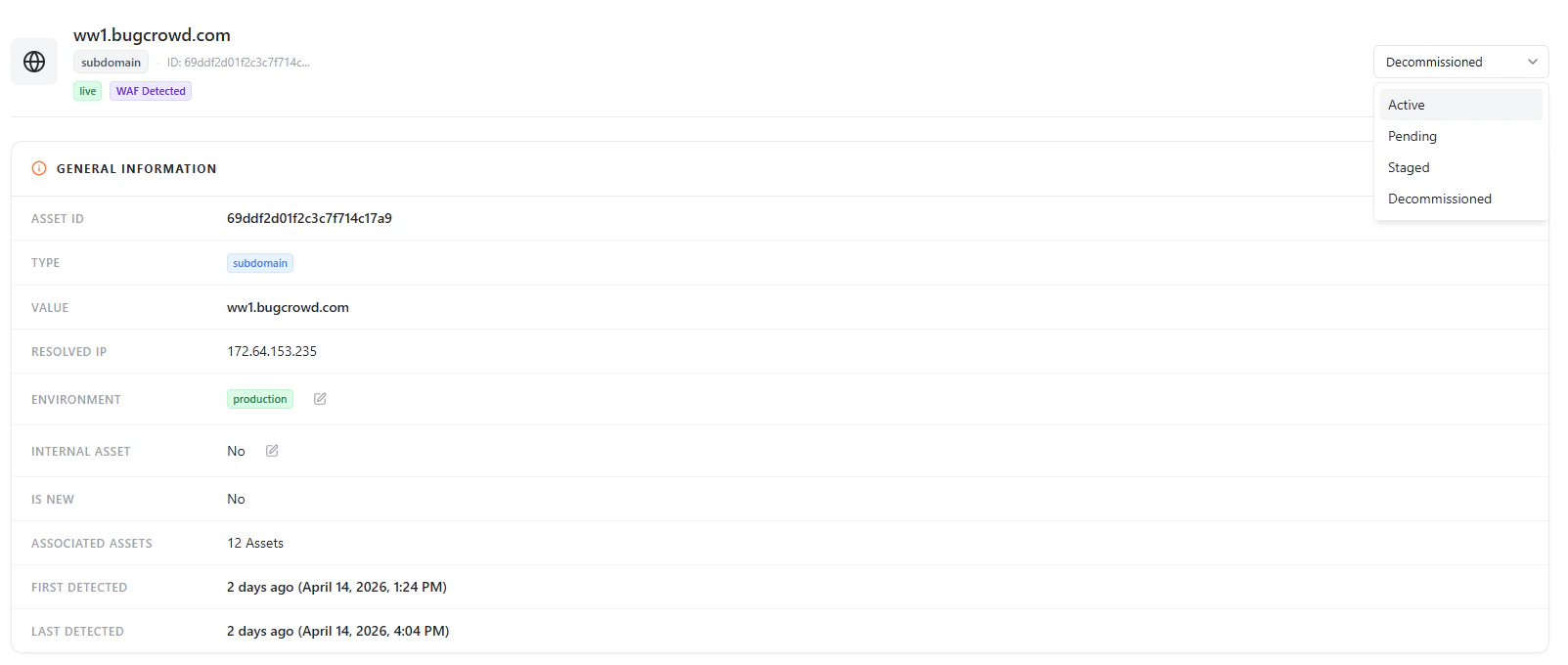 Each asset is assigned a lifecycle state that defines its operational status.
### Available States
* **Active** — Fully operational and monitored
* **Pending** — Newly discovered and under review
* **Staged** — Prepared but not yet active
* **Decommissioned** — Retired but retained for visibility
***
## General Asset Information
Provides core metadata required to understand the asset.
### Includes
* Asset ID and type
* Asset value (domain/IP)
* Environment classification
* Internal vs external designation
* Associated assets
* First and last detection timestamps
***
## Subdomain & Exposure Details
Each asset is assigned a lifecycle state that defines its operational status.
### Available States
* **Active** — Fully operational and monitored
* **Pending** — Newly discovered and under review
* **Staged** — Prepared but not yet active
* **Decommissioned** — Retired but retained for visibility
***
## General Asset Information
Provides core metadata required to understand the asset.
### Includes
* Asset ID and type
* Asset value (domain/IP)
* Environment classification
* Internal vs external designation
* Associated assets
* First and last detection timestamps
***
## Subdomain & Exposure Details
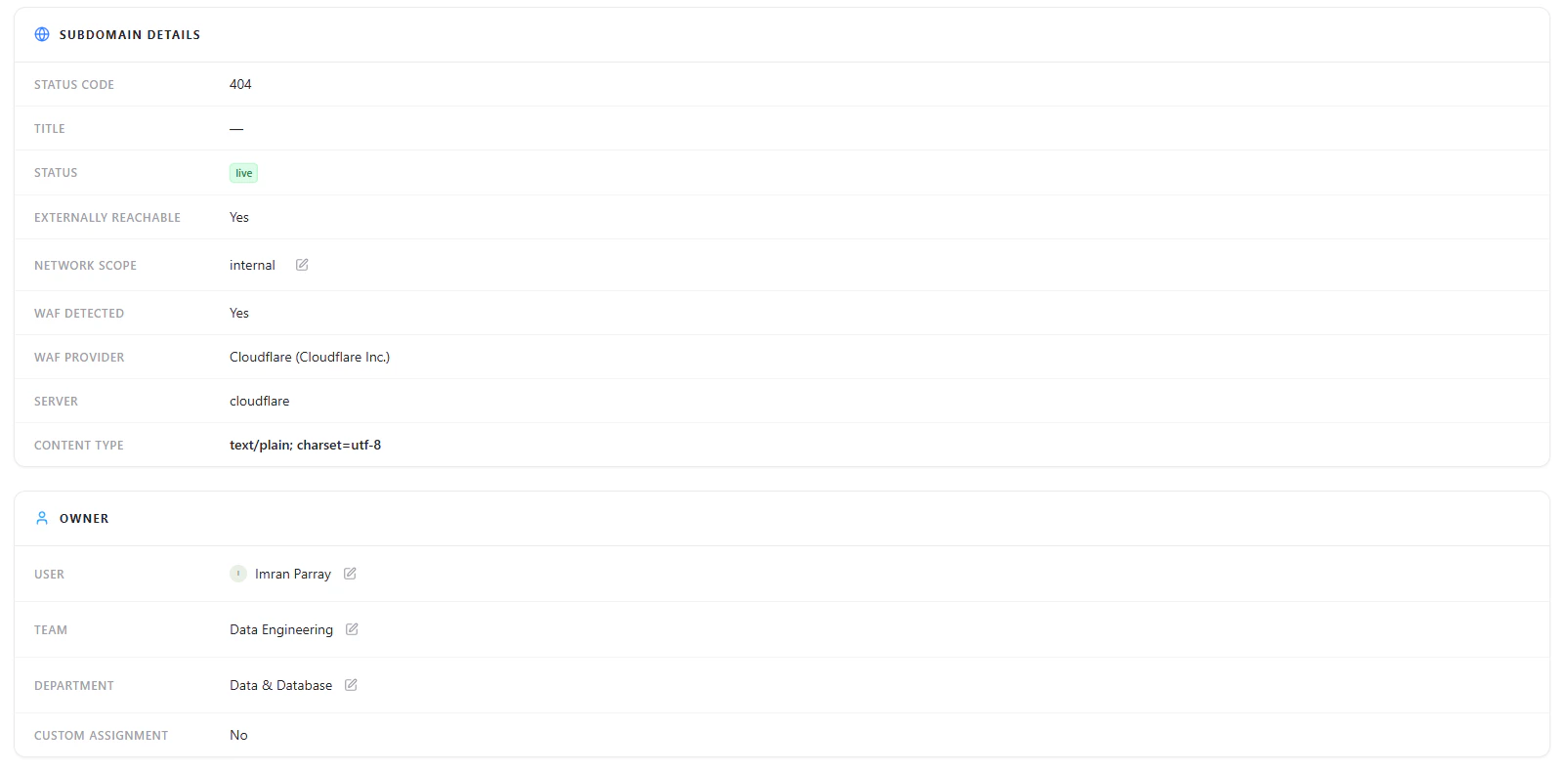 Gives visibility into how the asset behaves externally.
### Key Insights
* HTTP status code
* External reachability
* WAF presence and provider
* Network scope
***
## Ownership & Accountability
Gives visibility into how the asset behaves externally.
### Key Insights
* HTTP status code
* External reachability
* WAF presence and provider
* Network scope
***
## Ownership & Accountability
 Every asset is mapped to an owner to ensure accountability.
### Includes
* Assigned user
* Team
* Department
* Custom assignment status
***
## Location & Infrastructure Data
Every asset is mapped to an owner to ensure accountability.
### Includes
* Assigned user
* Team
* Department
* Custom assignment status
***
## Location & Infrastructure Data
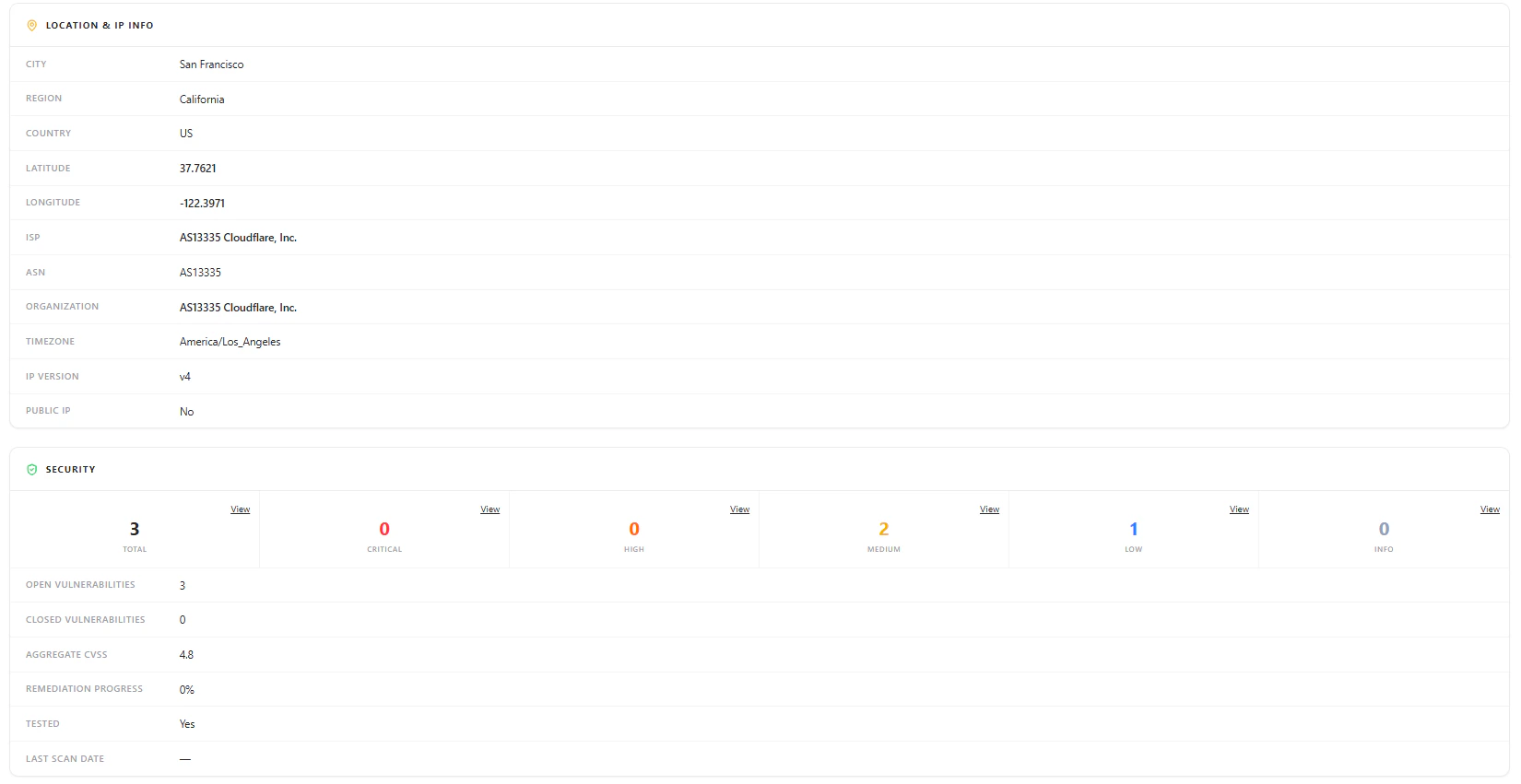
 Provides infrastructure-level intelligence about the asset.
### Data Points
* City, region, country
* Latitude and longitude
* ISP and ASN
* Organization and timezone
* IP version and exposure
***
## Security Overview
Provides infrastructure-level intelligence about the asset.
### Data Points
* City, region, country
* Latitude and longitude
* ISP and ASN
* Organization and timezone
* IP version and exposure
***
## Security Overview
 Summarizes the security posture of the asset.
### Includes
* Total vulnerabilities
* Severity breakdown (Critical, High, Medium, Low, Info)
* Open vs closed vulnerabilities
* Aggregate CVSS score
* Remediation progress
***
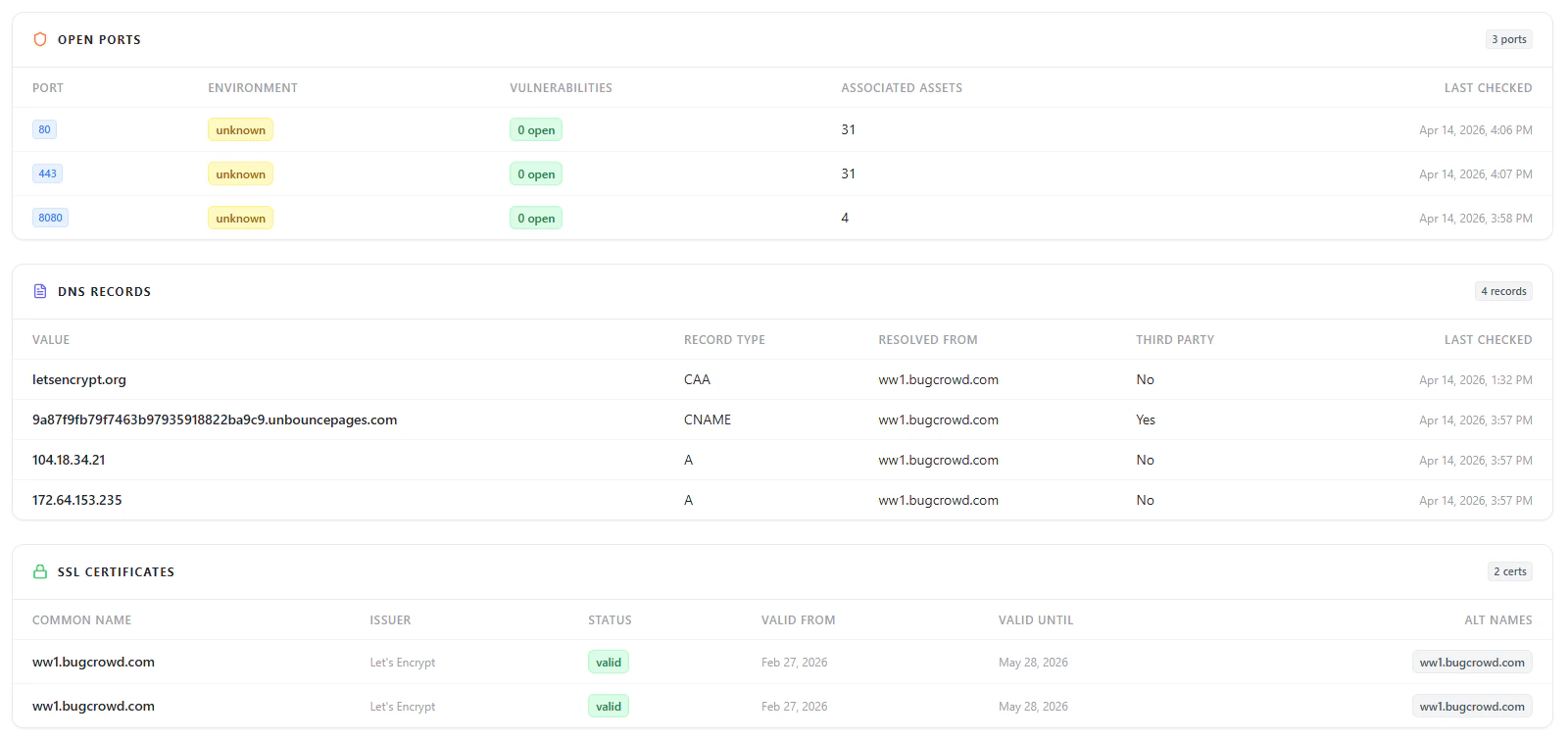
## Open Ports
Displays exposed services and potential entry points into the asset.
***
## DNS Records
Shows how the asset resolves across infrastructure.
***
## SSL Certificates
Tracks certificate validity and encryption posture of the asset.
***
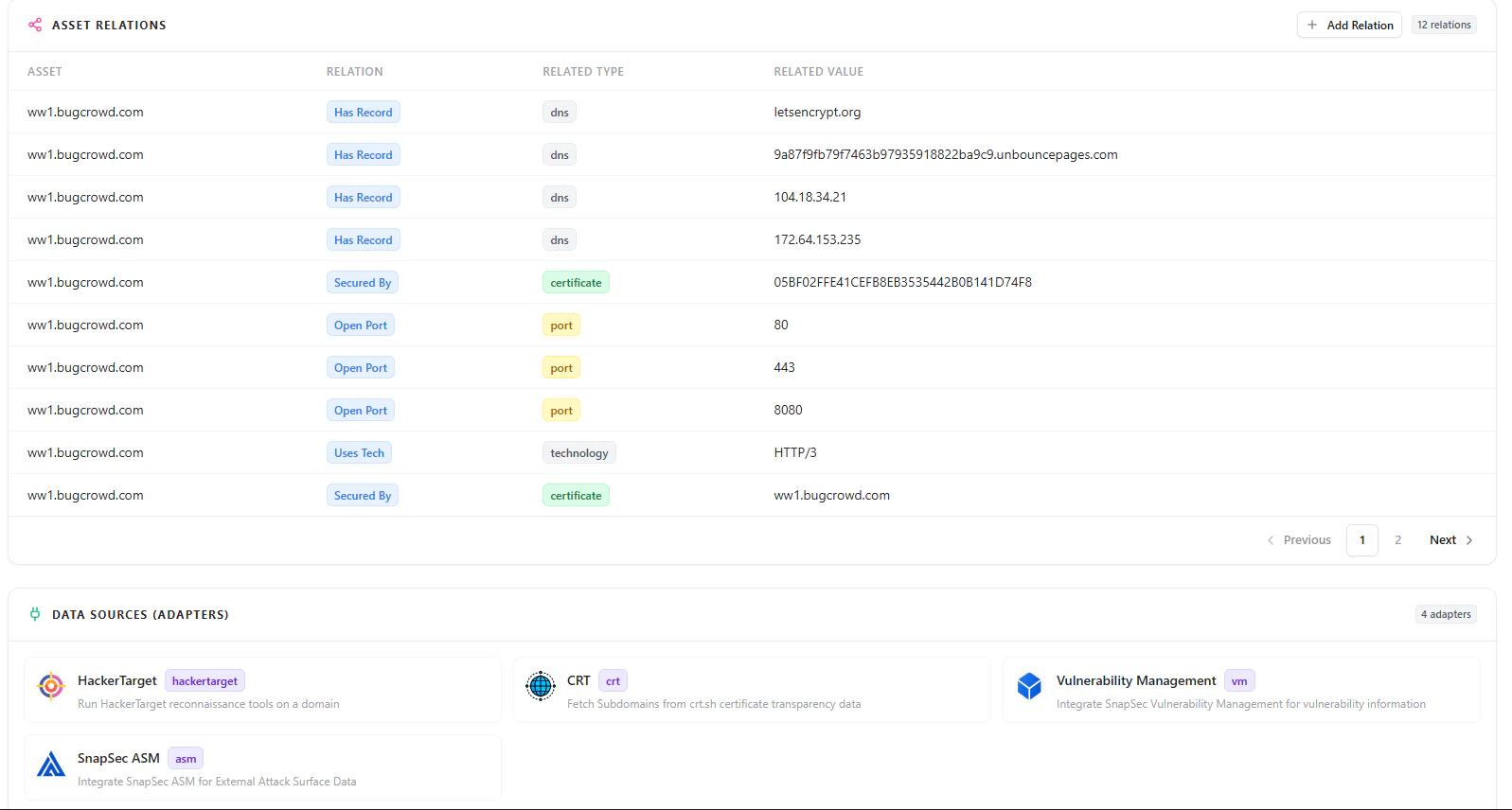
## Asset Relationships
Helps understand how the asset connects with other components.
***
## Data Sources
Displays integrations responsible for discovering and enriching asset data.
***
## Why This Matters
* Prevents orphaned and unmanaged assets
* Enables safe decommissioning without losing context
* Allows quick restoration of critical assets
* Maintains full lifecycle visibility across infrastructure
* Preserves security, ownership, and operational history
***
## Explore Live Demo
Experience how Snapsec AIM helps you manage asset states, restore assets instantly, and maintain complete lifecycle visibility across your infrastructure.
Summarizes the security posture of the asset.
### Includes
* Total vulnerabilities
* Severity breakdown (Critical, High, Medium, Low, Info)
* Open vs closed vulnerabilities
* Aggregate CVSS score
* Remediation progress
***
## Open Ports
Displays exposed services and potential entry points into the asset.
***
## DNS Records
Shows how the asset resolves across infrastructure.
***
## SSL Certificates
Tracks certificate validity and encryption posture of the asset.
***
## Asset Relationships
Helps understand how the asset connects with other components.
***
## Data Sources
Displays integrations responsible for discovering and enriching asset data.
***
## Why This Matters
* Prevents orphaned and unmanaged assets
* Enables safe decommissioning without losing context
* Allows quick restoration of critical assets
* Maintains full lifecycle visibility across infrastructure
* Preserves security, ownership, and operational history
***
## Explore Live Demo
Experience how Snapsec AIM helps you manage asset states, restore assets instantly, and maintain complete lifecycle visibility across your infrastructure.