> ## Documentation Index
> Fetch the complete documentation index at: https://docs.snapsec.co/llms.txt
> Use this file to discover all available pages before exploring further.
# Dashboard
> Get a real-time overview of your entire asset inventory with unified visibility across asset types, vulnerabilities, and infrastructure distribution.
## Overview
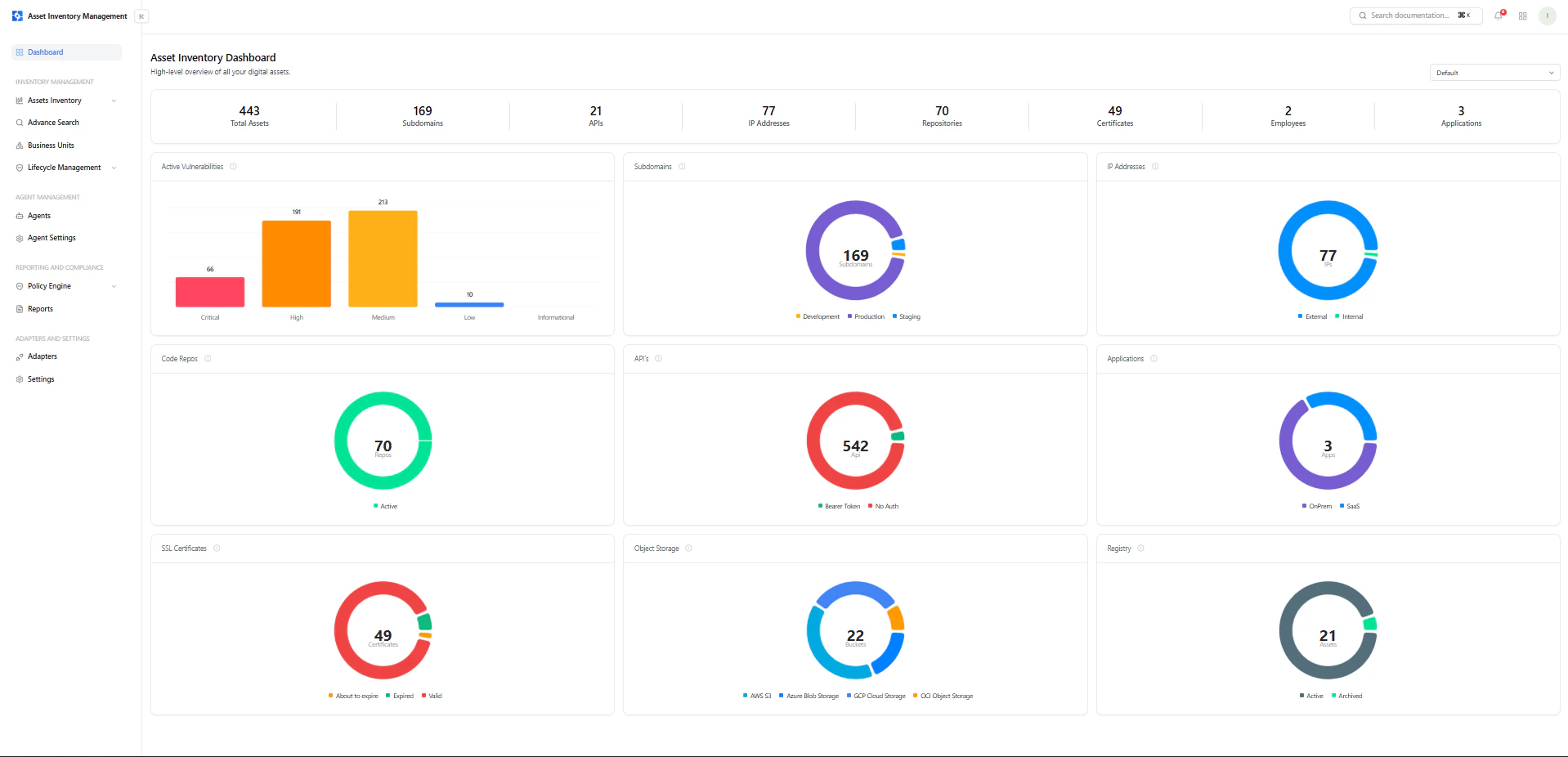
The **AIM Dashboard** provides a high-level, real-time view of all assets across your organization.\
It centralizes visibility into asset types, vulnerability distribution, and infrastructure composition — enabling security teams to quickly understand their external and internal footprint.
 ***
## Top-Level Asset Summary
At the top of the dashboard, you get an instant snapshot of your total asset inventory:
* **Total Assets** — Complete count of all discovered assets
* **Subdomains** — All discovered domains and subdomains
* **APIs** — Identified API endpoints and services
* **IP Addresses** — Mapped internal and external IPs
* **Repositories** — Connected code repositories
* **Certificates** — SSL/TLS certificates across assets
* **Employees** — Mapped identities (if integrated)
* **Applications** — Detected applications across environments
This summary helps you quickly assess the scale and diversity of your attack surface.
***
## Asset View Selector
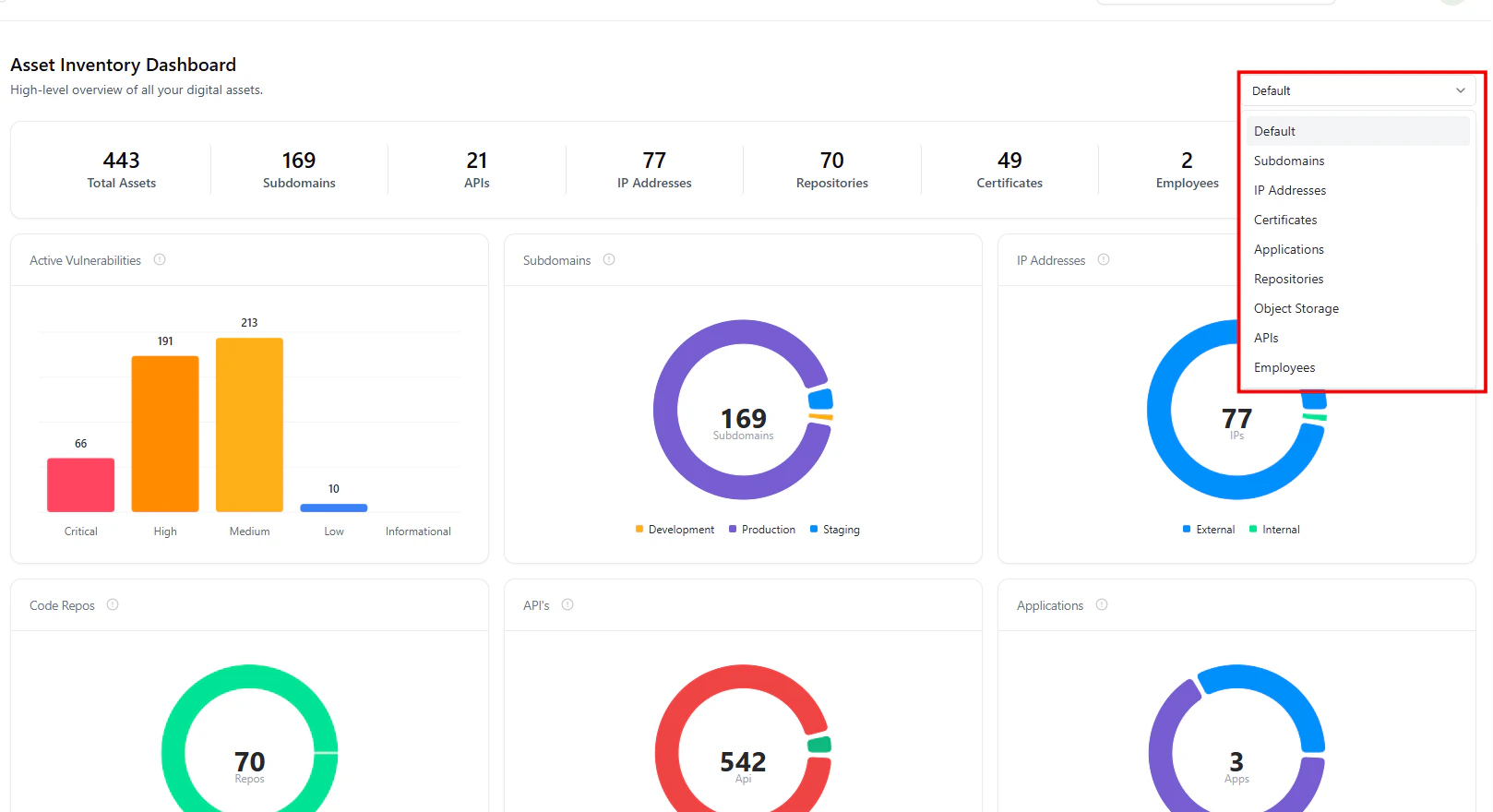
The dashboard includes a **dynamic view selector** (top-right), allowing you to filter insights by asset type:
* Default (All assets)
* Subdomains
* IP Addresses
* Certificates
* Applications
* Repositories
* Object Storage
* APIs
* Employees
***
## Focused Asset Dashboards
Each asset type has its **own dedicated dashboard view**, allowing you to drill into specific asset categories with tailored insights.
***
## Top-Level Asset Summary
At the top of the dashboard, you get an instant snapshot of your total asset inventory:
* **Total Assets** — Complete count of all discovered assets
* **Subdomains** — All discovered domains and subdomains
* **APIs** — Identified API endpoints and services
* **IP Addresses** — Mapped internal and external IPs
* **Repositories** — Connected code repositories
* **Certificates** — SSL/TLS certificates across assets
* **Employees** — Mapped identities (if integrated)
* **Applications** — Detected applications across environments
This summary helps you quickly assess the scale and diversity of your attack surface.
***
## Asset View Selector
The dashboard includes a **dynamic view selector** (top-right), allowing you to filter insights by asset type:
* Default (All assets)
* Subdomains
* IP Addresses
* Certificates
* Applications
* Repositories
* Object Storage
* APIs
* Employees
***
## Focused Asset Dashboards
Each asset type has its **own dedicated dashboard view**, allowing you to drill into specific asset categories with tailored insights.
 When a specific asset type is selected:
* Metrics update **contextually for that asset class only**
* Visualizations reflect **type-specific insights**
* Teams can analyze **risk and distribution in isolation**
* Noise is reduced, enabling **faster decision-making**
***
## Key Visual Insights
### Active Vulnerabilities
A severity-based bar chart showing:
* Critical
* High
* Medium
* Low
* Informational
This helps teams instantly prioritize remediation efforts.
***
### Subdomains Distribution
Breakdown across environments:
* Production
* Development
* Staging
***
### IP Address Classification
* External
* Internal
Helps identify exposed infrastructure.
***
### Code Repositories
Displays total repositories and their activity status.\
Useful for understanding code exposure and supply chain risk.
***
### APIs Overview
Shows API exposure and authentication posture:
* Secured (e.g., bearer token)
* Unauthenticated
***
### Applications Overview
Breakdown by deployment type:
* SaaS
* On-Prem
***
### SSL Certificates
Tracks certificate lifecycle:
* Valid
* Expired
* About to expire
***
### Object Storage
Distribution across cloud providers:
* AWS S3
* Azure Blob
* GCP Storage
* OCI
***
### Registry / Asset State
* Active
* Archived
***
## Why This Matters
The AIM Dashboard transforms fragmented asset data into a **single, actionable intelligence layer**:
* Understand your **complete asset inventory instantly**
* Identify **risk concentration areas quickly**
* Detect **public exposure and weak configurations**
* Analyze **specific asset classes in isolation**
* Enable **faster, data-driven security decisions**
***
## Explore Live Demo
Instantly explore how Snapsec AIM discovers, enriches, and tracks every asset in real time — all without creating an account.
When a specific asset type is selected:
* Metrics update **contextually for that asset class only**
* Visualizations reflect **type-specific insights**
* Teams can analyze **risk and distribution in isolation**
* Noise is reduced, enabling **faster decision-making**
***
## Key Visual Insights
### Active Vulnerabilities
A severity-based bar chart showing:
* Critical
* High
* Medium
* Low
* Informational
This helps teams instantly prioritize remediation efforts.
***
### Subdomains Distribution
Breakdown across environments:
* Production
* Development
* Staging
***
### IP Address Classification
* External
* Internal
Helps identify exposed infrastructure.
***
### Code Repositories
Displays total repositories and their activity status.\
Useful for understanding code exposure and supply chain risk.
***
### APIs Overview
Shows API exposure and authentication posture:
* Secured (e.g., bearer token)
* Unauthenticated
***
### Applications Overview
Breakdown by deployment type:
* SaaS
* On-Prem
***
### SSL Certificates
Tracks certificate lifecycle:
* Valid
* Expired
* About to expire
***
### Object Storage
Distribution across cloud providers:
* AWS S3
* Azure Blob
* GCP Storage
* OCI
***
### Registry / Asset State
* Active
* Archived
***
## Why This Matters
The AIM Dashboard transforms fragmented asset data into a **single, actionable intelligence layer**:
* Understand your **complete asset inventory instantly**
* Identify **risk concentration areas quickly**
* Detect **public exposure and weak configurations**
* Analyze **specific asset classes in isolation**
* Enable **faster, data-driven security decisions**
***
## Explore Live Demo
Instantly explore how Snapsec AIM discovers, enriches, and tracks every asset in real time — all without creating an account.