> ## Documentation Index
> Fetch the complete documentation index at: https://docs.snapsec.co/llms.txt
> Use this file to discover all available pages before exploring further.
# Certificates
> Monitor SSL/TLS certificates, track expiry risks, and manage certificate lifecycle across your asset inventory.
## Overview
The **Certificates** section provides complete visibility into all SSL/TLS certificates discovered across your environment.\
It helps teams monitor certificate health, prevent expirations, and understand how certificates are connected to assets like subdomains and services.
 ***
## Dashboard View
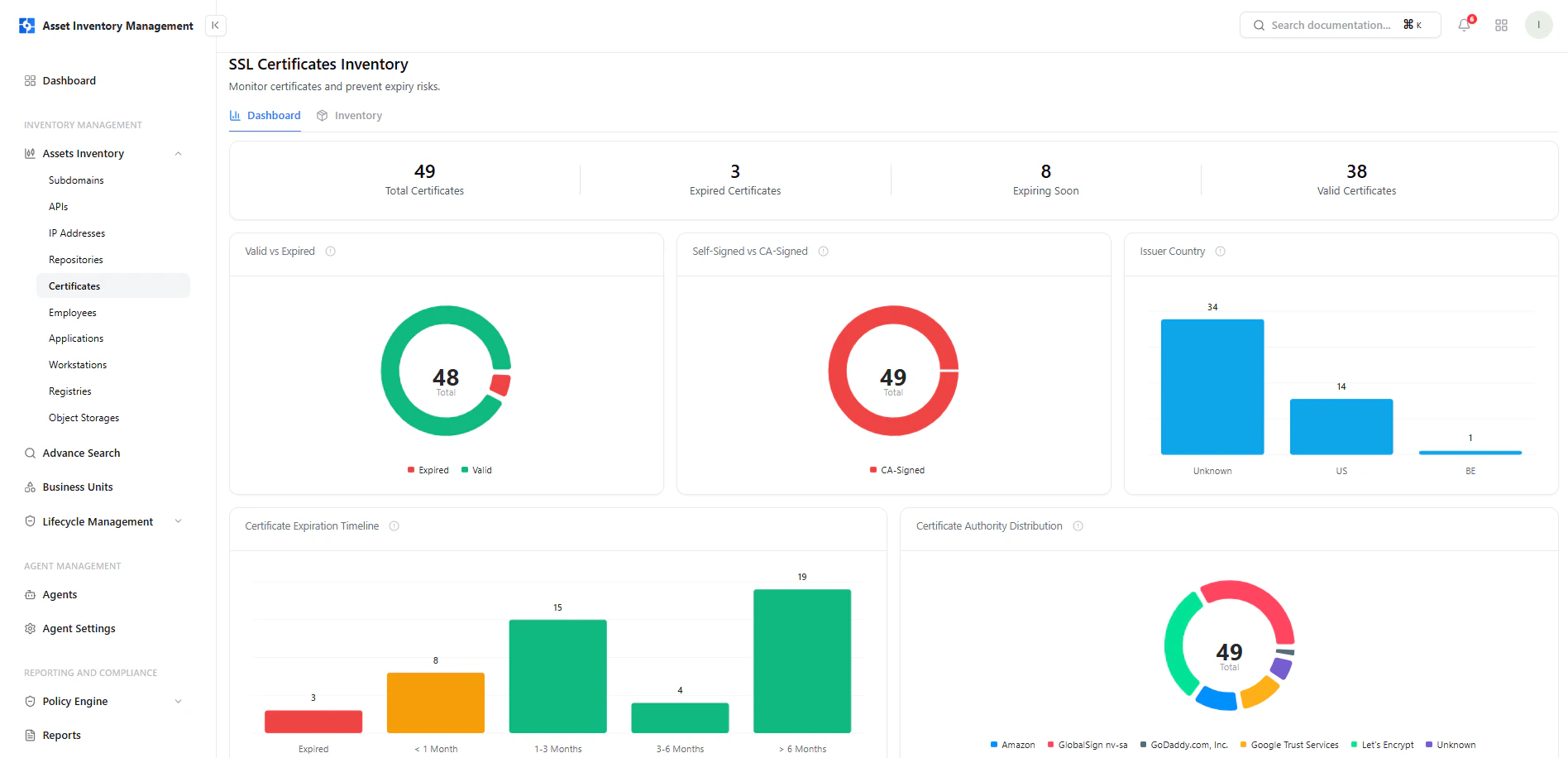
The dashboard provides a high-level overview of certificate posture and expiry risks.
***
## Dashboard View
The dashboard provides a high-level overview of certificate posture and expiry risks.
 ### Key Metrics
* **Total Certificates** — All discovered certificates
* **Expired Certificates** — Certificates no longer valid
* **Expiring Soon** — Certificates nearing expiration
* **Valid Certificates** — Currently active and trusted certificates
***
## Key Insights
### Valid vs Expired
Quickly identify:
* Active certificates
* Expired certificates
Helps prevent downtime caused by missed renewals.
***
### Certificate Authority Distribution
Shows which providers are issuing certificates:
* Let’s Encrypt
* Google Trust Services
* GlobalSign
* Others
Useful for trust analysis and compliance tracking.
***
### Issuer Country
Breakdown of certificate issuers by country:
* Helps detect unusual or unexpected issuance sources
***
### Expiration Timeline
Visualizes when certificates will expire:
* Immediate (\< 1 month)
* Short-term (1–3 months)
* Mid-term (3–6 months)
* Long-term (> 6 months)
Critical for proactive renewal planning.
***
## Inventory Table
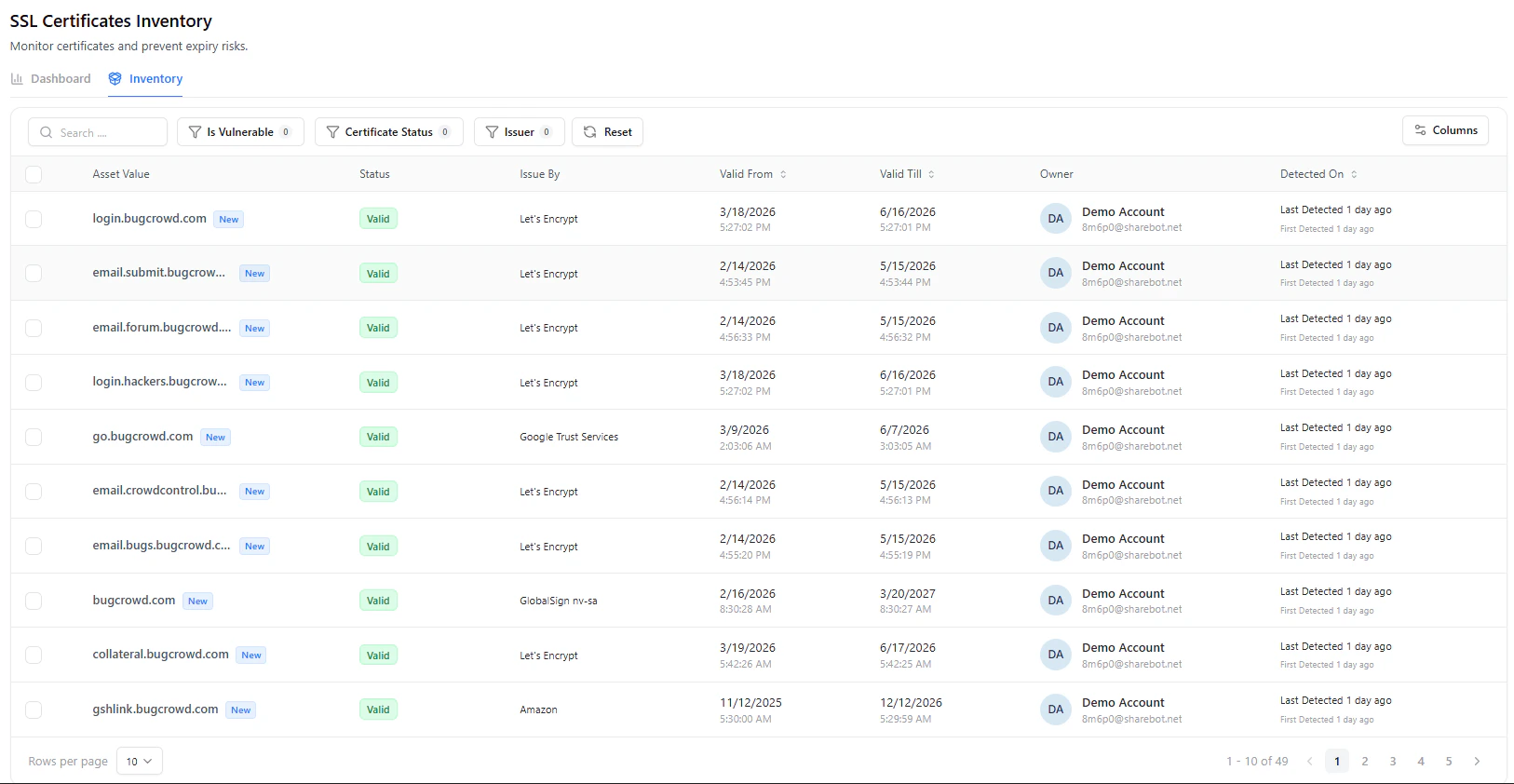
The certificates table is the primary view for managing certificate assets.
### Key Columns
| Column | Description |
| --------------- | ----------------------------------------- |
| **Asset Value** | Domain or hostname using the certificate |
| **Status** | Certificate status (Valid, Expired, etc.) |
| **Issued By** | Certificate authority |
| **Valid From** | Certificate start date |
| **Valid Till** | Expiration date |
| **Owner** | Assigned owner |
| **Detected On** | First and last detection timestamps |
***
## Certificate Detail View
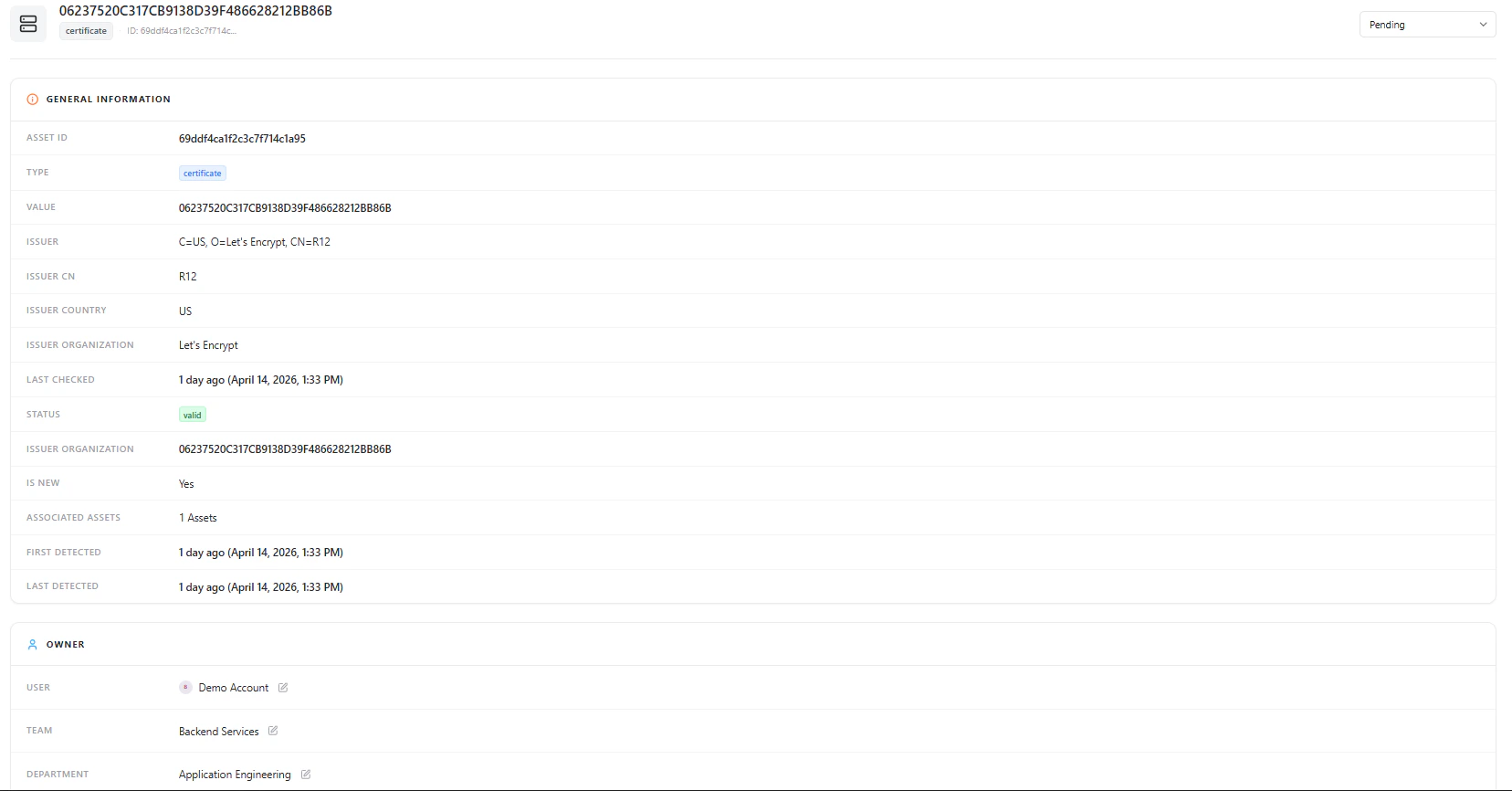
Selecting a certificate opens a detailed asset view with full context.
### Key Metrics
* **Total Certificates** — All discovered certificates
* **Expired Certificates** — Certificates no longer valid
* **Expiring Soon** — Certificates nearing expiration
* **Valid Certificates** — Currently active and trusted certificates
***
## Key Insights
### Valid vs Expired
Quickly identify:
* Active certificates
* Expired certificates
Helps prevent downtime caused by missed renewals.
***
### Certificate Authority Distribution
Shows which providers are issuing certificates:
* Let’s Encrypt
* Google Trust Services
* GlobalSign
* Others
Useful for trust analysis and compliance tracking.
***
### Issuer Country
Breakdown of certificate issuers by country:
* Helps detect unusual or unexpected issuance sources
***
### Expiration Timeline
Visualizes when certificates will expire:
* Immediate (\< 1 month)
* Short-term (1–3 months)
* Mid-term (3–6 months)
* Long-term (> 6 months)
Critical for proactive renewal planning.
***
## Inventory Table
The certificates table is the primary view for managing certificate assets.
### Key Columns
| Column | Description |
| --------------- | ----------------------------------------- |
| **Asset Value** | Domain or hostname using the certificate |
| **Status** | Certificate status (Valid, Expired, etc.) |
| **Issued By** | Certificate authority |
| **Valid From** | Certificate start date |
| **Valid Till** | Expiration date |
| **Owner** | Assigned owner |
| **Detected On** | First and last detection timestamps |
***
## Certificate Detail View
Selecting a certificate opens a detailed asset view with full context.
 ***
## General Information
This section includes:
* **Asset ID**
* **Type (Certificate)**
* **Certificate Value (Fingerprint / Hash)**
* **Issuer Details** (CN, Organization, Country)
* **Last Checked Timestamp**
* **Certificate Status (Valid/Invalid)**
* **Associated Assets**
* **First Detected / Last Detected**
***
## Lifecycle Management
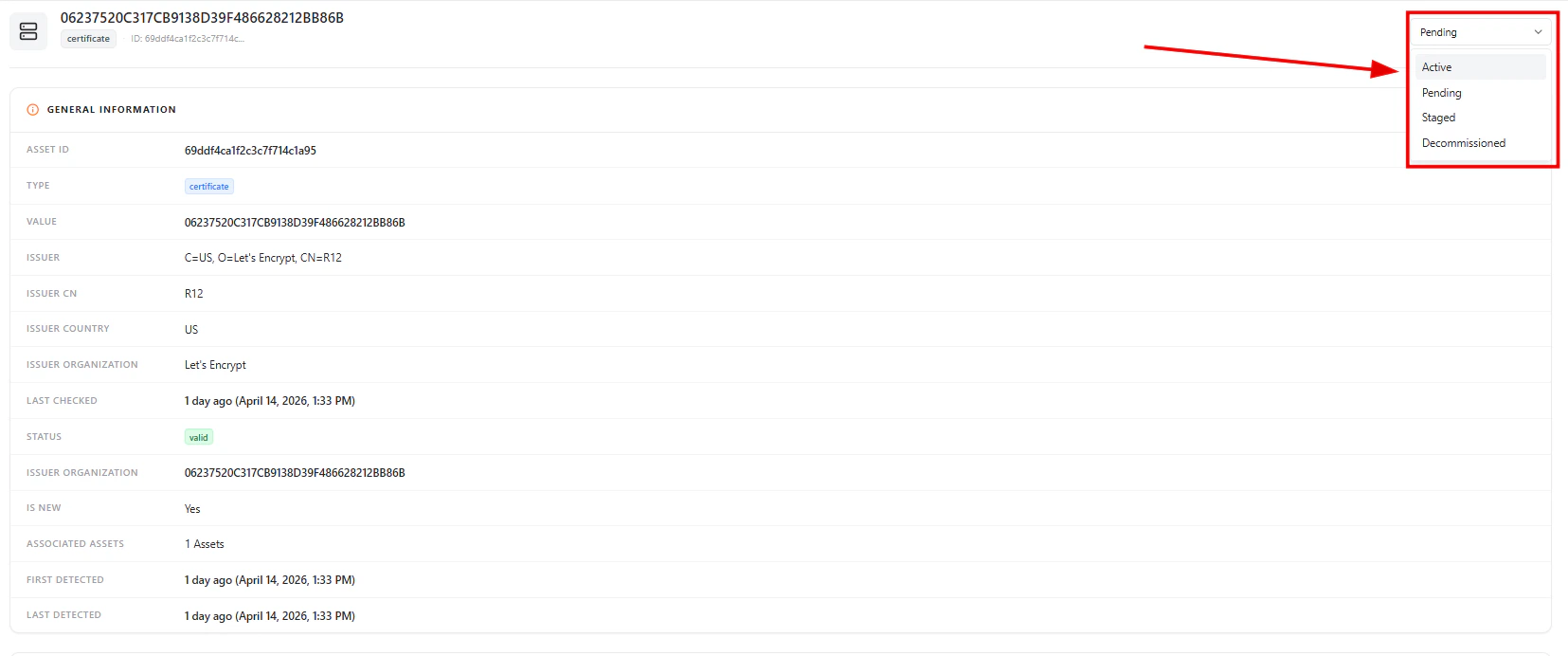
Each certificate can be assigned a lifecycle state:
* **Active** — Currently in use
* **Pending** — Newly discovered or under review
* **Staged** — Prepared but not fully active
* **Decommissioned** — No longer in use
This helps teams track operational status beyond technical validity.
***
## Ownership & Accountability
***
## General Information
This section includes:
* **Asset ID**
* **Type (Certificate)**
* **Certificate Value (Fingerprint / Hash)**
* **Issuer Details** (CN, Organization, Country)
* **Last Checked Timestamp**
* **Certificate Status (Valid/Invalid)**
* **Associated Assets**
* **First Detected / Last Detected**
***
## Lifecycle Management
Each certificate can be assigned a lifecycle state:
* **Active** — Currently in use
* **Pending** — Newly discovered or under review
* **Staged** — Prepared but not fully active
* **Decommissioned** — No longer in use
This helps teams track operational status beyond technical validity.
***
## Ownership & Accountability
 Certificates can be mapped to:
* **User**
* **Team**
* **Department**
Ensuring clear accountability for renewal and management.
***
## Security Insights
Certificates can be mapped to:
* **User**
* **Team**
* **Department**
Ensuring clear accountability for renewal and management.
***
## Security Insights
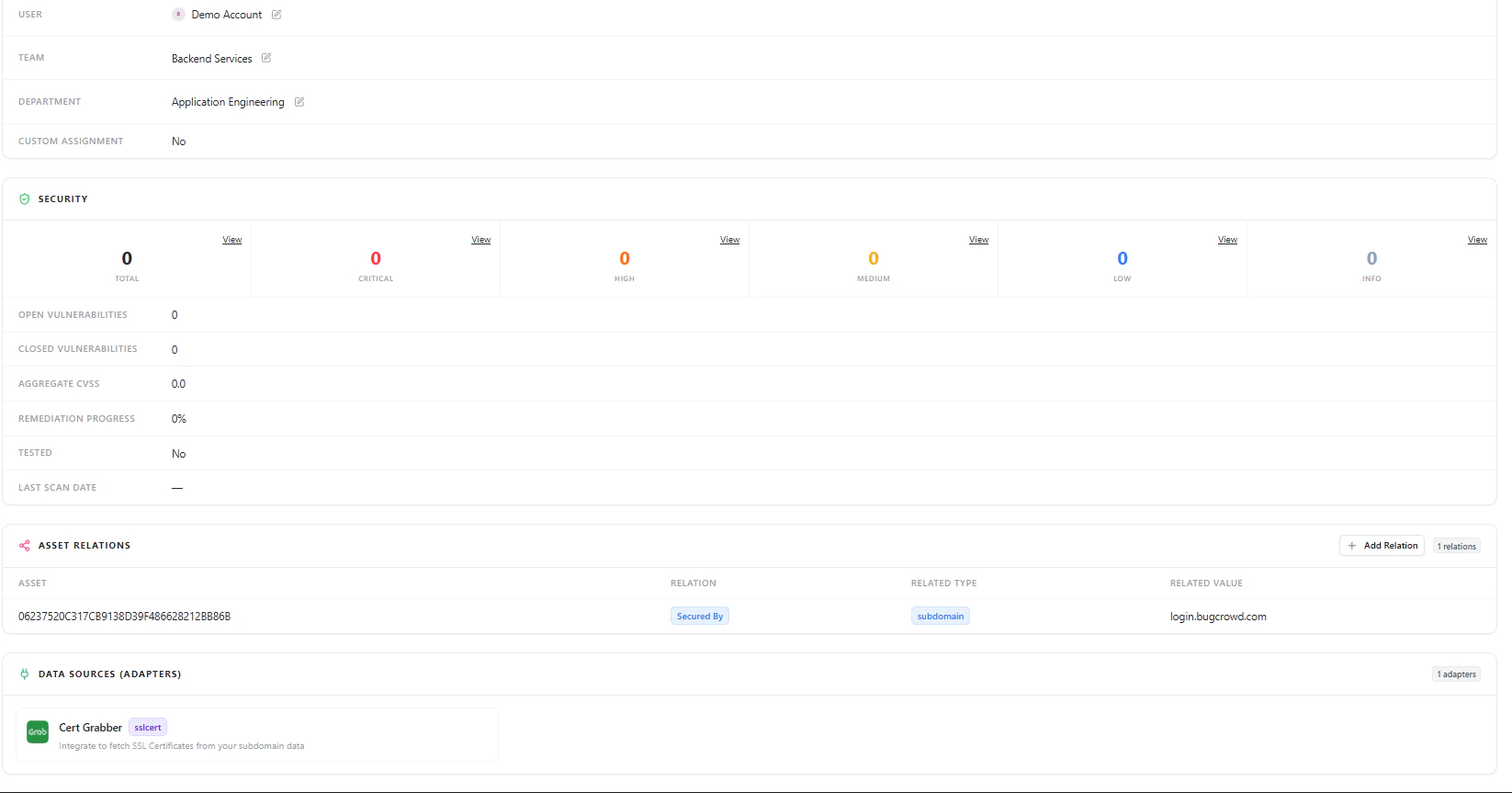 The security section provides:
* Total vulnerabilities linked to the certificate
* Severity breakdown (Critical, High, Medium, Low, Info)
* Open vs closed vulnerabilities
* Aggregate CVSS score
* Remediation progress
***
## Asset Relationships
Certificates are linked to other assets such as:
* Subdomains
* Domains
* Applications
This helps understand **impact before rotation or removal**.
***
## Data Sources
Shows which adapter discovered the certificate (e.g., SSL cert scanner), helping validate data origin and reliability.
***
## Why This Matters
The Certificates module helps teams:
* Prevent outages caused by expired certificates
* Identify weak or misconfigured certificates
* Maintain trust and compliance standards
* Track ownership and accountability
* Understand certificate dependencies across assets
***
## Explore Live Demo
Instantly explore how Snapsec AIM discovers, enriches, and tracks certificates and other assets in real time — all without creating an account.
The security section provides:
* Total vulnerabilities linked to the certificate
* Severity breakdown (Critical, High, Medium, Low, Info)
* Open vs closed vulnerabilities
* Aggregate CVSS score
* Remediation progress
***
## Asset Relationships
Certificates are linked to other assets such as:
* Subdomains
* Domains
* Applications
This helps understand **impact before rotation or removal**.
***
## Data Sources
Shows which adapter discovered the certificate (e.g., SSL cert scanner), helping validate data origin and reliability.
***
## Why This Matters
The Certificates module helps teams:
* Prevent outages caused by expired certificates
* Identify weak or misconfigured certificates
* Maintain trust and compliance standards
* Track ownership and accountability
* Understand certificate dependencies across assets
***
## Explore Live Demo
Instantly explore how Snapsec AIM discovers, enriches, and tracks certificates and other assets in real time — all without creating an account.