> ## Documentation Index
> Fetch the complete documentation index at: https://docs.snapsec.co/llms.txt
> Use this file to discover all available pages before exploring further.
# Applications
> Discover, monitor, and manage applications across your organization with visibility into ownership, exposure, and relationships.
## Overview
The **Applications** module provides a centralized inventory of all applications discovered across your environment — including internal services and externally exposed platforms.
It enables teams to track ownership, understand deployment types, and monitor application lifecycle and security posture.
 ***
## Dashboard View
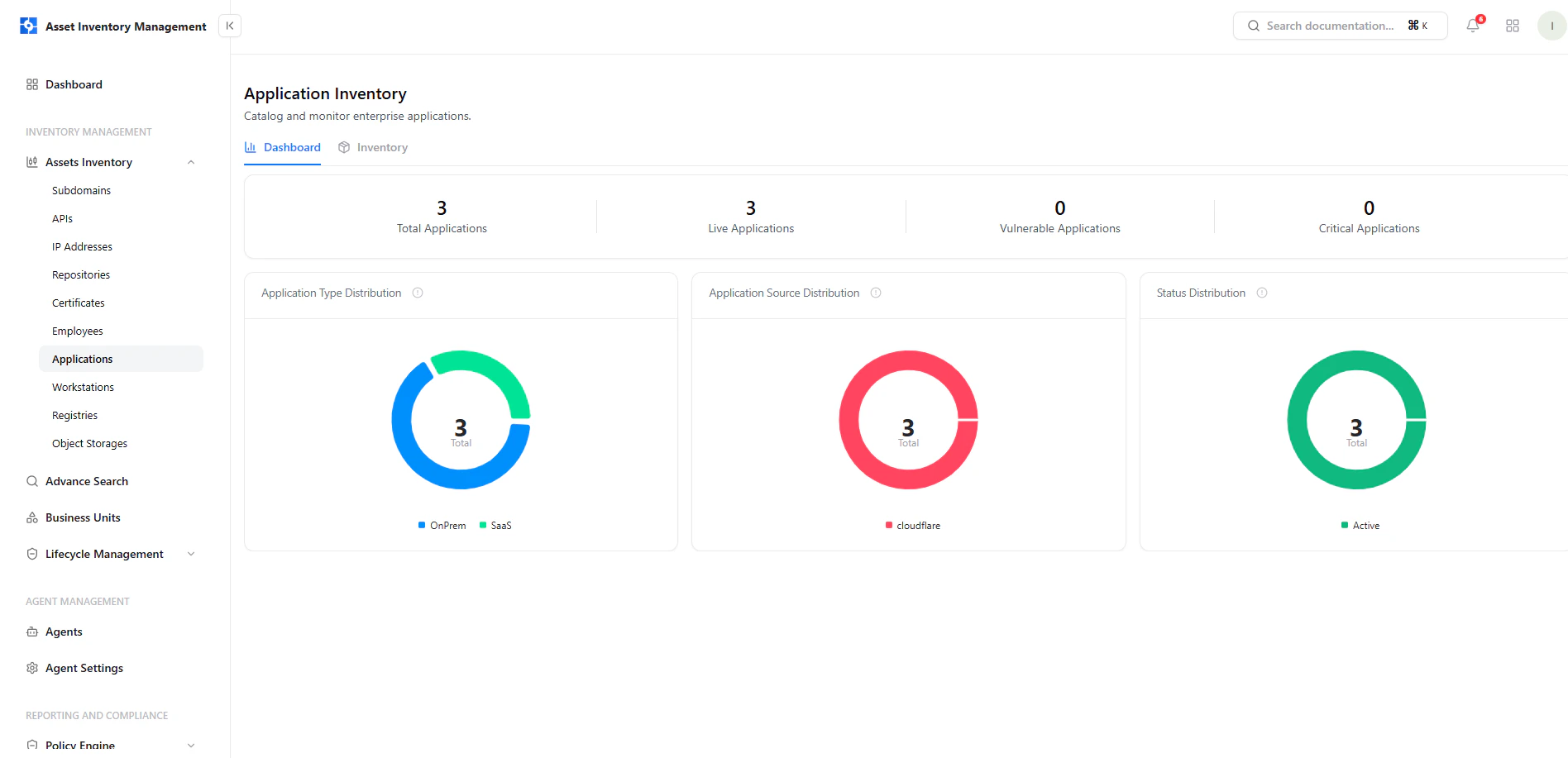
The dashboard gives a high-level overview of your application landscape.
### Key Metrics
* **Total Applications** — All discovered applications
* **Live Applications** — Currently active applications
* **Vulnerable Applications** — Applications with detected issues
* **Critical Applications** — Applications with critical findings
### Visual Insights
* **Application Type Distribution** — OnPrem vs SaaS
* **Application Source Distribution** — Discovery source (e.g., Cloudflare)
* **Status Distribution** — Lifecycle state of applications
***
## Application Inventory
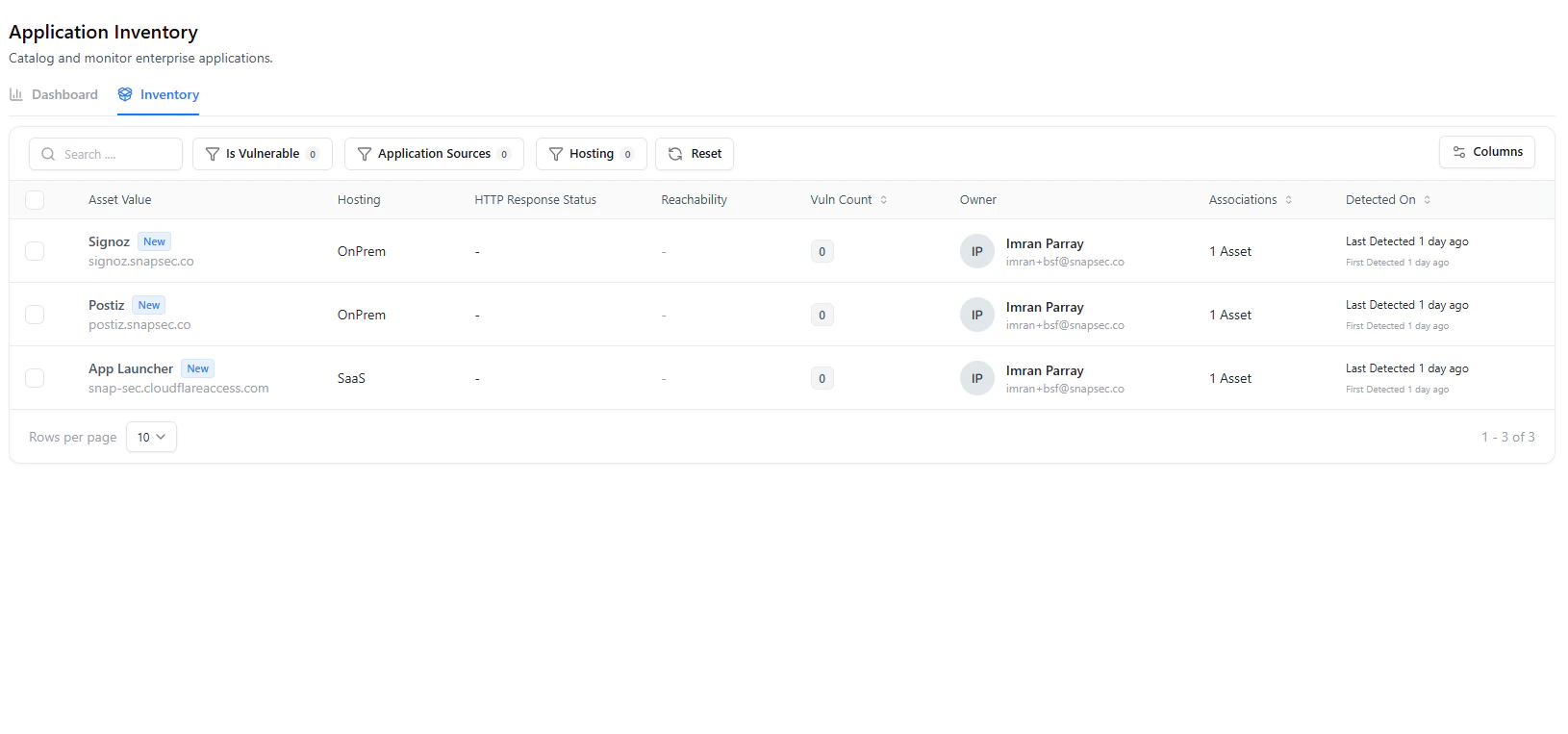
The inventory view lists all applications with operational and ownership details.
***
## Dashboard View
The dashboard gives a high-level overview of your application landscape.
### Key Metrics
* **Total Applications** — All discovered applications
* **Live Applications** — Currently active applications
* **Vulnerable Applications** — Applications with detected issues
* **Critical Applications** — Applications with critical findings
### Visual Insights
* **Application Type Distribution** — OnPrem vs SaaS
* **Application Source Distribution** — Discovery source (e.g., Cloudflare)
* **Status Distribution** — Lifecycle state of applications
***
## Application Inventory
The inventory view lists all applications with operational and ownership details.
 ### Table Columns
| Column | Description |
| ------------------------ | -------------------------------- |
| **Asset Value** | Application name and domain |
| **Hosting** | Deployment type (OnPrem / SaaS) |
| **HTTP Response Status** | Response status (if available) |
| **Reachability** | External/Internal visibility |
| **Vuln Count** | Number of linked vulnerabilities |
| **Owner** | Assigned owner |
| **Associations** | Linked assets |
| **Detected On** | Discovery timeline |
### Filters & Search
* **Is Vulnerable**
* **Application Sources**
* **Hosting Type**
* **Search by application name**
***
## Application Asset View
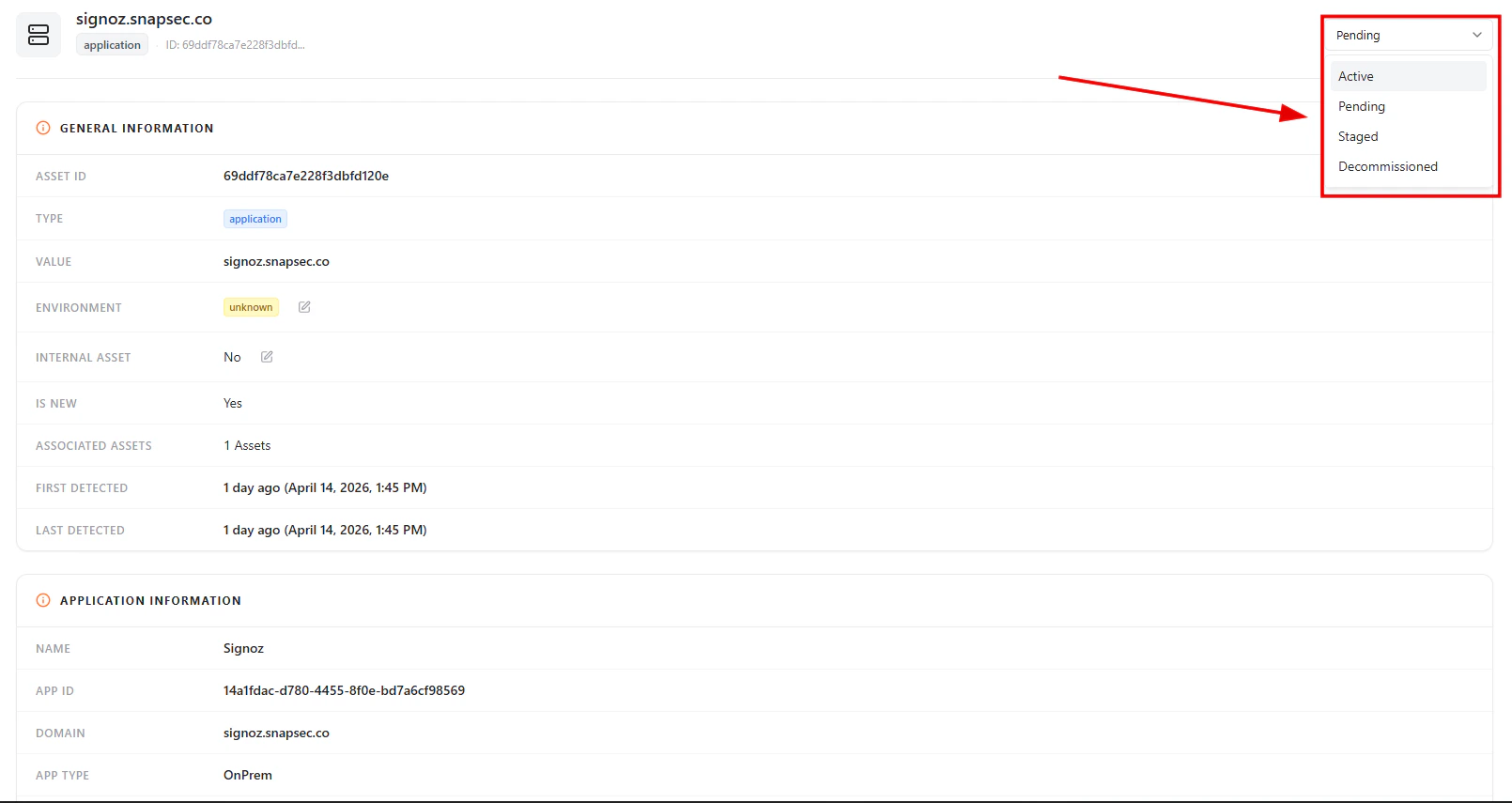
Selecting an application opens a detailed view with complete context.
### Table Columns
| Column | Description |
| ------------------------ | -------------------------------- |
| **Asset Value** | Application name and domain |
| **Hosting** | Deployment type (OnPrem / SaaS) |
| **HTTP Response Status** | Response status (if available) |
| **Reachability** | External/Internal visibility |
| **Vuln Count** | Number of linked vulnerabilities |
| **Owner** | Assigned owner |
| **Associations** | Linked assets |
| **Detected On** | Discovery timeline |
### Filters & Search
* **Is Vulnerable**
* **Application Sources**
* **Hosting Type**
* **Search by application name**
***
## Application Asset View
Selecting an application opens a detailed view with complete context.
 ***
## General Information
Each application includes:
* **Asset ID**
* **Type (Application)**
* **Value (Domain / Identifier)**
* **Environment**
* **Internal Asset (Yes / No)**
* **Associated Assets**
* **First Detected / Last Detected**
***
## Lifecycle Status
Applications support lifecycle tracking directly from the asset view.
***
## General Information
Each application includes:
* **Asset ID**
* **Type (Application)**
* **Value (Domain / Identifier)**
* **Environment**
* **Internal Asset (Yes / No)**
* **Associated Assets**
* **First Detected / Last Detected**
***
## Lifecycle Status
Applications support lifecycle tracking directly from the asset view.
 Available states:
* **Active** — Currently in use
* **Pending** — Newly discovered and under review
* **Staged** — Pre-production or testing phase
* **Decommissioned** — No longer in use
***
## Application Information
Available states:
* **Active** — Currently in use
* **Pending** — Newly discovered and under review
* **Staged** — Pre-production or testing phase
* **Decommissioned** — No longer in use
***
## Application Information
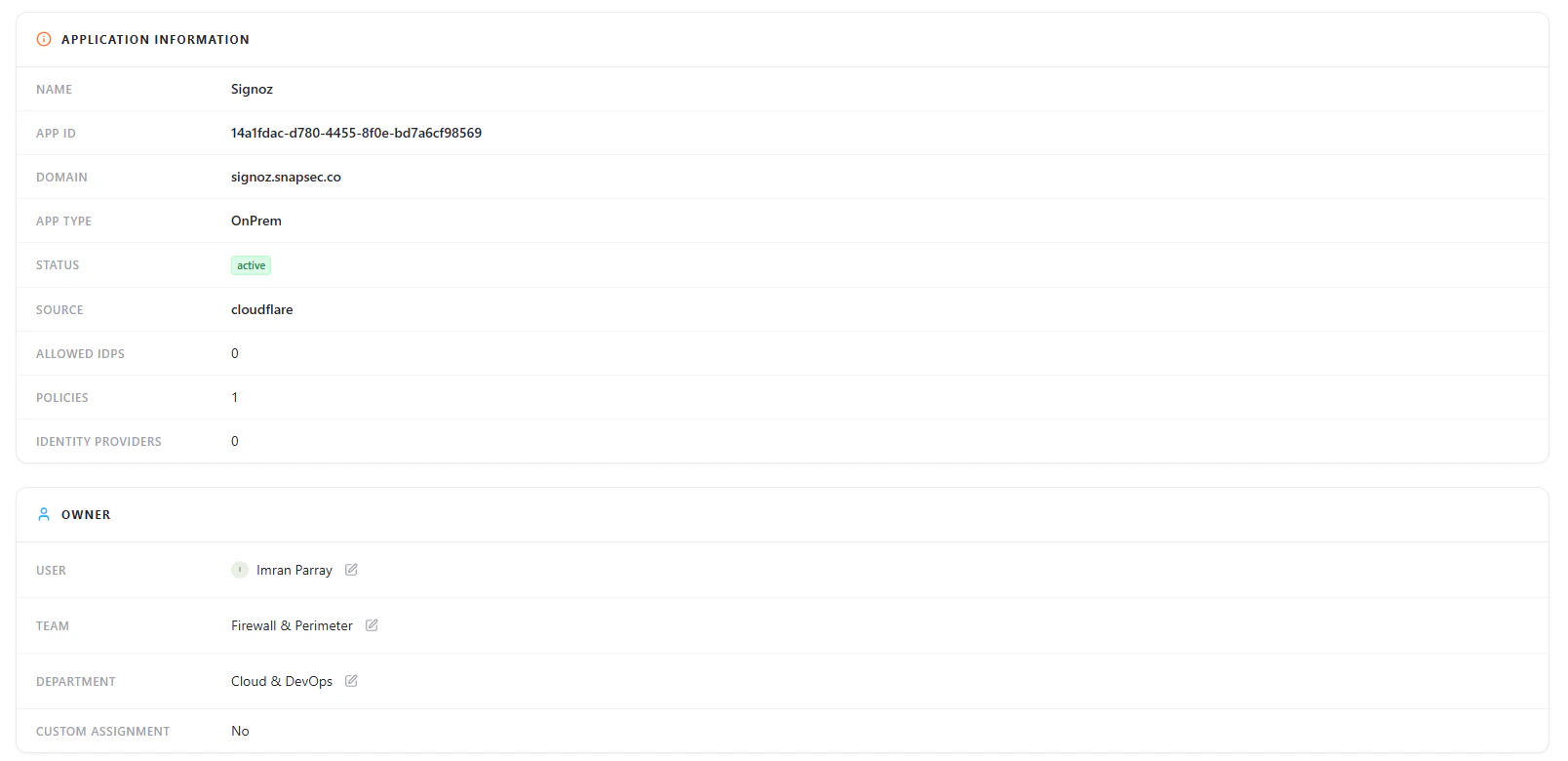
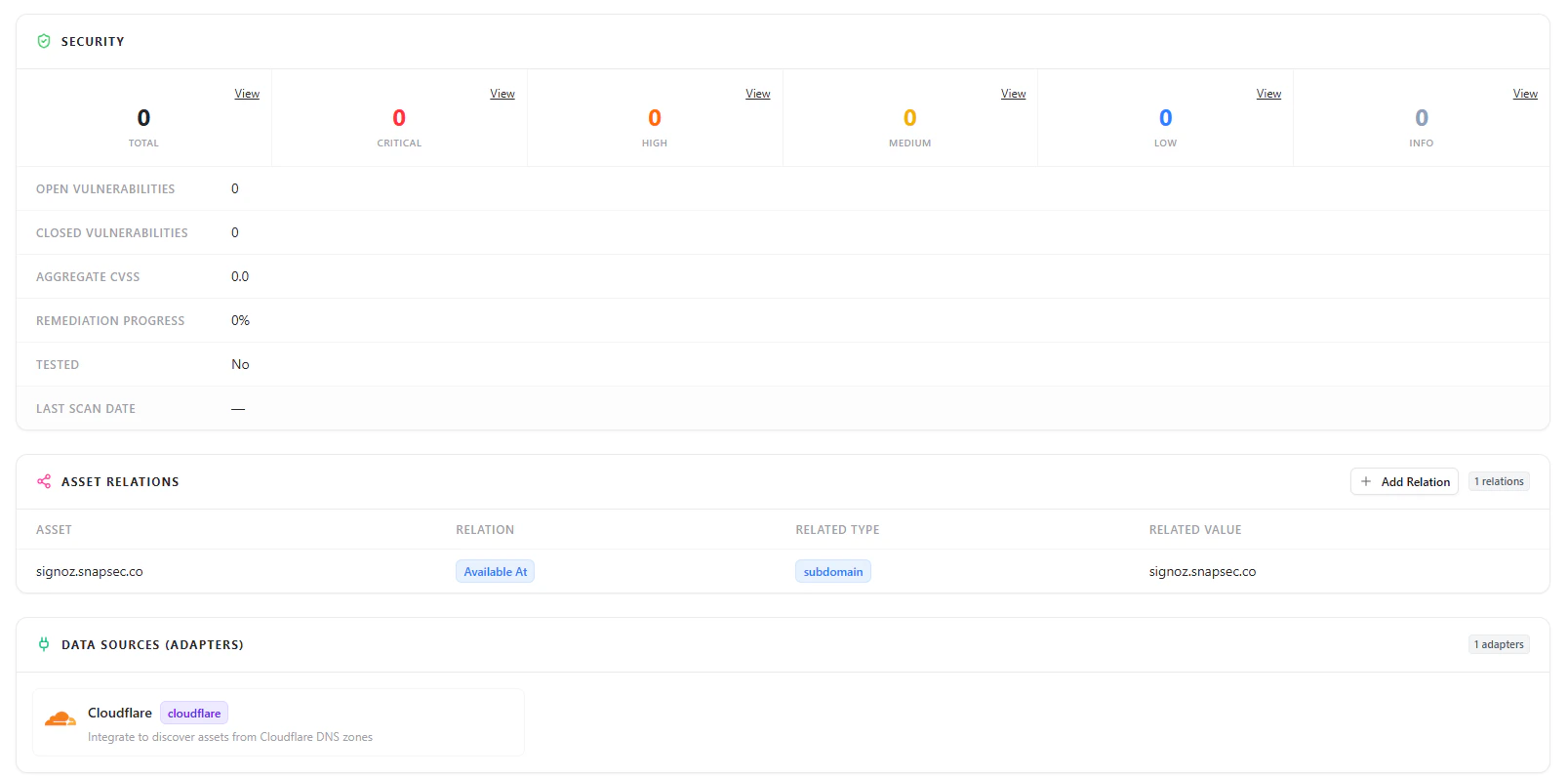 Includes:
* **Application Name**
* **App ID**
* **Domain**
* **Application Type (OnPrem / SaaS)**
* **Status**
* **Source (e.g., Cloudflare)**
* **Allowed IPs**
* **Policies**
* **Identity Providers**
***
## Security Overview
Includes:
* **Application Name**
* **App ID**
* **Domain**
* **Application Type (OnPrem / SaaS)**
* **Status**
* **Source (e.g., Cloudflare)**
* **Allowed IPs**
* **Policies**
* **Identity Providers**
***
## Security Overview
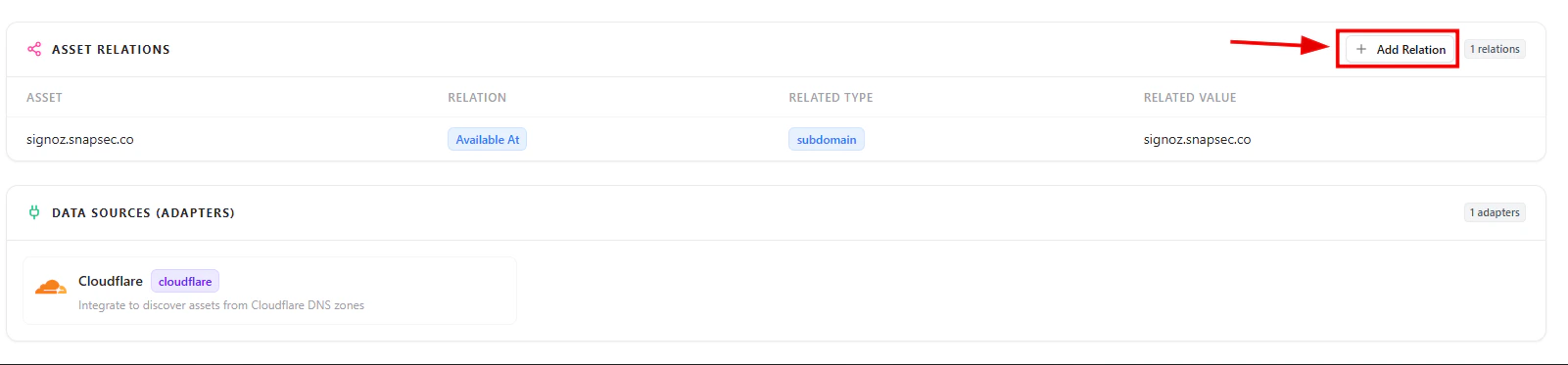 Displays:
* Total vulnerabilities
* Severity breakdown (Critical, High, Medium, Low, Info)
* Open vs closed vulnerabilities
* Aggregate CVSS score
* Remediation progress
***
## Asset Relationships
Applications are connected to other assets within your environment.
Displays:
* Total vulnerabilities
* Severity breakdown (Critical, High, Medium, Low, Info)
* Open vs closed vulnerabilities
* Aggregate CVSS score
* Remediation progress
***
## Asset Relationships
Applications are connected to other assets within your environment.
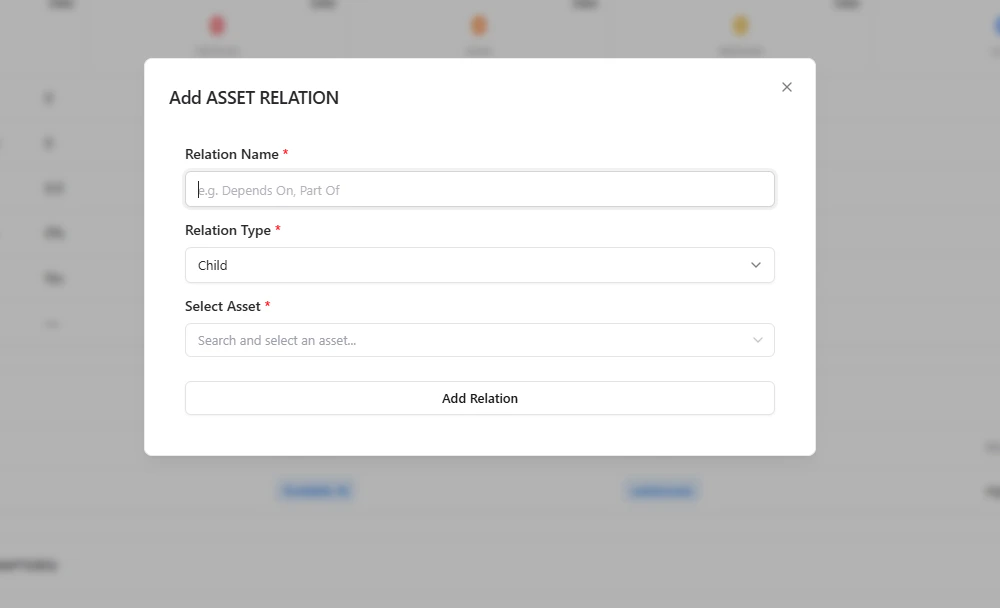 This helps teams:
* Understand how applications are linked to subdomains and other assets
* Identify dependencies across the environment
* Analyze impact before making changes
***
## Data Sources (Adapters)
Applications are discovered through integrated data sources.
* Example: **Cloudflare**
* Shows which integrations are contributing asset discovery
***
## Why This Matters
The Applications module helps teams:
* Maintain a complete application inventory
* Track ownership and accountability
* Understand deployment environments (OnPrem vs SaaS)
* Monitor lifecycle states of applications
* Identify security issues across applications
* Gain visibility into asset relationships
***
## Explore Live Demo
Instantly explore how Snapsec AIM discovers, enriches, and tracks applications across your organization — all without creating an account.
This helps teams:
* Understand how applications are linked to subdomains and other assets
* Identify dependencies across the environment
* Analyze impact before making changes
***
## Data Sources (Adapters)
Applications are discovered through integrated data sources.
* Example: **Cloudflare**
* Shows which integrations are contributing asset discovery
***
## Why This Matters
The Applications module helps teams:
* Maintain a complete application inventory
* Track ownership and accountability
* Understand deployment environments (OnPrem vs SaaS)
* Monitor lifecycle states of applications
* Identify security issues across applications
* Gain visibility into asset relationships
***
## Explore Live Demo
Instantly explore how Snapsec AIM discovers, enriches, and tracks applications across your organization — all without creating an account.