> ## Documentation Index
> Fetch the complete documentation index at: https://docs.snapsec.co/llms.txt
> Use this file to discover all available pages before exploring further.
# Agents
> Monitor and manage registered agents responsible for asset discovery, data collection, and real-time updates within your infrastructure.
## Overview
The **Agents** module provides visibility into all registered agents that continuously collect and update asset data across your infrastructure.
It enables teams to monitor agent health, activity, and ensure data ingestion pipelines remain active and reliable.
***
## Registered Agents
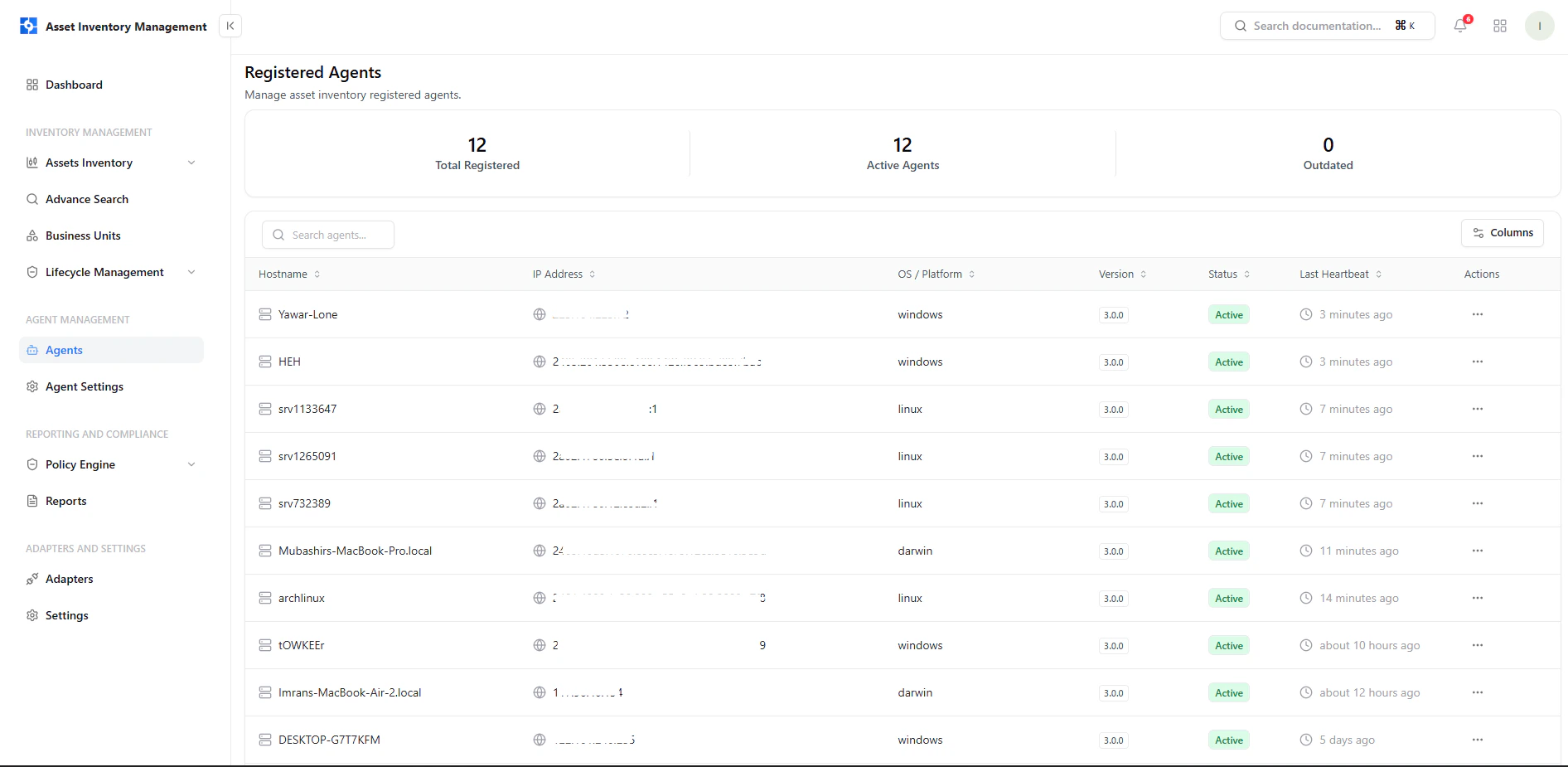 This view lists all agents currently connected to the platform.
### Key Information
* **Hostname** — Device or system running the agent
* **IP Address** — Network identifier of the agent
* **OS / Platform** — Operating system (Windows, Linux, Darwin, etc.)
* **Version** — Installed agent version
* **Status** — Current operational state (Active/Inactive)
* **Last Heartbeat** — Last communication timestamp
***
## Agent Status & Health
Agents continuously send heartbeat signals to indicate availability.
### What It Means
* **Active** — Agent is online and reporting data
* **Recent heartbeat** — Confirms real-time connectivity
* **Delayed heartbeat** — May indicate connectivity or system issues
This ensures asset data remains fresh and continuously updated.
***
## Agent Actions
This view lists all agents currently connected to the platform.
### Key Information
* **Hostname** — Device or system running the agent
* **IP Address** — Network identifier of the agent
* **OS / Platform** — Operating system (Windows, Linux, Darwin, etc.)
* **Version** — Installed agent version
* **Status** — Current operational state (Active/Inactive)
* **Last Heartbeat** — Last communication timestamp
***
## Agent Status & Health
Agents continuously send heartbeat signals to indicate availability.
### What It Means
* **Active** — Agent is online and reporting data
* **Recent heartbeat** — Confirms real-time connectivity
* **Delayed heartbeat** — May indicate connectivity or system issues
This ensures asset data remains fresh and continuously updated.
***
## Agent Actions
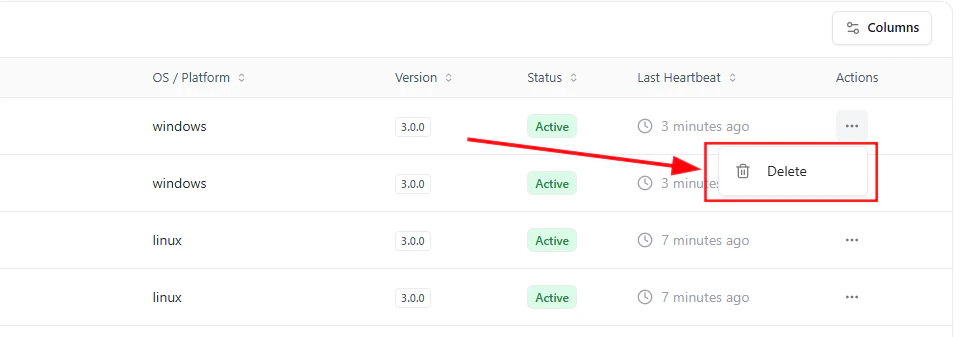 Each agent includes an action menu for management operations.
### Available Action
* **Delete Agent**\
Removes the agent from the system and stops further data collection from that source
***
## Why This Matters
* Ensures continuous asset discovery across environments
* Helps identify inactive or failing agents quickly
* Maintains accuracy of asset inventory data
* Provides control over data collection sources
***
## Explore Live Demo
See how Snapsec AIM tracks agent activity, monitors health in real time, and ensures continuous asset visibility across your infrastructure.
Each agent includes an action menu for management operations.
### Available Action
* **Delete Agent**\
Removes the agent from the system and stops further data collection from that source
***
## Why This Matters
* Ensures continuous asset discovery across environments
* Helps identify inactive or failing agents quickly
* Maintains accuracy of asset inventory data
* Provides control over data collection sources
***
## Explore Live Demo
See how Snapsec AIM tracks agent activity, monitors health in real time, and ensures continuous asset visibility across your infrastructure.