> ## Documentation Index
> Fetch the complete documentation index at: https://docs.snapsec.co/llms.txt
> Use this file to discover all available pages before exploring further.
# Departments
> Create, manage, and organize organizational departments and their associated teams within Snapsec.
 ## Overview
The **Departments** module helps organizations structure users into logical business units such as *IT*, *HR*, *Sales*, or *Engineering*.\
Departments act as the **top-level organizational layer**, enabling better ownership, access control, reporting alignment, and team management across Snapsec.
Each department can contain multiple teams, department leads, and members—allowing security operations to scale cleanly across large organizations.
***
## Departments List
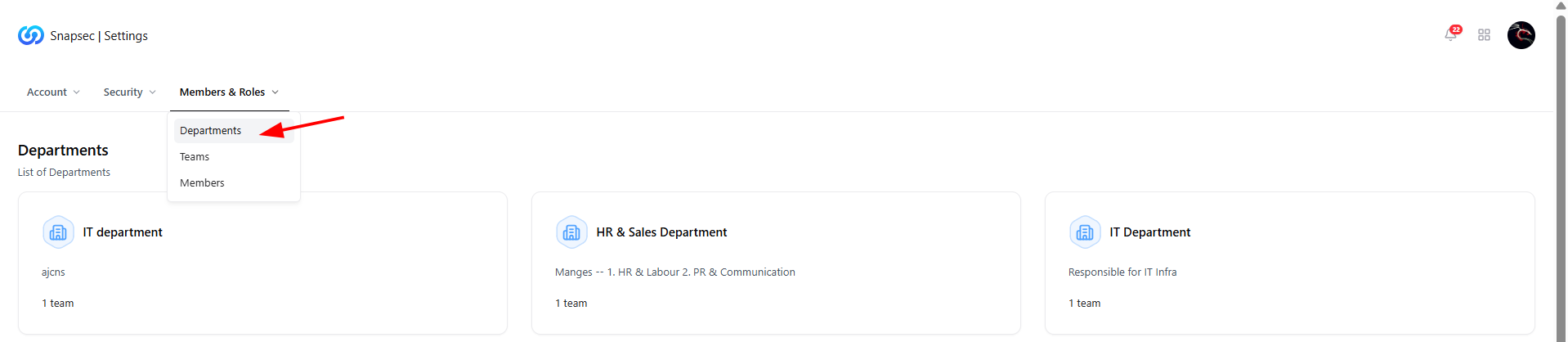
This view displays all existing departments within your organization.
### What You See Here
* **Department Name** — Logical business unit (e.g., IT Department).
* **Description** — Short context about the department’s responsibility.
* **Team Count** — Number of teams associated with the department.
* **Quick Access** — Click any department to view its internal structure.
This list gives admins instant visibility into how users and teams are distributed across the organization.
***
## Department FAQs
## Overview
The **Departments** module helps organizations structure users into logical business units such as *IT*, *HR*, *Sales*, or *Engineering*.\
Departments act as the **top-level organizational layer**, enabling better ownership, access control, reporting alignment, and team management across Snapsec.
Each department can contain multiple teams, department leads, and members—allowing security operations to scale cleanly across large organizations.
***
## Departments List
This view displays all existing departments within your organization.
### What You See Here
* **Department Name** — Logical business unit (e.g., IT Department).
* **Description** — Short context about the department’s responsibility.
* **Team Count** — Number of teams associated with the department.
* **Quick Access** — Click any department to view its internal structure.
This list gives admins instant visibility into how users and teams are distributed across the organization.
***
## Department FAQs
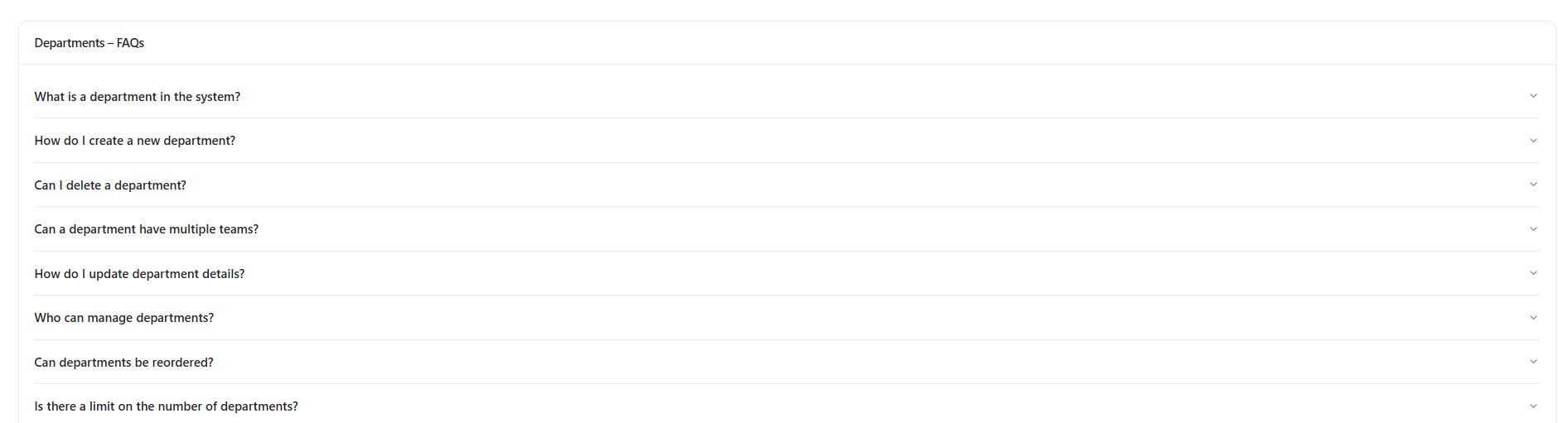 The **FAQs section** answers common administrative and structural questions related to departments.
### Covered Topics Include
* What a department represents in Snapsec
* How to create or delete departments
* Whether departments can contain multiple teams
* Who is allowed to manage departments
* Limits on the number of departments
This section is designed to reduce onboarding friction for administrators and clarify organizational modeling decisions.
***
## Inside a Department
The **FAQs section** answers common administrative and structural questions related to departments.
### Covered Topics Include
* What a department represents in Snapsec
* How to create or delete departments
* Whether departments can contain multiple teams
* Who is allowed to manage departments
* Limits on the number of departments
This section is designed to reduce onboarding friction for administrators and clarify organizational modeling decisions.
***
## Inside a Department
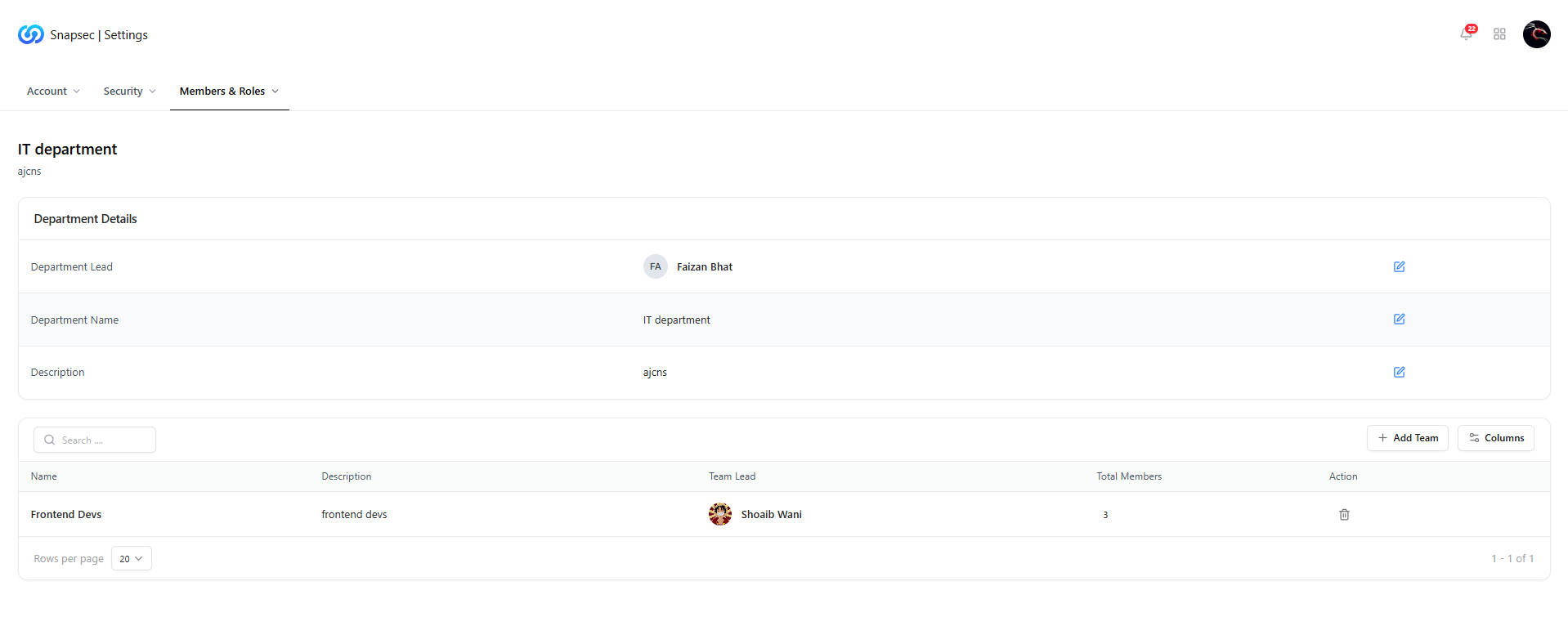 When you click on a department, you are taken to its **detailed view**.
### Department Details
* **Department Lead** — Primary owner responsible for the department.
* **Department Name** — Editable name of the department.
* **Description** — Functional summary of the department’s role.
All fields are editable (subject to permissions), ensuring departments stay aligned with organizational changes.
***
## Teams Within a Department
Below the department details, you’ll find the **Teams table**, listing all teams mapped to this department.
### Team Information Includes
* **Team Name**
* **Team Description**
* **Team Lead**
* **Total Members**
* **Actions** — Remove or manage teams
This structure allows granular ownership while maintaining department-level accountability.
***
## Adding a Team to a Department
When you click on a department, you are taken to its **detailed view**.
### Department Details
* **Department Lead** — Primary owner responsible for the department.
* **Department Name** — Editable name of the department.
* **Description** — Functional summary of the department’s role.
All fields are editable (subject to permissions), ensuring departments stay aligned with organizational changes.
***
## Teams Within a Department
Below the department details, you’ll find the **Teams table**, listing all teams mapped to this department.
### Team Information Includes
* **Team Name**
* **Team Description**
* **Team Lead**
* **Total Members**
* **Actions** — Remove or manage teams
This structure allows granular ownership while maintaining department-level accountability.
***
## Adding a Team to a Department
 Admins can assign new or existing teams to a department using the **Add Team** action.
### Use Cases
* Expanding department responsibilities
* Reorganizing teams after internal changes
* Aligning teams with reporting or access boundaries
This ensures departments remain flexible as organizations evolve.
***
## Update Department Teams
Admins can assign new or existing teams to a department using the **Add Team** action.
### Use Cases
* Expanding department responsibilities
* Reorganizing teams after internal changes
* Aligning teams with reporting or access boundaries
This ensures departments remain flexible as organizations evolve.
***
## Update Department Teams
 The **Update Department Teams** modal provides a controlled way to manage team assignments.
### What You Can Do
* Add multiple teams to a department
* Remove teams that no longer belong
* Update mappings without affecting team members directly
Changes take effect immediately across reporting, access control, and ownership views.
***
## Why This Matters
Departments provide the **foundation for structured access control and accountability** inside Snapsec.
* Enables clean separation of responsibilities
* Improves ownership for vulnerabilities and assessments
* Aligns security workflows with real-world org structures
* Scales seamlessly as teams and users grow
Well-defined departments ensure Snapsec mirrors how your organization actually operates.
***
## Explore Live Demo
Experience how Snapsec organizes departments, teams, and users to deliver scalable security governance.
The **Update Department Teams** modal provides a controlled way to manage team assignments.
### What You Can Do
* Add multiple teams to a department
* Remove teams that no longer belong
* Update mappings without affecting team members directly
Changes take effect immediately across reporting, access control, and ownership views.
***
## Why This Matters
Departments provide the **foundation for structured access control and accountability** inside Snapsec.
* Enables clean separation of responsibilities
* Improves ownership for vulnerabilities and assessments
* Aligns security workflows with real-world org structures
* Scales seamlessly as teams and users grow
Well-defined departments ensure Snapsec mirrors how your organization actually operates.
***
## Explore Live Demo
Experience how Snapsec organizes departments, teams, and users to deliver scalable security governance.